HirePro Assessment: Tenant Alias, System Check, and Every Error
What a HirePro assessment checks before the paper: the tenant alias screen, the compatibility check, each error message, and the Secure Exam Browser route.
TL;DR: HirePro is one of the assessment platforms Indian employers run campus and off-campus hiring on — Amazon India's assessments, Deloitte India's drives, NISM's tests and Pearson's Versant English test all run on it. The platform supplies the question library and the plumbing; the employer configures the sections, the clock, the pass mark and the proctoring level per tenant. Two things break candidates before the first question: the link is tenant-specific, so a copy-pasted URL lands on a "Tenant Alias" screen, and the machine has to pass a compatibility check whose requirements differ by employer. Past that gate, one route runs in an ordinary Chrome tab, the other needs the Secure Exam Browser — on Windows that means installing Chromium and the exam browser, and the browser closes your other applications when it starts.
Source note: the requirements, error strings and recovery steps below come from HirePro's own candidate help centres (the general/Amazon technical page, the Deloitte India page, the Versant page) as published, the live Secure Exam Browser page at securetest.hirepro.in, and HirePro's product pages for coding assessments, proctoring and video interviews, all read on 2026-11-15. Where a rule is set by the employer rather than by HirePro, it is marked as such — and the invitation you were sent always overrides anything on this page.
Two days before a drive, the same four messages appear in every placement group: HirePro link is asking for a tenant alias, camera not detected, my test closed, can I log back in, and do I need to install something. All four have answers, but not one shared answer — HirePro is an engine that many employers rent, and each of them hands you a different door.
The platform under the paper
HirePro is an Indian company — HirePro Consulting, head office in Bengaluru, eight offices across the country — that sells assessments, proctoring and video interviews to employers. It is not a test publisher in the way AMCAT or CoCubes is: there is no fixed HirePro syllabus and no score that follows you from one company to the next. What exists is a tenant — your employer's own compartment of the platform — with its own question bank, its own time limit, its own webcam policy and its own support mailbox.
You can see that structure in HirePro's own help centres. Amazon's candidate assessments get [email protected]; Deloitte India's get [email protected]; the Versant English test, which Pearson runs through HirePro, has a help centre of its own; NISM's candidates get a fourth. Same platform, four sets of rules.
Three products sit inside that tenancy, and a drive usually uses one or two of them:
- Coding assessments. Thousands of questions across 38 languages, edited and run inside the browser, scored automatically against the employer's test cases. The report an employer reads lists rank, percentile and marks, plus compilation status, how many test cases passed, time taken and memory used.
- Functional assessments. Cognitive, behavioural, domain and language sections, which is where an "aptitude test" in your invitation actually lives.
- Video interviews. Live interviews with screen sharing and whiteboarding, or asynchronous recorded answers. This is the round that follows a shortlist, and it runs on the same login.
First gate: the Tenant Alias screen
If you open ams.hirepro.in/assessment without a tenant in the URL, the page asks one question: Please enter tenant alias. That screen is not an error and it is not a sign that your invitation expired. It means the link you opened is shorter than the one in your mail.
The cause is almost always copy-paste. Long invitation URLs wrap in a mail client, and copying only the visible part leaves ams.hirepro.in/assessment/ behind. Two fixes, in this order:
- Open the link from the mail. Clicking it carries the full path, wrapping and all.
- If you must paste, paste everything. Select the whole URL, including the characters after the last slash, and check the address bar afterwards that the tail survived.
Where the tenant name is written down, it is in the compatibility link that the same mail also carries — the address ends in #/compatibility/<tenant>. Two examples from HirePro's own pages: hireproassessment on the general assessment flow, DeloitteIndia on Deloitte India's drive. The string in that position is the tenant identifier. If your mail spells the alias out anywhere, that is the one to use; if it does not, the support mailbox printed in the same mail will tell you in a few minutes.
Second gate: the compatibility check
Before the paper, HirePro asks you to run a compatibility check. It is per tenant, it runs on the machine in front of you, and it is the cheapest five minutes in the whole process.
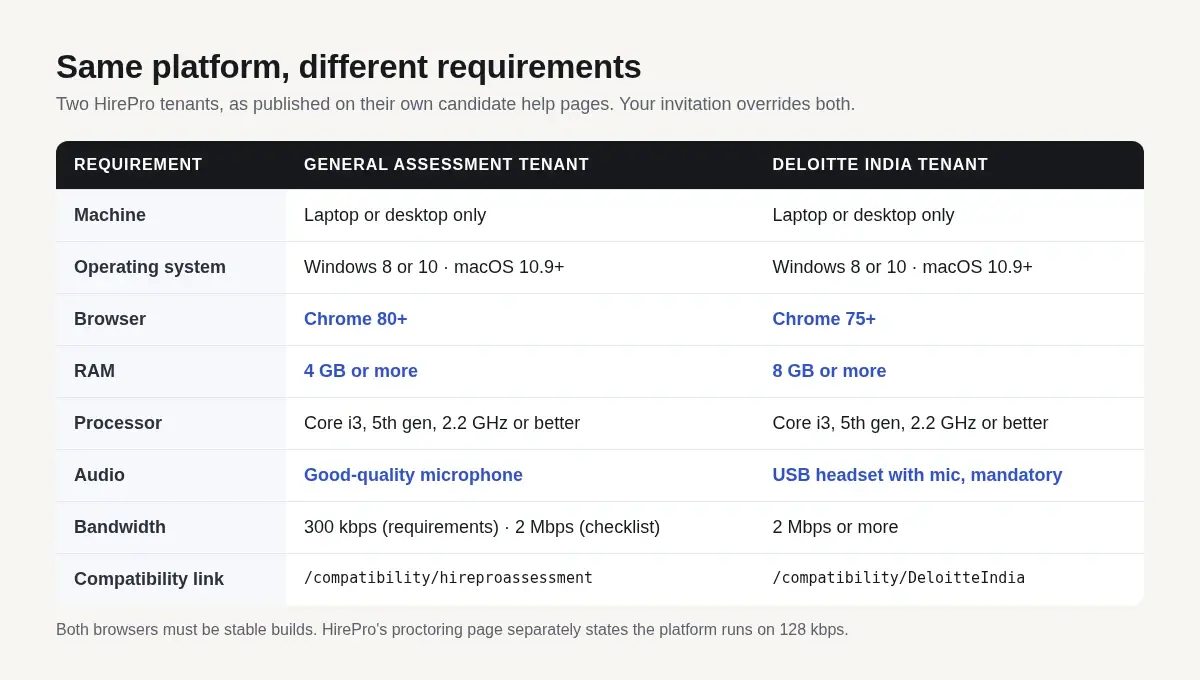
Here is what two of them actually ask for. The first column is the general assessment page, the one Amazon's candidates are pointed at; the second is Deloitte India's.
| General assessment tenant | Deloitte India tenant | |
|---|---|---|
| Machine | Laptop or desktop only | Laptop or desktop only |
| Operating system | Windows 8 or 10; macOS 10.9 Mavericks or later | Windows 8 or 10; macOS 10.9 Mavericks or later |
| Browser | Google Chrome 80 or above, no beta builds | Google Chrome 75 or above, no beta builds |
| RAM | 4 GB or more | 8 GB or more |
| Processor | Core i3, 5th generation, 2.2 GHz or equivalent | Core i3, 5th generation, 2.2 GHz or equivalent |
| Audio | Good-quality microphone | USB headset with microphone, mandatory |
| Bandwidth | 300 kbps up and down in the requirements line, 2 Mbps in the checklist | 2 Mbps or more |
| Compatibility link | /compatibility/hireproassessment |
/compatibility/DeloitteIndia |
Read that table as evidence rather than as a specification. The two pages agree on the operating systems and disagree on the browser build, the RAM floor and whether a USB headset is optional; the general page even contradicts itself, asking for 300 kbps in one section and 2 Mbps in the next. That is what a per-tenant configuration looks like from the outside.
Three practical conclusions:
The RAM and processor lines are real. They are not aspirational marketing. A machine under them gets "Your system is too slow" when it tries to start, and dropped frames once the paper is running.
Bandwidth is the loosest of the requirements. HirePro's own proctoring page says the platform needs 128 kbps and works on 3G and 4G; the assessment help pages then ask you to avoid 3G and 4G and prefer broadband. Both statements are about stability rather than speed. A 2 Mbps hostel line that holds is better than a 40 Mbps phone hotspot that reconnects.
Run the check on the machine you will sit. A green tick earned on a friend's laptop tells you nothing about the one in the lab, and a Windows update between the check and the paper can quietly break the camera driver.
Every error message, and what it is actually telling you
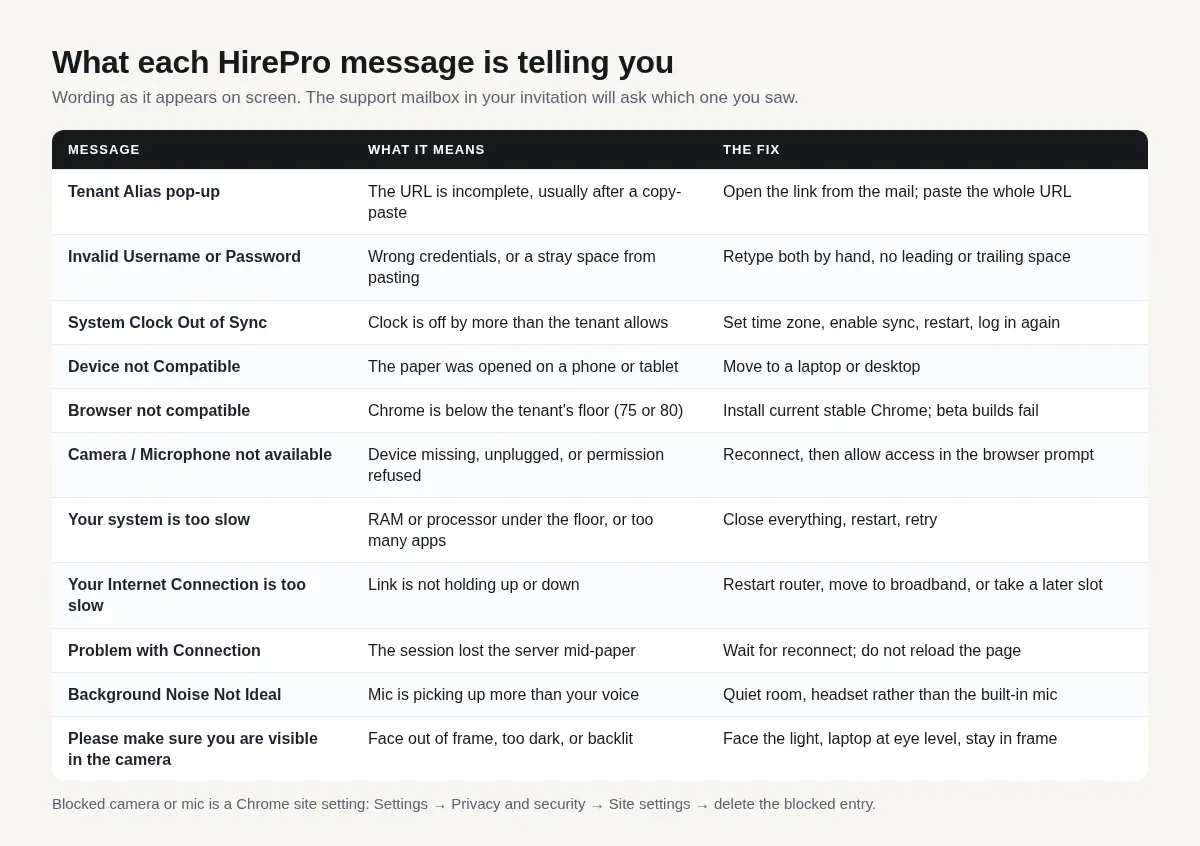
The wording below is HirePro's, not a paraphrase, because the support mailbox will ask which one you saw.
| Message | What it means | What to do |
|---|---|---|
| Pop-up asking for Tenant Alias | The URL is incomplete | Open the link from the mail; if pasting, paste the whole URL |
| Invalid Username or Password | Wrong credentials, or a copy-paste that carried a leading space | Retype both by hand, checking for a space before or after |
| System Clock Out of Sync | Your clock is off by more than the tenant tolerates | Set the date, time and time zone, enable automatic sync, restart |
| Device not Compatible | You opened the paper on a phone or tablet | Move to a laptop or desktop |
| Browser not compatible | Chrome is below the tenant's floor (75 or 80, depending) | Install the current stable Chrome; beta builds are rejected |
| Camera/Microphone not available | A device is missing, unplugged, or permission was refused | Reconnect the device, then allow access in the browser prompt |
| Your system is too slow | RAM, processor, or too many applications open | Close everything else, restart, and retry; if it persists the machine is below the floor |
| Your Internet Connection is too slow | Upload or download is not holding | Restart router and modem, switch to broadband, retry; if it cannot be fixed now, sit the paper in a later slot |
| Problem with Connection | The session lost the server mid-paper | Wait for it to reconnect before touching anything; do not reload |
| Background Noise Not Ideal | The microphone is picking up more than you | A quiet room, a headset rather than the laptop's built-in mic |
| Please make sure you are visible in the camera | Face out of frame, too dark, or backlit | Face a light source, put the laptop at eye level, stay in frame |
The camera and microphone block is a browser setting, not a HirePro setting
If you clicked "Block" on the permission prompt, the paper will keep saying the device is unavailable however many times you plug it back in. The fix lives in Chrome: Settings → Privacy and security → Site settings, then open Camera and Microphone and delete the blocked entry for the assessment site. Reload the page and the prompt appears again.
Two things that look like permission failures and are not: a privacy shutter or a function-key camera toggle left closed, and another application — Zoom, Teams, a browser tab with a call running — holding the device.
Clock drift deserves its own paragraph
"System Clock Out of Sync" is the error most often mistaken for a server fault. The server stamps the session, your browser stamps the answers, and a machine whose clock is hours out produces a paper that looks like it was written before it started. Laptops that have been asleep, dual-boot machines with the hardware clock in the wrong time zone, and Windows installs with automatic time sync switched off all produce it.
Set the time zone to IST, switch time sync on, restart, and check the clock against your phone before you log in again.
If the browser closes or the machine hangs
HirePro's instruction is short: log in again with the original credentials, and if the login answers "password disabled", contact your test administrator. There is no self-service unlock, and that is deliberate — the tenant decides whether a crashed candidate may resume.
Practical consequence: keep the invitation, the support mailbox and your login details open on a second device, so that a dead laptop does not also take your credentials with it.
The other route: Secure Exam Browser
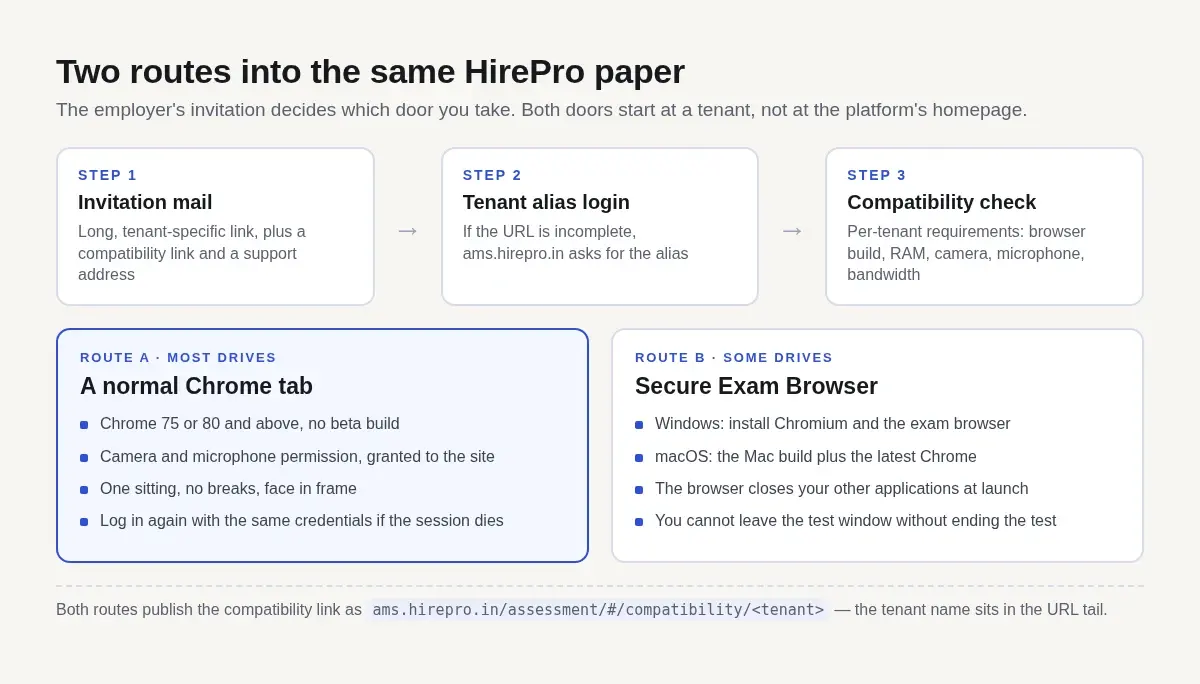
Some drives do not run in a tab at all. They run inside HirePro's Secure Exam Browser, downloaded from securetest.hirepro.in/hirepro/, and it behaves like every other locked exam browser on the market.
The install page is specific, and the specificity is where people lose time:
- Windows needs two installs. Chromium first, then the Secure Exam Browser. The page says it plainly: please ensure that you install both Chromium and Secure Exam Browser. The instruction is repeated twice on the page, which is a fair sign of the step candidates skip.
- macOS needs the Mac build plus the latest Chrome. Both, from the same page.
- The browser closes your other applications when it starts. Save your work, close what you care about, then launch. A document left open with unsaved changes loses them.
- Once the test window opens, you cannot leave it without exiting the test. There is no minimise-and-check-something path back in.
- Launch is a deliberate step. The page asks you to launch only when you are ready to attend, then the browser asks permission to open the Secure Exam Browser, and you click "Open Secure Exam Browser" in that prompt.
Do this the day before, not twenty minutes before. The two-install sequence, the Windows permission prompt and a first launch that closes everything else are not steps to discover while the invitation clock is running.
If your fortnight has drives on more than one platform, the same gate exists in a different wrapper elsewhere: the CoCubes system check and AMCAT's exam-day instructions cover those two screens line by line, and the HackerEarth proctoring breakdown and the TCS iON NQT analysis take the platform layer rather than the setup layer.
What happens once the machine is through
The questions are the employer's, but the machinery behind them is consistent.
Coding sections open in an in-browser editor with a language picker drawn from the 38 that HirePro supports — the usual set, from Java 8 and Python 3 to Go, Rust and the front-end stack. Your code compiles and runs against the employer's test cases, and the report records which cases passed, how long you took and how much memory you used. The report carries test-case status per problem, so a solution that clears the sample cases and times out on the large ones still registers; how much of the mark it earns is the employer's setting.
Aptitude and functional sections are the employer's selection from HirePro's cognitive, behavioural, domain and language banks. The section list, the order and the clock are fixed before you start, and the help centre's instruction is to complete the paper in a single sitting without breaks — so plan the block of time around the paper, not around a break in the middle.
Proctoring runs either with human proctors watching live, or with HirePro's automated system, or both. The documented behaviour: identity verification against a photo ID with face matching, monitoring of the video and audio feeds, detection of a candidate change, a second person, cross-conversation, a missing candidate or a blocked camera, automated warnings during the paper, and browser monitoring that logs a candidate out for repeated tab switching. Live proctors can pause a test and disqualify a candidate. The automated mode produces a suspicion score — high, medium, low or none — that the employer reads afterwards.
What that means in practice is narrow: one sitting, one room, one person, and the invitation's own instructions as the version that applies.
Two hours before: the short list
- Open the invitation link from the mail, not from your notes, and confirm you land on a login and not on the Tenant Alias screen.
- Run the compatibility check on the same laptop, in the same browser, on the same network.
- If the drive uses the Secure Exam Browser, confirm both installs are present and launch it once.
- Close everything else — browser tabs, chat apps, downloads, the editor you left open.
- Set the clock, switch on time sync, plug the laptop in, and put the phone away.
- Keep the support mailbox and your credentials on a second screen or a second device.
Where an AI assistant fits
Two situations, and they are different problems.
The paper itself. AceRound AI's OA Copilot runs as a desktop client: it reads the question on your screen and streams the approach and the answer into a click-through overlay that never takes focus, so the timer and the editor keep behaving as they normally would. Quick mode covers the aptitude and functional items, up to four captured pages at a time; programming mode takes a coding statement with its examples and constraints across up to six captured pages, and is billed per question rather than per screenshot. Because it reads the screen instead of integrating with the test site, the platform named in your invitation does not change how it works. Thirty free minutes, no card required. For drives that run inside a locked exam browser, the OA Copilot page documents the Windows native-window route, and the platform list shows what is currently supported.
The round after the shortlist. HirePro also hosts the interviews: live video rounds with screen sharing and whiteboarding, and asynchronous recorded answers. The preparation for those is a different job — mock interview mode for the HR and technical conversation, and for the Indian IT context in particular, what interviewers in Indian service companies and GCCs actually probe is the better starting point.
If your drive is one of several in the same fortnight, how to survive back-to-back placement drives covers the scheduling side, and if you are still deciding which pipeline to aim at, the off-campus OA formats compared sets the product-company papers next to the service-company ones.
FAQ
Is a HirePro assessment the same as an Amazon assessment?
Only in the sense that Amazon India runs some of its assessments on HirePro's platform. The paper, the clock, the pass mark and the proctoring level come from Amazon's tenant, and HirePro's help centre lists [email protected] as the technical support address for those candidates. A HirePro assessment for another employer has different rules.
How do I know which Chrome version my drive needs?
From your invitation or the compatibility check, because it is set per tenant. Chrome 80 is the floor on the general assessment page and Chrome 75 on Deloitte India's. In practice, install the current stable Chrome and the question disappears — beta and canary builds are the ones that get rejected.
The compatibility check passes but the paper still says the browser is not compatible.
Two causes worth ruling out first: a second Chrome profile or a Chromium-based browser that reports an old user agent, and an enterprise-managed machine where the browser is pinned to an old build. Try the check in a fresh Chrome profile before you go looking for anything more exotic.
Is there a HirePro app for the test?
No. The assessment runs in the browser, and if the drive is a locked one it runs in the Secure Exam Browser you install from HirePro's download page. A phone will get you the "Device not Compatible" message, not a mobile version of the paper.
What if I fail the compatibility check an hour before the paper?
Fix what you can — permissions, camera, browser build — and mail the support address in your invitation with the exact message on screen. For an unfixable connection problem, HirePro's own guidance is to take the test at a later time, which means asking the employer rather than deciding it yourself. What does not work is sitting down at the start time and hoping.
Can I switch tabs during a HirePro test?
HirePro's proctoring documentation says browser monitoring logs candidates out for switching tabs frequently, and live proctors can pause or disqualify. The threshold is the employer's. Treat the paper as a single-window session: one tab, one screen, one sitting.
Do all HirePro drives use the Secure Exam Browser?
No. Most run in an ordinary Chrome tab with camera and microphone proctoring, and the Secure Exam Browser appears on drives where the employer asks for a locked environment. Your invitation is the only reliable indicator.
Author · Alex Chen. Career consultant and former tech recruiter. Spent 5 years on the hiring side before switching to help candidates instead. Writes about real interview dynamics, not textbook advice.
Online assessment coming up? Get the answer right next to each question
OA Copilot — online assessments on HackerRank, CodeSignal, Codility and aptitude tests. Hover over a question and the answer appears in a private overlay only you can see: no tab switching, nothing on the shared screen. New users get 30 minutes free, no credit card.
Related Articles
Dell and HPE Fresher Interview Process in India: HirePro Tests and Project-Heavy Rounds
Dell and HPE campus drives as candidates describe them: HirePro tests, CGPA cut-offs, funnel sizes, technical and HR rounds, and where posts disagree.
Unstop Assessment Proctoring: Full-Screen, Tab Switches, and SmartHire
How Unstop online assessments proctor campus and off-campus drives: Basic, Standard, and Advanced tiers, full-screen violations, SmartHire virtual camera errors, and the Tab-key focus bug.

CoCubes System Check: Every Test It Runs, and What Each Error Means
assess.cocubes.com/check-system runs twelve checks before a CoCubes drive. What each one tests, what the four Error 3.x screens mean, and the Windows-only SAB step.