AMCAT Exam Instructions: Camera, Lockdown Browser, Resume Rules
What AMCAT checks before the paper: the webcam trial, the lockdown browser, the rules that lock a test for good, and the two-hour resume window.

TL;DR: AMCAT — the Aspiring Minds Computer Adaptive Test, now run by SHL in India — is taken in Chrome or Firefox on a laptop with a working webcam. Your college's placement cell or the employer sends the link, username and password on the day, and you note down the 15-digit AMCAT ID the paper gives you after the registration form. Two gates sit before the questions: a webcam trial that photographs your face and asks you to confirm it, and, in many corporate drives now, a lockdown browser you install from the same mail. During the paper the things that actually end a test are mechanical: switching to another tab, taking a screenshot, a pop-up stealing focus, a phone or a second person in frame. A paper that a power cut or a dropped connection stops is different — wait five minutes, log in again, choose Resume Incomplete Test, and you have two hours to get back in.
Source note: the requirements, warnings and resume rules below come from the AMCAT candidate instruction sheet SHL and its partner colleges circulate, the live webcam trial page at amcatglobal.aspiringminds.com, SHL's myAMCAT help centre, the module sheet issued for the 2026 BE batch (the one with the 221-minute CSE total), and Cognizant's own test-instructions page for its 2026 GenC assessment, which runs on AMCAT infrastructure. Where a rule is set by the employer or the college rather than by AMCAT, it is marked as such.
Two days before a drive, the placement group fills with the same four messages: system check link not opening, camera not detected, my test got locked, can I resume, and is AMCAT proctored. The answers people pass around are usually half right, because AMCAT is not one test — it is an engine that colleges, employers and candidates each configure differently, and the rules that matter live in whichever invitation you were sent.
This page is the version that separates those layers: what AMCAT itself fixes, what the employer adds, and what your college adds on top.
The three gates, in the order they happen
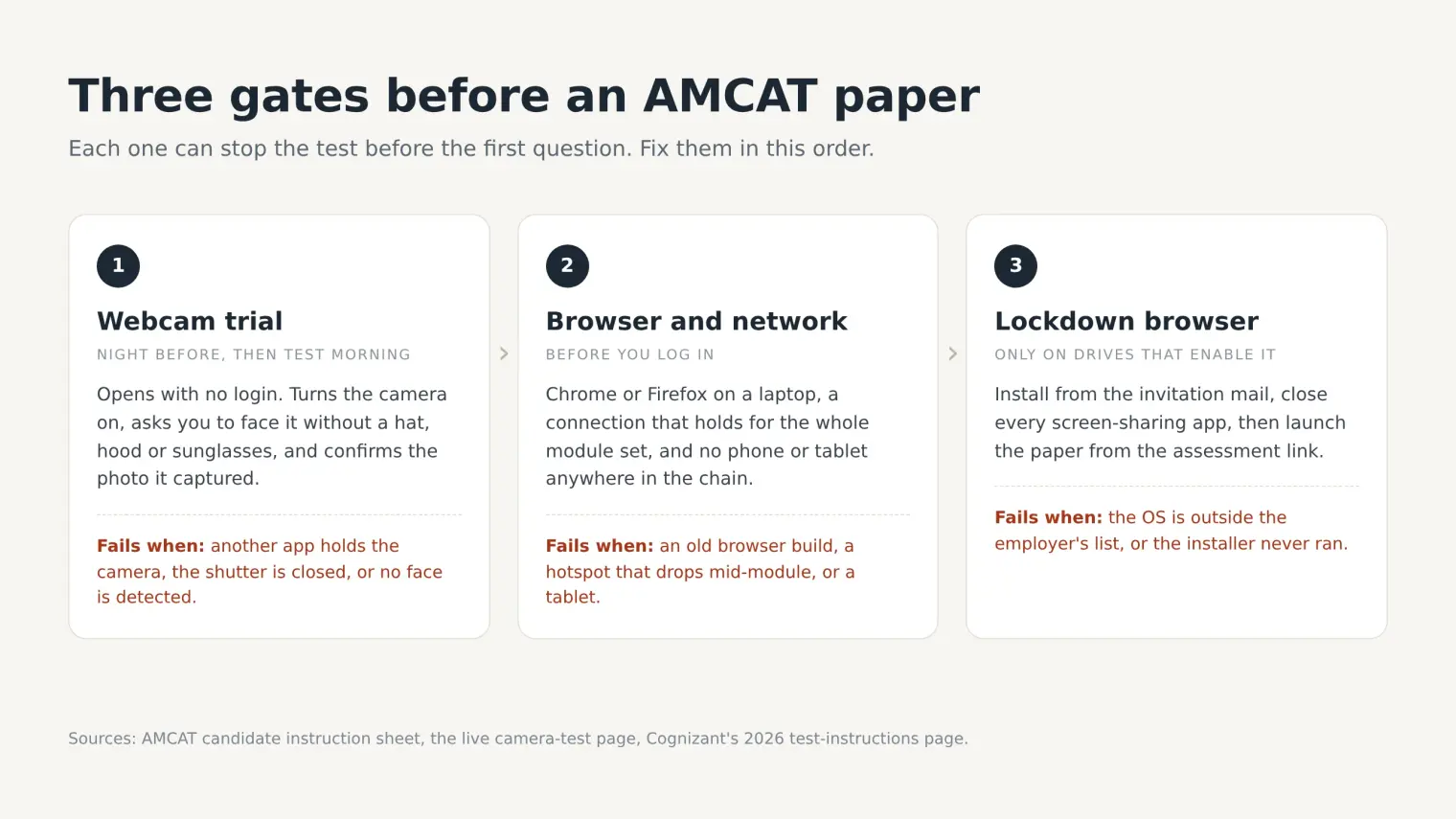
| Gate | When | What it checks | The failure people hit |
|---|---|---|---|
| Webcam trial | Any time before the paper | That a face is visible in the frame and that you confirm the photo | "Webcam testing was unsuccessful — we cannot detect your face" |
| Browser and network | Before you log in | Chrome or Firefox, working internet, a laptop rather than a phone | An old browser build, a phone hotspot that drops, a tablet |
| Lockdown browser | On drives that switch it on | That the paper opens inside a controlled window and stays there | The installer does not run, or the launch button says the browser is missing |
None of the three is a formality. The webcam trial decides whether the paper will start at all; the lockdown browser decides whether it will stay open; the browser check decides how much of the timer you lose to a fixable problem.
What you are actually sitting
AMCAT stands for Aspiring Minds Computer Adaptive Test. Aspiring Minds was the company; SHL bought it, and myAMCAT's own footer now reads SHL (India) Private Limited. The old name survives in the domain the webcam trial runs on, which is why a candidate who was told to visit an SHL link ends up on amcatglobal.aspiringminds.com and assumes they are in the wrong place. They are not.
There are two ways in:
- Self-booked. You register on myAMCAT, pay, choose a slot, and sit the full test on your own. The score report is yours, valid for a year, and employers who source through AMCAT can see it.
- Screened by an employer or a college. The module set is chosen for you, the credentials arrive on the day, and the score goes to whoever is hiring. This is the version most freshers meet during placement season, and it is the version where the lockdown browser appears.
What is common to both: the test is adaptive, the module list is fixed before you start, and nothing about the paper is negotiable once the timer begins. What differs: the modules, the total duration, the proctoring level, and whether a lockdown browser is in the path. A CSE student on the 2026 BE module sheet sits 221 minutes; a Chemical Engineering student on the same sheet sits 123. Neither number is "the AMCAT duration".
The webcam trial: two minutes that decide the next three hours
The trial lives at https://amcatglobal.aspiringminds.com/?go=cameraTesting. It opens with no login, which is why it is safe to run the night before. What it actually does is narrower than people expect, and worth knowing exactly:
- It switches the webcam on and asks you to wait a few seconds.
- It instructs you to face the camera with your face clearly visible, and to remove hats, hoods and sunglasses.
- It captures a frame and asks: are you able to see your photograph?
- It records your confirmation, then lets you continue.
If it cannot find a face, it prints: "Your webcam testing was unsuccessful. We cannot detect your face in the webcam. Please try again to proceed with assessment." That message is about face detection, not about the camera being broken. A camera pointed at a ceiling, a face lit from behind by a window, or a face half out of frame all produce the same sentence.
Three practical notes from the page itself. It still carries an old Adobe Flash notice — you do not need Flash, and installing it will not fix anything; the current check runs on the browser's own media APIs. It runs in whatever browser you opened it in, so run it in the browser you will sit the paper in, not in the browser you happen to have open. And it is also embedded inside employer invitations for companies whose assessments ride on AMCAT infrastructure, which is why candidates sitting a Cognizant test end up on the same page.
When the trial fails, in the order worth trying
| Cause | What you will see | Fix |
|---|---|---|
| Another app is holding the camera | The page loads but never shows a picture | Close Zoom, Teams, Meet, OBS and any other tab using the camera; quit them, do not just minimise |
| Camera blocked at the OS level | A black frame, or a permission prompt that never appears | Windows: Settings → Privacy → Camera; macOS: System Settings → Privacy & Security → Camera. Also check for a physical shutter or an Fn camera key |
| Wrong browser permission | "Cannot detect your face" while the camera light is on | Site settings for amcatglobal.aspiringminds.com → allow camera; then reload |
| Backlight or a low camera angle | A picture where your face is a silhouette or half out of frame | Face a wall or a lamp, put the laptop on a table, tilt the screen up |
| External webcam on a hub | Nothing detected although the webcam works in other apps | Plug it directly into the laptop, and re-open the page |
| Antivirus camera shield | Works in the Camera app, fails in the browser | Turn off the webcam shield for the browser, or pause it for the duration |
Run the trial on the machine and the network you will sit the paper on, then again on the morning of the test. A Windows update, a new antivirus, or a different Wi-Fi network is enough to turn a working camera into a dead one overnight.
The lockdown browser, and why your other windows matter
A lockdown browser is a separate application that opens the paper inside a controlled window: it blocks other applications, blocks screen mirroring, and reports when you leave. On AMCAT-based drives the build in circulation is Respondus, shipped as an OEM installer under the employer's own name, which is why the file in your mail is called something like LockDownBrowserOEMSetup.exe rather than anything with AMCAT in it.
The sequence the instructions describe is short:
- Install the browser from the link in the invitation mail. Windows gets an
.exe; Mac gets a zip. - Open the assessment link. It offers two buttons: Launch the assessment if the browser is already installed, and Download the browser if it is not.
- Before launching, close every application that can share your screen — remote-desktop tools, screen recorders, streaming apps. The browser asks you to close whatever screen-sharing tool it detects before it opens the paper.
- Sit the paper without touching another window. If you close the lockdown browser mid-paper, you are logged out, and where the employer has that setting on, the exit is recorded as a resume count.
The employer's platform support is the part candidates get wrong. Cognizant's 2026 instruction page, which is representative of how these builds are pinned, lists Windows 7, 8 and 10 (Windows 10S excluded), macOS 10.12 to 10.15, and states plainly that Linux is not supported. A Mac on macOS 15, or an Ubuntu laptop, is outside that list. If your only machine is outside it, ask the recruiter before the day rather than at 9:55 for a 10:00 slot. Colleges that run AMCAT under their placement cell sometimes publish their own supported-OS list, and it is usually the more current of the two.
There is one more layer that only some candidates see: a mirroring block. The AMCAT instruction sheet does not allow you to mirror your screen over HDMI or through a screen-sharing app, so a second screen in the room has to be off before the paper starts.
The rules that end a paper, and the ones that only flag you
This is the table worth saving into your notes, because the two categories are not the same and candidates treat them as if they were.
| What you do | What the platform does | Can you get back in? |
|---|---|---|
| Switch to another tab, window or app | Locks the test | No — a locked paper cannot be resumed |
| Take a screenshot (PrintScreen, Snipping Tool, phone camera at the screen) | Locks the test | No |
| Let a notification or pop-up steal focus | Can auto-submit the module | No — the module is submitted as it stands |
| Phone on the desk, earphones in, calculator in reach | Flagged for review; employers treat it as malpractice | Yes, the paper continues — the decision comes later |
| Another person in the room, or talking | Flagged | Yes, the paper continues |
| Face out of frame, looking away repeatedly, covering the camera | Warnings accumulate on the webcam record | Yes, until the accumulation triggers a shutdown |
| Logging in more than 10 minutes after the scheduled start | Marked absent (college and employer rule, not AMCAT's) | No |
The first three are mechanical and immediate. The rest are judged after the fact, by a person looking at flags and screenshots, which is why two candidates can do the same thing and get different outcomes: one had a phone face-down on the desk and never touched it, the other picked it up.
AMCAT's own candidate terms state the mechanism in one line: "You will receive warnings if prohibited behaviour is detected. Multiple instances of prohibited behavior will result in automatic shut-down of the test and rejection of your application." Note what that means in practice — the shutdown is automatic and cumulative, not a proctor deciding in the moment.
If the paper stops: the resume route
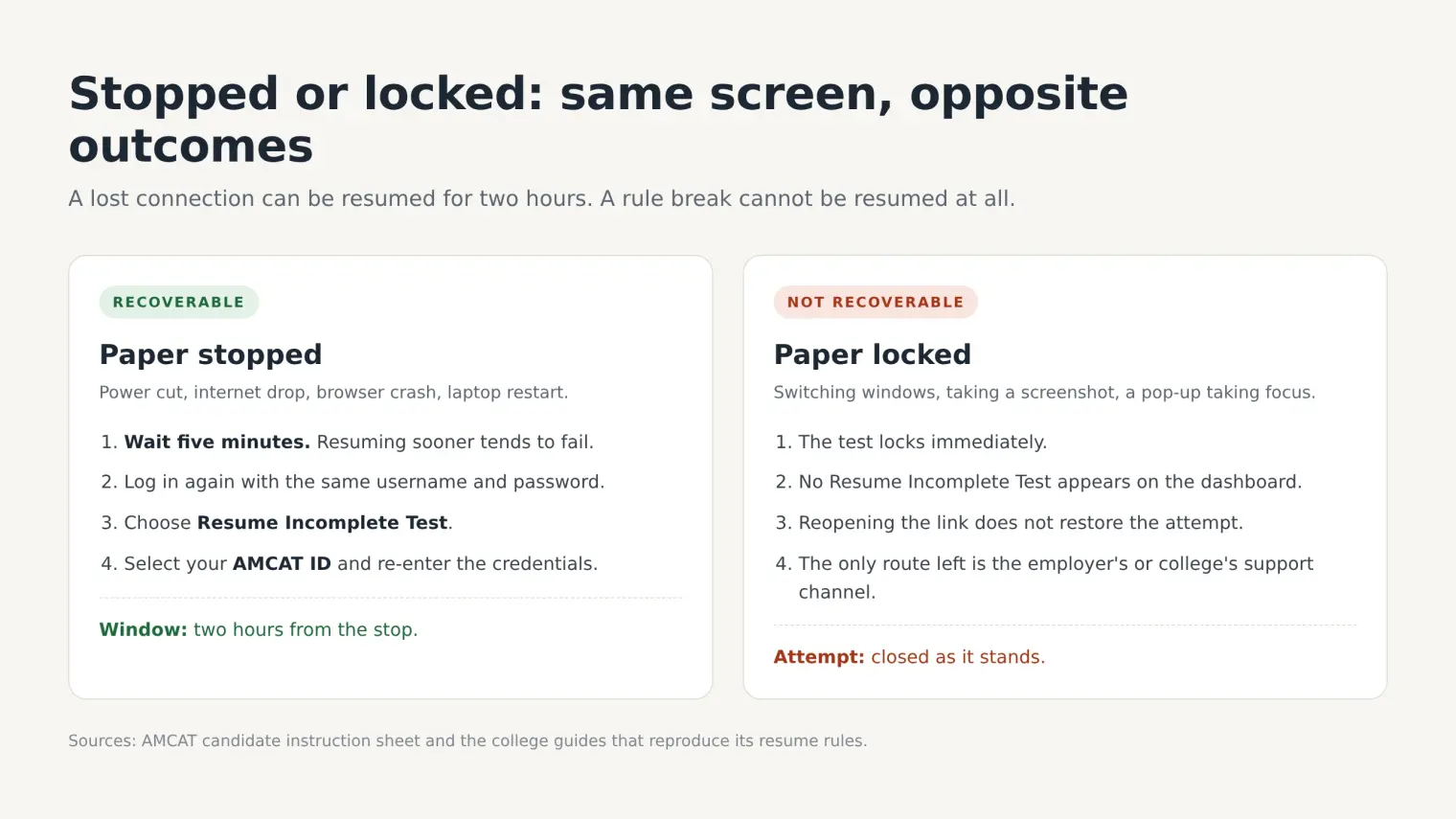
A stopped paper and a locked paper look similar on screen and are handled in opposite ways. Stopped means the connection died, the power went, or the browser crashed. Locked means the platform decided you broke a rule.
For a stopped paper, the instruction sheet gives a precise sequence:
- Wait five minutes. Resuming sooner than that tends to fail.
- Log in again with the same username and password, on the same link.
- Choose Resume Incomplete Test, select your AMCAT ID, and re-enter the credentials.
- You are back at the question where the paper stopped. You have two hours from the stop to do this. After two hours, the attempt is over.
The AMCAT ID is the 15-digit number that appears after you fill the registration form and click Start Test, before the first question. Write it on paper. It is what the resume screen and the support chat both ask for, and it is not in your email.
Two smaller rules from the same sheet that people learn too late: the instruction sheet asks you to type the username and password rather than paste them, and not to click Module Exit or Test Exit at any point.
If you were locked rather than stopped, there is no Resume Incomplete Test on the dashboard. The attempt is closed, and the only route left is the employer's or the college's support channel. AMCAT's chat support, where the drive provides it, runs business hours — the instruction sheets print 9 AM to 6 PM.
The paper itself: modules, timing and the no-skip rule
The module sheet circulated for the 2026 BE batch is the clearest public picture of what the adaptive engine actually asks, and it is worth reading as a shape rather than as a promise.
| Module | Questions | Time | What it is |
|---|---|---|---|
| English | 18 | 18 min | Comprehension, grammar, vocabulary |
| Logical Ability | 12 | 15 min | Series, deductions, arrangements |
| Quantitative Ability | 16 | 20 min | Arithmetic, algebra, data interpretation |
| Personality | 72 | 15 min | Forced-choice statements, no right answer |
| Computer Programming | 12 | 15 min | Output, complexity, language basics |
| Automata Pro | 2 | 45 min | Write working code for two problems |
| Automata Fix | 7 | 20 min | Repair given code |
| Domain module | 12–20 | 10–25 min | Stream-specific (CS, ECE, Mechanical, Civil, Biotech and so on) |
| WriteX | 1 | 25 min | A written response, typed |
Stream totals on that sheet run from 123 minutes to 221. myAMCAT's own help centre lists slightly different per-module counts for the aptitude sections, which is the honest answer to "how many questions in AMCAT": the assembled form is not fixed.
Four rules govern all of it, and they are identical across every version of the sheet:
- No negative marking. A guess costs nothing but seconds.
- No skipping. Every question must be answered before the module moves on.
- No going back. Once submitted, an answer is final.
- Auto-submit at the module timer. There is no pause, no break, and no "save and continue later".
The SVAR section, if your drive includes it
Voice-process employers — the BPO and customer-experience hiring that runs through Concentrix, Teleperformance and Cognizant — often add AMCAT's SVAR module. SVAR is an automated spoken English test: in its most common 16-minute form it asks you to read sentences aloud, listen and repeat, answer comprehension questions, and speak on a topic for a minute or so, and it scores pronunciation, fluency, intonation and listening.
SVAR keeps a voice signature of your responses, which the platform says can be used later to verify that the same person sat the test. Practically, that means the microphone matters as much as the camera on those drives, and it means the ambient noise of a shared room is not a neutral condition.
What AMCAT records, and what it does not
The proctoring layer on a browser-based AMCAT is not a person watching you. It is a set of records:
- the photograph captured at the webcam trial, and your confirmation that it is you;
- session events — window switches, screenshot attempts, pop-up interruptions;
- webcam frames and warnings on drives where continuous monitoring is switched on;
- resume counts, each relaunch of a lockdown session where that setting is enabled;
- for SVAR, the voiceprint attached to your spoken answers.
Those records go to the employer or the college, and a human decides what they mean. That is why "is AMCAT proctored" has an unsatisfying but correct answer: the platform is instrumented, the judgment is institutional, and the threshold is set per drive. For the SHL-side view of the same question — screenshots, camera use, and what happens on a re-sit — our SHL proctoring breakdown covers the platform layer rather than the AMCAT wrapper.
Where an AI assistant actually fits
Two situations, and they deserve different answers.
Practice and the rounds after the paper. AMCAT's aptitude and coding sections are the part you can rehearse; the interview that follows the score is the part most freshers under-prepare. AceRound AI's OA Copilot runs as a desktop client: it reads the question on your screen and streams the approach and the answer into an overlay beside it, with a quick mode for the aptitude items and a programming mode for the coding modules. Mock interview mode handles the HR and technical conversation that comes after a shortlist, and question prediction gives you the questions that employer actually asks. Thirty free minutes, no card.
The paper itself, on a browser-based drive. The overlay sits beside the test window rather than in another tab, and it reads the screen without integrating with AMCAT or touching the test session. On a drive that runs inside a lockdown browser, the constraint is the browser, not the assistant: check the platform list for the current state of that environment before you plan around it, and treat the invitation's lockdown requirement as the deciding fact.
If you are still choosing between the service-company pipeline and the product-company one, the two OA formats compared is the place to start; if AMCAT is already behind you and the interview is next, what the Cognizant, Accenture, Capgemini and HCL interview actually tests picks up there.
FAQ
Can I take the AMCAT on a phone or a tablet? No. The instruction sheets require a personal computer or laptop with a webcam, and the lockdown build is desktop-only.
Do I need to install anything for a self-booked AMCAT? Usually not — a browser with a working camera is enough. Installation starts with drives that use a lockdown browser.
What if my webcam works in the Camera app but not on the test page? That is a browser permission or a device-in-use problem, not a hardware one. Grant camera access to the exact site, close the app that is holding the device, and reopen the trial page.
Is the AMCAT ID the same as my registration number? No. It is the 15-digit number shown after the registration form, immediately before the first question. Keep it written down.
Can I use the bathroom or take a break? No. There are no breaks, and leaving the frame is itself a flagged event.
What happens if I score badly? The score is valid for a year and you can retake after 45 days. The feedback report names the sections to work on, which is more useful than the percentile on its own.
Does the test get harder if I answer well? Yes — it is adaptive, which is why two candidates rarely see the same paper and why comparing question counts with a friend is pointless.
Is a locked paper the same as a failed paper? Not automatically. The employer decides; what a lock removes is your ability to finish, and the attempt is closed either way.
Author · Alex Chen. Career consultant and former tech recruiter. Spent 5 years on the hiring side before switching to help candidates instead. Writes about real interview dynamics, not textbook advice.
Related Articles
Unstop Assessment Proctoring: Full-Screen, Tab Switches, and SmartHire
How Unstop online assessments proctor campus and off-campus drives: Basic, Standard, and Advanced tiers, full-screen violations, SmartHire virtual camera errors, and the Tab-key focus bug.
HirePro Assessment: Tenant Alias, System Check, and Every Error
What a HirePro assessment checks before the paper: the tenant alias screen, the compatibility check, each error message, and the Secure Exam Browser route.
Capital One Virtual Job Tryout 2026: What Each Module Scores
Capital One's FAQ confirms four VJT modules and a 20–45 minute average. What each module measures, the navigation rules, and a worked business-case method.