Can You Use AI on a CodeSignal GCA? Rules, Telemetry and Setup (2026)
CodeSignal bans AI on the certified GCA and ships its own Cosmo copilot on AI-assisted assessments. What each mode records, what the Suspicion Score reads, and where an external assistant fits the 70 minutes.
TL;DR: CodeSignal does not have one answer to this question. On the certified GCA, the rules forbid AI outright, including using it as a syntax reference, and a proctored session records your screen, camera and microphone for human review. On an AI-assisted assessment, CodeSignal ships its own assistant, Cosmo, and the employer reads a transcript of every prompt you send it. What stays constant across both is the Suspicion Score, which reads paste events, typing linearity, description copy and solution similarity rather than the brand of any tool. This guide covers what each mode records, how the 70 minutes break down when an assistant is in the loop, and what an external OA Copilot does and does not change.
Search "can you use AI on CodeSignal" and you get two genres of answer. One says AI is banned, full stop. The other sells you an undetectable overlay and tells you the ban is unenforceable. Both are arguing about permission. Neither tells you what the session actually records, which is the part you can plan around.
CodeSignal is worth taking seriously here because it is not a generic coding test. It is a standardized, portable credential: one session can be shared with every employer that accepts it, the question set rotates between candidates, and the platform publishes its own fraud-detection stack with a human review step. That combination changes the arithmetic. A flag on a company-specific HackerRank test lives in one employer's account. A flag on a CodeSignal session exists inside the credential itself.
Here is what the platform says it does, what the rules say about AI in each mode, and how a 70-minute sitting actually goes when you have an assistant available.
Three configurations, three different answers
CodeSignal runs more than one kind of assessment, and the AI rules belong to the assessment, not to the brand on your invitation.
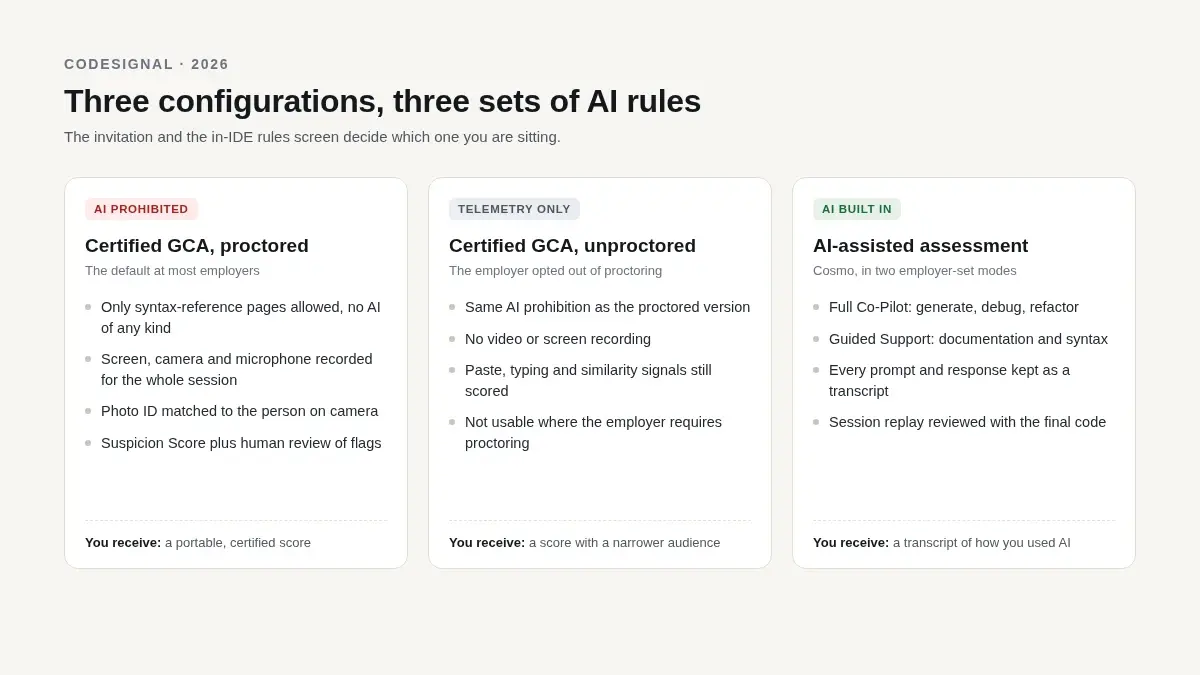
| What you were sent | AI rules | What records the session | What the employer receives |
|---|---|---|---|
| Certified GCA, proctored (the default at most employers) | AI prohibited, including as a syntax search; syntax-reference pages only | Screen share, camera, microphone, photo ID before the timer; full-session recording | Suspicion Score breakdown, proctoring report, flagged moments for human review |
| Certified GCA, unproctored (the employer opted out) | Same rules as above | No video; telemetry and submission history only | Suspicion Score only; not usable by employers that require proctoring |
| AI-assisted assessment (Cosmo enabled) | AI allowed by design, through CodeSignal's own assistant | Full transcript of every prompt and response, plus session replay | The transcript, the replay, the final code, and how you used the assistant |
The certified-GCA rules are unusually explicit. CodeSignal's knowledge base answers the "syntax reference only" question directly: basic syntax lookups are permitted, a page that helps you work out the solution is not, and "the use of AI is not allowed, including syntax search." You acknowledge those rules item by item before the timer starts.
The AI-assisted product is a different thing entirely. CodeSignal announced it as AI-Assisted Coding Assessments and Interviews, powered by Cosmo, with two employer-selectable modes: Full AI Co-Pilot, where the assistant can generate, debug and refactor alongside you, and Guided Support, where it stays on documentation, syntax and navigation. The company's pitch is that hiring should look like the job, where 76% of engineers use an AI assistant daily. The trade is stated just as plainly: every AI-assisted session produces a full transcript of candidate-AI interactions plus a session replay, and employers are told to read it for prompt quality and judgement, not just for the final answer.
There is a third lever most candidates never see. CodeSignal's safeguards page shows the per-assessment settings an employer can toggle: copy and paste, IP tracking, an Allow AI Usage switch, proctoring, ID verification and transcript protections. So the honest answer to "does CodeSignal allow AI" is that the company paying for the assessment decides, and the in-IDE rules screen is where that decision becomes visible to you.
What a certified session actually records
Setup happens before the clock. CodeSignal's own set-up article describes the sequence: camera, microphone and screen sharing, a photo of your face, a photo of a government ID, an internet check. The timer does not start until those steps finish, and the whole block usually takes under five minutes — which is also why "just open the link and see" is a bad way to learn the interface.
Once the timer runs, six safeguards are in play on the platform side:
- Suspicion Score. A composite trust score. CodeSignal's own dashboard breaks it into named fields — paste events, typing linearity, description copy, similarity score — and describes the inputs as solution similarity, telemetry and copy-paste activity.
- LeakSweep. Automated monitoring of public sites such as Stack Overflow and LeetCode for leaked CodeSignal questions, with DMCA takedowns and question replacement behind it.
- AI proctoring. Video, audio and screen recorded for the entire session, analysed by multiple models, with human reviewers validating anything that gets flagged. CodeSignal quotes results within about an hour, against the 24–48 hours typical of manual review.
- Dynamic questions. Thousands of rotated variants at consistent difficulty, so a memorized answer is worth less than it used to be.
- ID verification. Government photo ID matched against the person on camera.
- Optional controls. Copy-paste blocking, IP and location context, an AI-usage allowance, and transcript protections, configured per assessment.
Read that list as a description of what the system measures, because that is exactly what it is. None of these signals identifies a product. They measure whether the work looks like it came from you: whether code arrived in one block or grew with edits, whether the prompt text ended up in your editor, whether the solution resembles something already published, and whether the person on camera matches the ID.
Two mechanical details matter more than most prep advice. You must submit before you leave a task — switching tabs without submitting means the code does not save. And CodeSignal grades your highest-scoring submission for each task, even if your last attempt has a syntax error. That is a gift: submit early, submit partial, submit again. The candidate who loses points is the one who polishes Q3 for twenty minutes without ever banking a passing run.
The 70 minutes, with an assistant in the loop
The GCA is four tasks in 70 minutes, ordered by difficulty, with a global timer and no pause. The score runs 200–600 on the current scale — older threads still quote the retired 300–850 range — and partial credit is real: a brute force that passes most test cases scores above a clean-looking solution that times out. CodeSignal's General Coding Framework describes four task types (basic coding, data manipulation, implementation, problem solving) and keeps advanced material such as dynamic programming and graph algorithms out of the standard assessment, which is why the first two tasks are usually data manipulation rather than algorithm puzzles.
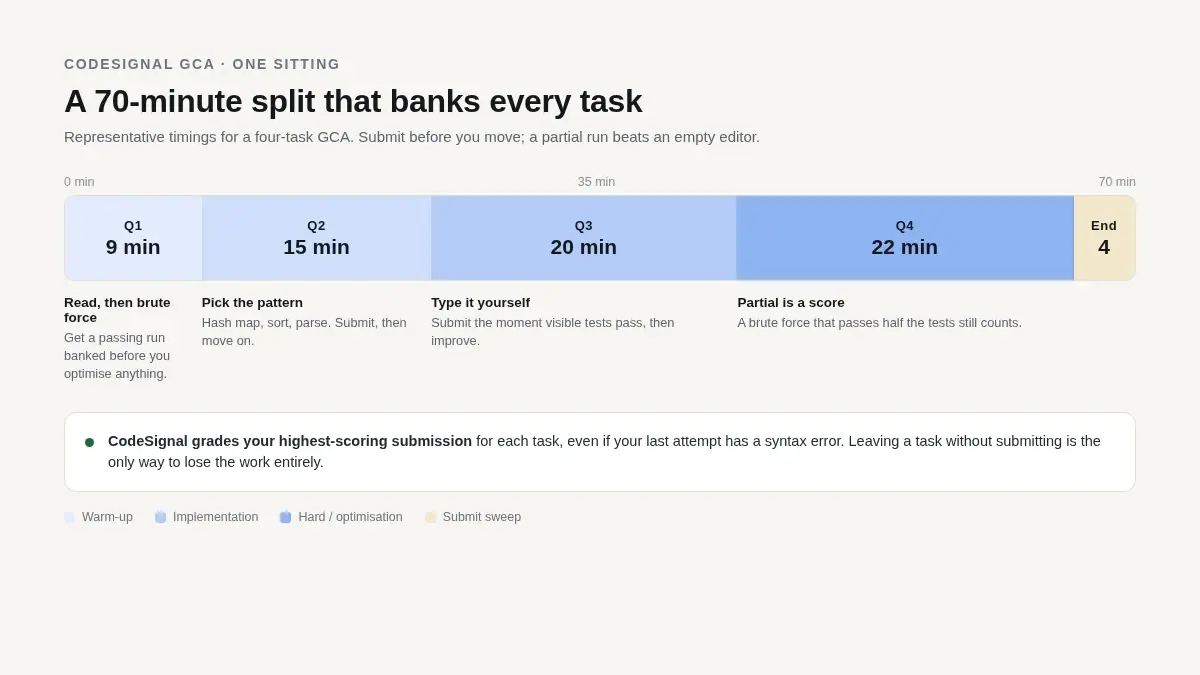
| Task | Typical shape | Time | Where an assistant earns its keep | Where it costs you |
|---|---|---|---|---|
| Q1 | Arrays, strings, counting | 8–10 min | Confirming edge cases before you submit | Reading a longer explanation than the problem needs |
| Q2 | Hash maps, sorting, parsing | 13–16 min | Pattern recognition when the statement is wordy | Accepting a solution you cannot retype under time |
| Q3 | Implementation, simulation, 2D grids | 18–20 min | Reviewing the code you actually typed | Debugging someone else's structure instead of your own |
| Q4 | Optimization, harder data structures | 18–22 min | A second approach when your first is O(n²) | Chasing a perfect answer with nothing submitted |
| Final | Submit sweep | 3–4 min | Nothing | Everything |
Three rules survive contact with a real sitting.
Submit before you switch. Every task, every time, even a brute force. A timeout on hidden tests scores better than an empty editor, and the highest submission is the one that counts.
Type it yourself. The paste signal is real, the clipboard may be disabled, and typing linearity is one of the named fields in the report. An assistant that hands you a finished block has handed you a decision about how that block arrives on screen.
Capture the whole task. Constraints, examples, and the function signature. A cropped screenshot produces confident answers to the wrong question, which is worse than no answer at all in a timed test.
If an answer cannot be explained in one sentence — "hash map of seen values, one pass, O(n)" — it is a liability rather than an asset, because the same company that reads a Suspicion Score also runs the follow-up round.
What an OA Copilot changes, mechanically
The AceRound OA Copilot is a desktop client feature, not a browser extension. It reads the assessment from your screen, so CodeSignal's IDE needs no integration: you keep the test in Chrome or Firefox, capture the task pane, and the answer streams into an overlay beside it.
What that means in a CodeSignal session specifically:
- No tab switching and no focus loss. The overlay is click-through and never takes keyboard focus, so the assessment page keeps focus and your typing stays in CodeSignal's editor.
- Capture is deliberate. A global hotkey or the hover trigger sends the task pane for solving. Quick mode takes up to four pages per capture; Programming mode takes up to six and is built for problems rather than lookups.
- The answer layer stays off the captured surface on Windows. The overlay is excluded at the compositor level, the same mechanism that keeps it out of screen sharing and window recording. On macOS the exclusion depends on which capture path the other app uses; the macOS screen-share notes cover the cases and the self-test.
- A second device is an option, not a requirement. If you would rather have nothing on the interview machine at all, dual-device mode puts the answers on a phone or tablet while the assessment runs on the computer.
- Follow-ups are the useful half. Explain the approach, ask for an alternative with better complexity, have it review the code you actually typed, or ask for a partial solution that gets the main path right. In a 70-minute test the review step is usually worth more than the first answer.
- Lockdown clients on Windows. If the employer's exam client hides other windows, the native exam window runs the answer layer in its own process; the OA Copilot documentation covers the switches and the practice-test step.
What it does not change
An overlay is a rendering trick, not a cloak. It cannot touch:
- The camera, the microphone, or the room. A webcam sees what it sees, and a second camera or a person walking past is outside any overlay's reach.
- Identity verification. The photo ID and the face match happen in CodeSignal's flow, before the timer.
- Typing telemetry. You still have to produce the code through the keyboard, in an order that looks like construction rather than insertion.
- Clipboard controls. If the employer blocked copy and paste, that is enforced by the assessment, not by your client.
- A managed device. CodeSignal's published safeguard list does not include a process scanner, but an employer-issued laptop can run its own endpoint tooling, and that layer is invisible to you.
- The Cosmo transcript. On an AI-assisted assessment the employer reads your prompts. A separate tool produces nothing they can read, and nothing they asked for.
What it costs
OA solving draws on the same minute pool as the interview copilot, and an active Pass makes it unlimited. Without a Pass, Quick mode bills per screenshot and Programming mode bills per question, so a four-task GCA is four Programming charges rather than a charge per capture. The OA Copilot page lists both modes, the per-capture page limits and the follow-up options; the FAQ covers how balances are consumed.
If you are still deciding whether a CodeSignal session is in scope for you, the GCA prep guide covers the format and score bands, the detection explainer goes deeper on the Suspicion Score, and the Capital One Power Day guide shows how one employer layers CodeSignal into a longer loop. For the policy side across employers, see which companies allow AI in coding interviews.
FAQ
Can you use AI on a CodeSignal GCA?
Not on the certified General Coding Assessment. The rules you acknowledge before the timer starts say that the use of AI is not allowed, including AI used as a syntax search; the only web lookups the rules permit are syntax references, and a page that explains how to solve the problem is explicitly out of bounds. Two other configurations exist and follow different rules: an AI-assisted assessment built around CodeSignal's own Cosmo assistant, and unproctored practice. The invitation and the rules screen inside the IDE are the source of truth for the session you were sent.
Does CodeSignal know if I use ChatGPT in another window?
It does not need to identify the tool. On a proctored session CodeSignal records the screen, camera and microphone for the whole assessment, and the Suspicion Score reads paste events, typing linearity, description copy and solution similarity on every submission. A second browser window on the same screen is inside that recording. On an unproctored session there is no video, but the telemetry signals still apply.
What is the CodeSignal Suspicion Score based on?
CodeSignal's own description lists solution similarity, telemetry and copy-paste activity, and the dashboard breaks the score into named fields: paste events, typing linearity, description copy and similarity score. It is a composite trust score with a breakdown for human review, not a single yes-or-no detector and not an AI-text classifier that reads your code.
What is Cosmo, and is it allowed?
Cosmo is CodeSignal's built-in assistant on AI-assisted assessments and interviews. Employers configure it in either Full AI Co-Pilot mode, where it can generate and refactor code, or Guided Support mode, where it explains concepts and fixes syntax. It is allowed because it is part of the assessment. The trade is that every prompt and response is included in a transcript sent to the employer, alongside a session replay.
Can I use an external copilot during a proctored CodeSignal assessment?
Yes. The AceRound OA Copilot runs as a desktop client outside the assessment: it reads the task from your screen and streams the answer into an overlay beside it. The overlay is excluded from screen capture at the Windows compositor level and never takes focus, but it cannot change a webcam, a microphone, your room or an identity check.
Does the OA Copilot work inside CodeSignal's IDE?
Yes, because it reads the screen rather than integrating with the site. You keep the assessment in the browser, capture the task pane with the hotkey or the hover trigger, and the answer streams into an overlay beside it. Quick mode handles up to four pages per capture for multiple-choice and short questions; Programming mode takes up to six pages and bills per question instead of per screenshot.
What happens if I paste the answer into the editor?
Paste is one of the signals CodeSignal scores, and an employer can disable copy and paste on the assessment entirely. The practical rule is to type the solution yourself, in pieces, submitting as you go: CodeSignal keeps your highest-scoring submission for each task even if a later one has a syntax error, so there is no benefit to holding a finished solution back and dropping it in at once.
Is a CodeSignal result reusable across companies?
A certified GCA result is designed to be shared with employers that accept it, which is why the platform rotates questions and reviews sessions centrally. An unproctored attempt is not the same credential: employers that require proctoring cannot use it. Retake windows and per-company score thresholds change, so confirm both on your account and in the invitation rather than relying on a figure from a forum thread.
Author · Alex Chen. Career consultant and former tech recruiter. Spent 5 years on the hiring side before switching to help candidates instead. Writes about real interview dynamics, not textbook advice.
Online assessment coming up? Get the answer right next to each question
OA Copilot — online assessments on HackerRank, CodeSignal, Codility and aptitude tests. Hover over a question and the answer appears in a private overlay only you can see: no tab switching, nothing on the shared screen. New users get 30 minutes free, no credit card.
Related Articles
Does CodeSignal Detect Cheating? What Actually Gets Flagged
Does CodeSignal detect cheating? Yes, via Suspicion Score, LeakSweep, and ID/webcam verification. Here's exactly what triggers a flag and what doesn't.
The SQL Technical Screen: What Interviewers Actually Watch You Do Live
The SQL technical screen is a live, shared-editor round, not a take-home. Here's the format, what interviewers watch for beyond correct output, and how to prep.

The Palantir Forward Deployed Engineer Interview: What Decomposition Tests
Palantir's FDE interview has a round most candidates never expect: decomposition. Here's what it actually tests, and why AI tools are banned in the room.