Best AI Interview Helper in 2026: 12 Real-Time Assistants Compared
Compare 12 AI interview helpers and real-time AI interview assistants in 2026 — what each one is best for, starting price and free tier. Every price checked against the vendor's own page on 30 September 2026.
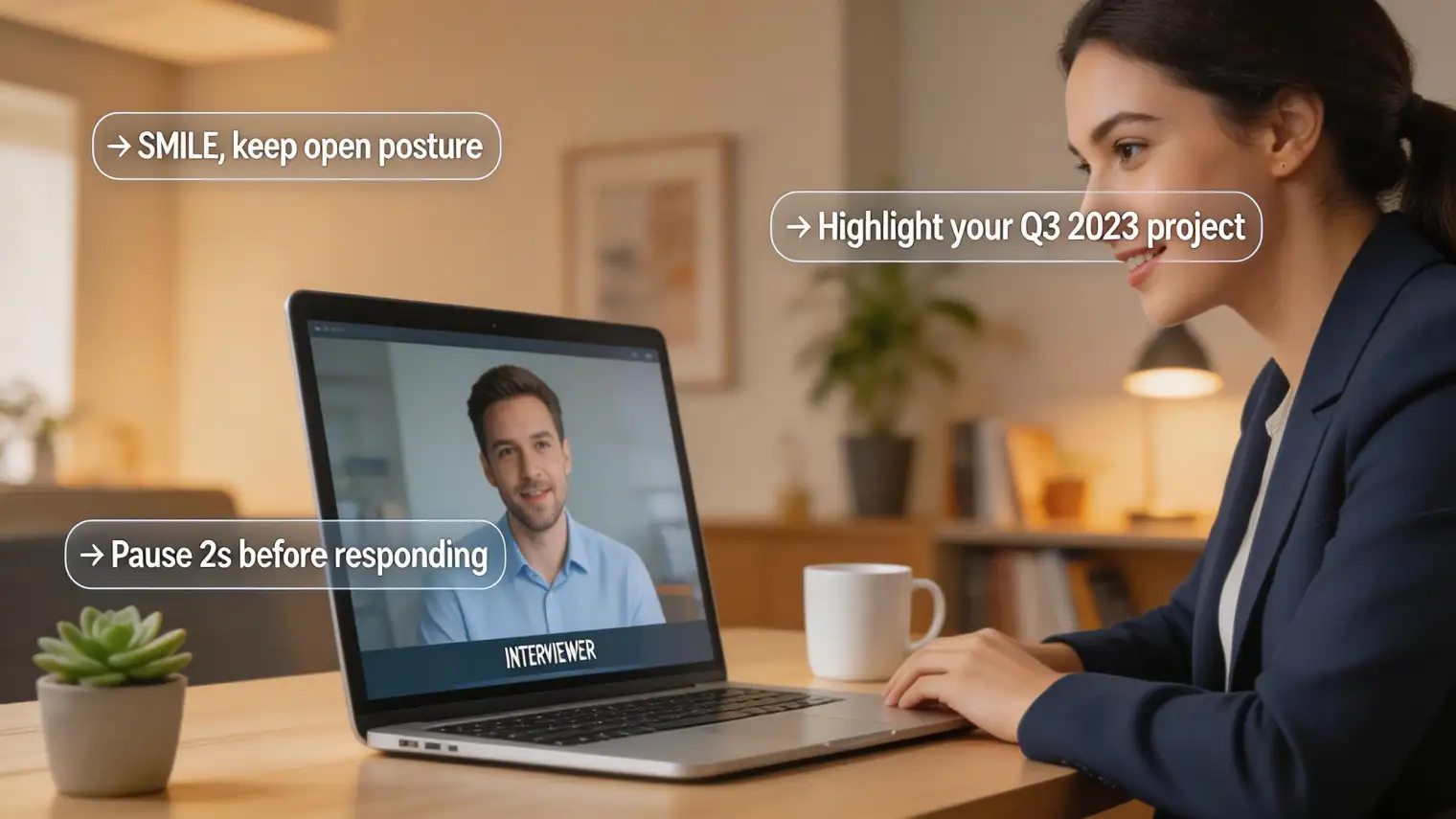
TL;DR: A real-time AI interview helper listens to your interview as it happens and surfaces talking points, STAR examples and company context within a few seconds. Twelve tools are worth your time in 2026, and the right one depends on whether you want a live reading aid, a preparation layer, or both. Prices below were checked against each vendor's own pricing page on 30 September 2026 — where a vendor publishes no price without a signup, we say so instead of guessing.
You've spent three weeks preparing. You know your STAR stories cold. Then the interviewer asks a question you weren't expecting — something half-behavioral, half-situational — and your mind goes blank.
That's not a knowledge gap. That's interview anxiety, and it's something that affects roughly 93% of job seekers at some point. It's also the primary reason the real-time AI interview helper category has exploded over the past two years.
Most articles about these tools skip the substance. They list five products, show a pricing table, and spend the rest of the piece hedging about whether you'll get caught. This page does it the other way round: the twelve tools and what each one actually costs first, then how the category works, what it helps with, and where the real risks sit.
Quick Guide: The 12 Best AI Interview Helpers in 2026
| Tool | Best for | Starting price (checked 30 Sep 2026) | Free option |
|---|---|---|---|
| AceRound AI | Live help plus a mock-practice and OA layer in one pass | $39.90 one-time Monthly Pass; $69.90 Season Pass (90 days) | Yes — free interview time on signup |
| Verve AI | Cheapest full live-assist plan | $16.99/mo Standard; $34.99/mo Pro; Enterprise from $10/session | Yes — 3× 15-min copilot sessions, 5 mocks |
| CoPrep AI | Pay-as-you-go credits that never expire | 120 credits $12, 360 credits $24, 840 credits $48; subscription $60/mo (list $90) | Yes — 20 credits on signup |
| HuddleMate | Interviewing once — pay by the hour, no subscription | $9.99/hour of active assist | Yes — 5 free minutes every hour |
| InterviewFox | One-time credit packs, no subscription | 30,000 credits $58 (≈500 min), 72,000 $89, 120,000 $129 | Free/promo credits vary |
| Interview Sidekick | Prep-first bundle with a 10,000+ question bank | $160/mo list price; $80/mo with its public SAVE50 code | Yes — free Basic tier |
| LockedIn AI | Unlimited live sessions for a heavy interview season | $54.99/mo month-to-month; $39.99/mo billed quarterly | No free tier |
| JobLander | Resume and CV work with interview practice attached | £9.87/mo Starter; £13.79/mo Professional; £16.34/mo Premium | Free trial on signup |
| Cluely | Meeting notes and a light live overlay | Pro from $11.99/mo; undetectability sold as a separate tier | Yes — Starter tier, capped AI responses |
| Final Round AI | Broad preparation suite with a CoPilot attached | No price published without signup | No free tier |
| Parakeet AI | Trying the category before paying | Credit packs bought in-app | Yes — one 10-minute session |
| Natively | A genuinely $0 setup if you supply your own model key | Software free; you pay your model provider | Yes — open source |
Two things the table can't show you. First, "starting price" hides the billing model: an hourly tool and a monthly pass are not comparable until you know how many interviews you have. Second, price alone says nothing about whether the answer quality is usable for your round type — a behavioural-question tool and a live-coding tool are different products wearing the same label.
How We Compared
This is an editorial comparison, not a lab leaderboard. For each tool we opened the vendor's own product and pricing pages on 30 September 2026, recorded what the vendor states about plan, platform and price, and marked vendor claims as claims rather than independent measurements.
We did not run a same-device latency or screen-share test across all twelve tools, and we don't imply that we did. The one figure we treat as a hard filter is price, because it's the one thing every vendor publishes and the thing that changes most often. Where a vendor did not publish a price at the time of checking, we say so.
The 12 AI Interview Helpers, Reviewed
1. AceRound AI — best overall for live help plus preparation
AceRound is the one on this list that covers both halves of the job hunt in a single pass. The live side listens through your system audio, detects the question type, and streams a short answer to a private window within a couple of seconds — the same shape as every other live copilot here. The difference is what sits behind it: mock interviews with an AI interviewer, interview question prediction built from your resume and the job description, and an OA (online assessment) copilot that handles coding rounds and take-homes rather than treating them as out of scope.
Pricing is a $39.90 one-time Monthly Pass with no auto-renewal, or $69.90 for a 90-day Season Pass. There is no separate "undetectability" upgrade — the desktop app's overlay behaviour during screen sharing is included at every tier rather than sold as a higher plan, which is not true of several tools below. It runs as a standalone desktop app on macOS and Windows and supports interviews in multiple languages.
The trade-off is positioning: AceRound markets itself to candidates preparing seriously rather than to people looking for the cheapest live reading aid, so if all you want is one hour of assistance for a single interview, an hourly tool further down this list will cost less. Our full AceRound review covers platform support and setup in detail.
2. Verve AI — cheapest full live-assist plan
On 30 September 2026 Verve published three plans: a free tier with three 15-minute copilot sessions and five mock interviews, a Standard plan at $16.99/month with 60-minute sessions ×60 and unlimited mocks, and a Pro plan at $34.99/month with unlimited 90-minute sessions and 20 specialised interview domains. The free tier's 14 supporting tools (resume builder, cover letter, ATS checker) are included at every level, which is unusual at this price.
For anyone who needs a full plan rather than a one-off, $16.99 is the lowest monthly number on this list — roughly a third of LockedIn AI and a fifth of Interview Sidekick's list price. The catch is session length and model access: long technical rounds and the newest reasoning models sit on Pro, not Standard. Our Verve AI alternatives breakdown covers where it stops being the cheap option.
3. CoPrep AI — credit packs that never expire
CoPrep sells interview time the way mobile networks sell data: 120 credits for $12 (2 hours of copilot time), 360 for $24, 840 for $48, with one credit equal to one minute. Credits never expire, and they're usable across the assistant, mock interviews and the resume tools. If you'd rather subscribe, the monthly plan is $60/month (shown marked down from $90), $40/month billed quarterly, or $30/month billed yearly.
Buying credits rather than subscribing is the right shape if your interviews are bursty — three rounds in one week and then nothing for a month. The reason it's third rather than first is that the credit price per minute only beats HuddleMate's hourly rate at the larger packs. Signup includes 20 free credits, which is enough to judge answer quality before paying.
4. HuddleMate — best if you interview once
HuddleMate prices by active assistance time rather than by month, which is unusual in this category. Checked on 30 September 2026: a free tier of five minutes per hour, then $9.99 per hour of active assist on the Standard plan, with an Enterprise tier for teams. Purchased minutes don't expire, and the page is explicit that you're billed for active assist time rather than for sitting in the app.
For one 45-minute interview that's roughly $7.50 against $39.90–$54.99 for a monthly pass — cheaper if you interview once, more expensive if you interview six times. HuddleMate is also the alternative most often surfaced by AI search results for this query, which is worth knowing when you're comparing what tools actually do against how often they get mentioned. Our HuddleMate alternative page covers where it stops being the cheap option.
5. InterviewFox — one-time credit packs, no subscription
InterviewFox sells three one-time credit packs as of 30 September 2026: 30,000 credits for $58 (estimated 500 minutes of interview time), 72,000 for $89 (≈1,200 min) and 120,000 for $129 (≈2,000 min). Usage is metered by the second rather than in fixed blocks, and purchased credits don't expire. It supports coding assistance, real-time responses and a dual-device mode where the interview runs on one machine and the assistant on another.
The straight comparison is with CoPrep: InterviewFox's entry pack is $58 against CoPrep's $12, and its per-minute economics only become competitive at the largest pack. It earns its place here for the dual-device workflow and the coding focus, not for price. Our InterviewFox comparison goes through the coverage differences.
6. Interview Sidekick — best prep-first bundle
On 30 September 2026 Interview Sidekick listed a free Basic tier and an Ultimate Sidekick plan at $160/month, discounted to $80/month with a public 50%-off code. The list-versus-promo gap is worth noticing: without the code it's the most expensive monthly plan here, and discount codes in this category expire. What you're paying for is breadth — unlimited prep sessions, a 10,000+ question bank, transcripts, Code Mode and stealth mode.
It's the strongest option on this list if your problem is the interview before the interview: the question bank and the answer feedback are the product, and the live overlay is a feature attached to them. If you need live assistance rather than rehearsal, you're paying for a lot of library you won't open. Our Interview Sidekick alternatives page covers that trade-off.
7. LockedIn AI — unlimited live sessions
On 30 September 2026 LockedIn AI's pricing page listed $54.99/month on month-to-month billing (shown as 50% off a $109.98 standard price) or $39.99/month billed every three months. It advertises unlimited interview sessions covering coding, meetings and online assessments, a mock layer, unlimited document upload, and credits that never expire — the last point matters if your job search is bursty.
Two honest caveats. First, this is not the budget option it's sometimes described as: at $39.99–$54.99 a month it sits above most of this list, and older write-ups quoting "$10–15/month" are out of date. Second, like Cluely, LockedIn AI is primarily a live-session product — the mock layer exists but the pitch is real-time assistance, not preparation. Our LockedIn AI alternatives breakdown compares it against five other tools if you're leaving rather than joining.
8. JobLander — resume work with interview practice attached
JobLander is really a CV and job-targeting tool that has grown an interview layer: £9.87/month for resume scoring, £13.79/month adding job targeting and ATS keyword matching, £16.34/month for the full set including cover-letter scoring, LinkedIn optimisation and AI interview practice. Prices are in pounds and the interview practice sits only on the top tier.
That makes it a poor fit if what you want is live in-interview assistance — there's no real-time copilot here — and a reasonable one if your bottleneck is getting past screening in the first place. It's on this list because it keeps appearing in AI-generated answers to "best AI interview assistant" questions, and a reader comparing options should know it's a different kind of product. Our JobLander comparison spells that out.
9. Cluely — meeting notes with a light live overlay
Cluely's own pricing page on 30 September 2026 advertised Pro from $11.99/month with undetectability in a separate, higher tier, on top of a free Starter tier capped at a limited number of AI responses per day. The product listens to your screen and microphone and overlays suggested answers — the same core mechanism as everything else here.
The reason it's ninth rather than first: Cluely repositioned during 2025 as a general AI meeting assistant competing with note-takers rather than an interview tool, and its weaknesses in this category are well documented — response lag in the 5–10 second range, no preparation layer at all, and a 2025 breach that exposed 83,000 users' data including interview transcripts and screenshots. It's fine for meetings. For interviews, it sells the undetectability you'd want as an upgrade. Our Cluely alternatives page runs the full comparison and the breach timeline.
10. Final Round AI — broad preparation suite
Final Round AI pairs its Interview CoPilot with a preparation stack: resume work, company-specific question sets, and a debrief loop that feeds each round into the next. Its feature page claims support across Zoom, Meet, Teams, Webex, HackerRank, CoderPad and phone screens via a second device.
What we can't tell you is the price. As of 30 September 2026 its pricing route pushes to a signup-gated plans page, so there is no number to check and we're not going to estimate one — it's the heaviest price bracket in the category by reputation, and reputation is all we have. If price matters to your decision, the monthly plans above are the ones you can actually compare. Our Final Round AI alternatives review goes through price-versus-fit in more detail.
11. Parakeet AI — try before you pay
Parakeet gives every account a single 10-minute free session, then sells credit packs for full-length calls bought from inside the app. The marketing is loud — "#1 AI interview assistant on SimilarWeb", 1.5M users, a 4.86 rating from 340K+ reviews — and none of those numbers are independently verified, so treat them as the vendor's own claims. The product itself is a real-time overlay with screenshot reading and a question bank marked "coming soon".
It's on this list because it's one of the brands AI assistants name constantly when asked for the best AI interview assistant, and because the free session is a genuinely low-commitment way to test whether this category works for you at all. Our Parakeet AI alternatives page covers the alternatives.
12. Natively — the open-source option
Natively is an open-source interview copilot, and the software itself costs nothing. That's the honest headline and also the whole catch: it's bring-your-own-key, so you either connect a paid API key from OpenAI, Anthropic or Google and pay that provider directly for usage, or you run a local model on your own machine for a genuinely $0 setup.
For anyone comfortable running a local model, this is the only entry here with no vendor between you and your interview audio — nothing leaves your machine. For everyone else, installation, key management and model quality become your problem, and there's no support path when an interview goes wrong. Our Natively comparison covers the BYOK maths.
What Is a Real-Time AI Interview Helper?
A real-time AI interview helper is software that runs during your live job interview and responds to what the interviewer is saying. It's not a practice tool. It's not a mock interview simulator. It operates while you're on the call.
The core mechanism: the tool captures your interview audio (and sometimes the interviewer's questions via screen-share transcription), processes the input against your uploaded resume, job description and any pre-loaded materials, and then surfaces content on a separate screen you control. You see suggestions; the interviewer sees your face.
The suggestions typically fall into a few categories:
- STAR story prompts — reminders of specific experiences that match the question
- Key phrase anchors — terms from the job description that belong in your answer
- Company context — facts about the company you researched in advance, surfaced at the right moment
- Structural guides — a quick "Situation → Task → Action → Result" skeleton if you're going blank on structure
The distinction from an AI interview assistant used in preparation is timing. Prep tools help you build answers before the interview. Real-time tools activate during it. Vendors use "helper" and "assistant" interchangeably; the distinction that matters is live versus prep, not the noun.
Why Candidates Use Them: The Asymmetry Problem
Here's context that most articles leave out: you are not the only party using AI in your interview.
The company screening you has almost certainly run your resume through an ATS that scores it against keywords. If you made it to a HireVue stage, an AI model scored your facial expressions, word choice and speech cadence. Even in traditional interviews, many companies now use AI note-taking tools that flag whether your answer hit the competency markers they're looking for.
Companies have been using AI to evaluate candidates for years. Candidates using AI to prepare for those evaluations isn't a moral imbalance — it's adaptation.
This is what researchers are finding too. A 2025 study published in Nature Humanities and Social Sciences Communications found that AI-conducted interviews reduced candidates' job application intention specifically because candidates felt they couldn't adequately express their capabilities. The power asymmetry is real and documented.
An AI copilot for interviews is, in this framing, a candidate-side corrective. It doesn't answer for you — it helps you surface what you already know under pressure.
That said, this framing only holds for certain use cases. There's a meaningful line between levelling the playing field and outsourcing the entire answer.
How Live Interview AI Actually Works (Step by Step)
Before deciding whether to use one, understand the mechanics:
1. Setup (10–15 minutes before your interview)
You upload your resume, the job description, and optionally some notes on the company or your key stories. The AI uses this to build a context layer — it knows your background and the role you're applying for.
2. Audio capture during the interview
The tool runs in the background. Most tools use your system audio or a virtual audio device to capture both sides of the conversation. Some, like AceRound AI, use a dedicated capture mode that keeps working when you're sharing your screen with the interviewer.
3. Transcription and question detection
The interviewer's question is transcribed in near real-time. The AI identifies whether it's a behavioural question ("Tell me about a time…"), a situational question ("How would you handle…"), a technical question, or a general conversational prompt.
4. Suggestions appear on your private display
Within a few seconds, relevant content appears on a separate window or secondary display. You're not reading a script — you're seeing a prompt like "→ Use the Airtable migration project, focus on cross-team coordination" or a key phrase "mention: stakeholder alignment, data integrity."
5. You answer in your own words
This is the critical part. The tool gives you a hook. You speak from genuine experience. The difference between a natural answer and a robotic one is whether you're reading verbatim or using the prompt as a launchpad.
Tools worth knowing: the twelve compared above, plus our 2026 copilot comparison for the category as a whole and the full tool breakdown for prep-only options.
5 Use Cases Where a Real-Time AI Interview Helper Genuinely Helps
1. Non-native English speakers structuring answers
If English isn't your first language, the gap between what you know and what you can articulate on demand is real. You have the experience. You have the qualifications. But retrieving a polished STAR story in a second language while managing interview nerves is hard. A structural prompt ("→ Situation: Shanghai office launch, Task: coordinate with three time zones") gives you the skeleton. You provide the fluency you already have.
2. Career changers bridging terminology
When you're moving from one field into another, your experience is relevant but the vocabulary is different. A former nurse interviewing for a healthcare technology role has the domain knowledge — but the interviewer is listening for specific tech terms. A real-time helper can surface those terms when relevant, so you're not losing credit for experience you legitimately have.
3. Interview anxiety and the blank-mind moment
This is the most common use case and the least acknowledged one. The question lands, your mind empties, and 5 seconds of silence feel like 30. A prompt — even one you already know — breaks the freeze. It's not different in kind from having notes on your desk during a phone interview.
4. Recall for candidates with a long track record
If you've been working for 15 years, you have dozens of relevant stories. The problem isn't that you lack experience — it's that you can't retrieve the right story under pressure. A real-time tool that has pre-loaded your career history and can match questions to experiences is genuinely useful.
5. Company research surfaced at the right moment
You researched the company for three hours. You know about the recent product pivot, the new VP of Engineering, the SEC filing. A real-time helper can surface specific data points when relevant ("→ Company Q3 earnings miss, cost-cutting focus"), so your "why this company" answer lands with actual specificity.
Where This Crosses Into Cheating Territory
The empowerment framing holds — until it doesn't. There are several scenarios where real-time AI assistance stops being preparation support and becomes something else:
Technical coding interviews
If you're reading AI-generated code during a live coding screen, you're misrepresenting your technical ability to do the job. This is the clearest case. It's also increasingly detectable — most companies doing live coding use proctored environments or pair programming formats where your hesitation patterns are observable.
In-person interviews
Running a real-time AI helper while sitting across from an interviewer, with a phone or tablet visible, is conspicuous and inappropriate. The tool is designed for video interviews.
Reading answers verbatim
This is where candidates get caught not by detection software, but by basic human observation. Experienced interviewers notice unnatural pacing, mismatched cadence, and the specific flatness that comes from reading rather than speaking. The tool is a prompt, not a script.
Roles where the interview is a direct sample of job performance
If you're interviewing for a live interpretation role by interpreting in real-time, or for a customer-facing role by demonstrating live customer handling, using AI to produce that performance defeats the purpose. You'd be hired into a job you can't actually do.
For a fuller discussion of where the ethical lines sit, our guide to AI interview cheating covers the landscape in more depth — including what companies can and can't detect.
How to Set Up Before Your Interview
If you've decided a real-time AI interview helper makes sense for your situation, here's the practical setup:
30 minutes before:
- Upload your resume, the job description, and any notes you've prepared
- If the tool allows it, add 3–5 pre-written STAR stories tagged by competency (leadership, conflict, failure, collaboration)
- Review the tool's display layout — know where suggestions will appear so you're not hunting for them mid-answer
10 minutes before:
- Run a test session with a friend or a mock question to confirm the audio capture is working
- Adjust your window layout so the suggestion panel is visible at your natural eye level — looking down or sideways during the interview is noticeable
- Set the suggestion display to "minimal" mode if available — bullet points, not paragraphs
During the interview:
- Don't watch the AI panel. Maintain eye contact with your camera. Glance at the panel between the question ending and your answer beginning.
- If a suggestion is irrelevant, ignore it — the tool has a context window, not perfect judgment
- Pause intentionally (1–2 seconds) before answering. This is good interview practice anyway and gives the AI time to surface relevant content.
FAQ
What is the best AI interview helper in 2026?
It depends on whether you want live assistance, preparation, or both. AceRound covers live help plus mock practice and OA rounds inside a $39.90 Monthly Pass. Verve AI is the cheapest full plan at $16.99/month. Interview Sidekick is the strongest prep-first option. HuddleMate is the one to pick if you interview once and don't want a subscription at all.
How much do real-time AI interview assistants cost?
As of 30 September 2026, plans run from $9.99 per hour of active assistance (HuddleMate) or $12 for a 2-hour credit pack (CoPrep AI) up to $54.99/month (LockedIn AI) and $160/month list price (Interview Sidekick, discounted to $80 with its public code). AceRound is a $39.90 one-time Monthly Pass. Final Round AI does not publish a price without a signup.
Is there a free AI interview helper?
Yes, several. Cluely's Starter tier is free with a capped number of AI responses per day, Verve AI gives three 15-minute copilot sessions on its free plan, CoPrep AI starts you with 20 credits, Parakeet AI gives a 10-minute session, HuddleMate gives five free minutes every hour, and Interview Sidekick has a free Basic tier. Natively is open-source and free if you supply your own model key.
Can interviewers tell when you're using a real-time AI interview helper?
In most video interview setups, no — provided you're not reading verbatim and your eye contact is natural. Detection tools exist on the employer side but are primarily designed to flag AI-generated text in pre-recorded or written responses, not to detect real-time audio tools during live calls. That said, an experienced interviewer will notice if your answers sound like they're being read.
What's the difference between an AI interview helper and an AI interview assistant?
Nothing technical — the two phrases describe the same category of software, and vendors use them interchangeably. "Helper" usually shows up in search queries and "assistant" in product pages. Both refer to a tool that runs during the interview and surfaces talking points while you speak.
Companies get to screen me with a robot, but I'm supposed to spend hours preparing — is that fair?
This is a real tension that a lot of candidates feel, and it's legitimate. The power asymmetry in hiring — companies using AI extensively while expecting candidates to perform entirely on their own — is something researchers are actively studying. Using AI assistance to compensate for that asymmetry isn't inherently wrong. What matters is whether the outcome accurately reflects your ability to do the job.
I use AI mocks daily. Is adding a live helper just the next logical step?
Preparation tools and live assistance tools are different in kind, not just degree. Mock practice helps you build genuine capability. Live assistance during the actual evaluation changes what the evaluation is measuring. Whether that's acceptable depends on the role, the company, and your own judgment about what you'd be representing.
Does using an AI helper mean I'm not actually qualified for the job?
Not necessarily. If the tool is surfacing experiences and knowledge you genuinely have — helping you access it under pressure — you're still the one who owns the underlying capability. If the tool is generating capabilities you don't have, that's a different situation.
What happens if I get the job and can't perform without the AI?
This is the real risk that nobody talks about. An AI helper that gets you through an interview for a role you're not ready for is a short-term win and a long-term problem. The onboarding period will expose the gap quickly. Use these tools to surface what you know, not to fake what you don't.
AI can't assess cultural fit or soft skills — so why do companies keep using it?
Mostly because human interviews are also bad at this — and AI screening is faster and cheaper. Whether that's a good tradeoff is a different debate. For candidates, the practical reality is that you're being evaluated by a system that has limitations on both sides.
Author · Alex Chen. Career consultant and former tech recruiter. Spent 5 years on the hiring side before switching to help candidates instead. Writes about real interview dynamics, not textbook advice.
Related Articles
OpenAI's AI Interview Policy: Banned, Required, or Team-Dependent
OpenAI sells AI coding agents, then bans most candidates from using one. Here's the round-by-round policy, including the new agentic round that flips it.
Does Harver Detect Cheating? What Its Proctoring Actually Checks
Does Harver detect cheating on its pre-employment assessments? A candidate look at Harver's Proctoring add-on, what gets logged after a flag, and what happens next.
Micro1's Zara AI Interview: What It Actually Tests (And Why Timing Gets Flagged)
Micro1's AI interviewer Zara has run 300,000+ interviews for remote roles. Here's why it flags response latency as a cheating signal, and what that means for AI prep.