Does Harver Detect Cheating? What Its Proctoring Actually Checks
Does Harver detect cheating on its pre-employment assessments? A candidate look at Harver's Proctoring add-on, what gets logged after a flag, and what happens next.
TL;DR: Proctoring — the part of Harver that watches for cheating — is an employer-optional add-on built on periodic photo capture, copy-paste blocking, and tab-switch logging, not a continuous webcam feed. A flag goes to a human reviewer afterward; Harver doesn't publish a review timeline or a candidate-facing way to dispute one.
You get an email — maybe still branded Outmatch, maybe already Harver — with a link to a pre-employment assessment: a personality inventory, a cognitive section, sometimes a gamified module. The instructions rarely say what's actually being monitored while you take it, and most of what comes up when you search "does Harver detect cheating" is written for the HR teams buying the product. We read Harver's own post on its anti-fraud and proctoring capabilities to lay out what's true from the candidate's side.
What Proctoring Actually Does
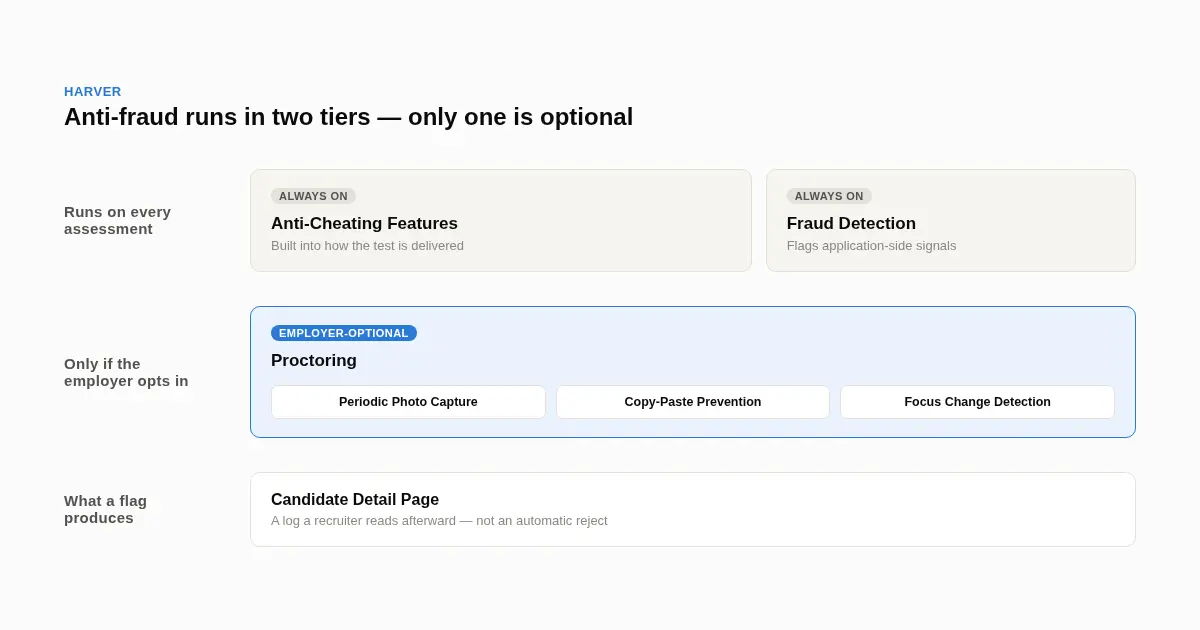
Two layers, Anti-Cheating Features and Fraud Detection, run quietly on every assessment by default. Proctoring is different — an employer has to switch it on for a specific role — and it's the one candidates mean when they ask if Harver is "watching" them. Once it's on:
- Periodic Photo Capture takes your photo at intervals, and Harver says the same identity check can carry through to a later interview stage
- Copy-Paste Prevention disables cutting, copying, and pasting inside the assessment window, aimed at blocking pasted-in ChatGPT answers specifically
- Focus Change Detection logs it when you switch tabs, open another window, or tab into a different app
That's a photo taken every so often and a list of timestamps, not a video feed someone watches live. A tab switch or a photo mismatch gets written to what Harver calls the Candidate Detail Page — a log a recruiter opens later, not a system that rejects you on its own.
Three things Harver hasn't published anywhere in its own material: how sensitive Focus Change Detection is (a two-second glance at the clock vs. minutes with the tab backgrounded), how quickly a flag gets reviewed, and a formal channel for explaining one after the fact. In practice, that leaves you with one lever — the recruiter named on your application — and it's worth using differently depending on what happens next. If you get invited to the next round anyway, leave it alone; raising it unprompted just plants a doubt nobody had. If you get a rejection that doesn't match how the test actually went, a short, factual note works better than an apology: name the moment ("I stepped away for maybe ten seconds around question 12 to check the time") rather than a general "I promise I wasn't cheating," which reads as defensive to a recruiter skimming a log.
Also Worth Knowing: Harver Used to Be Outmatch
If the sender name doesn't match what you're reading about online, that's a rebrand, not a red flag. Outmatch bought the Amsterdam-based Harver in 2021 and folded its own tools into the Harver name a few months later. The same company now also owns pymetrics, the neuroscience-game assessment some candidates take separately, and Checkster for reference checks — so if you've hit more than one "Harver-style" test across different employers, there's a real chance it was one platform each time.
For the assessment stage itself, our Criteria Corp and Pymetrics breakdowns cover the other platforms candidates run into in the same hiring pipeline. If your Harver test is a filter ahead of a live interview, that's the round AceRound AI is built for.
FAQ
Is Proctoring active on every Harver assessment, or just some of them?
Just some. It's a feature an employer switches on per role, not something built into every Harver link by default, and there's no banner or notice on the test screen telling you either way — you're meant to behave as if it could be on.
If I get flagged, does anyone tell me, and can I explain myself?
Not automatically. Harver hasn't published a standard time window for how fast a flag gets reviewed, and there's no built-in candidate form for disputing one — your only real lever is the recruiter contact on your application, not the platform itself.
Does a quick tab switch — like checking the time — count the same as leaving the test open in the background?
Harver hasn't published the sensitivity threshold, so there's no confirmed line between a two-second glance and a longer absence. The safest assumption is that any switch gets logged as an event, and it's the recruiter reading the log afterward who decides how much a given entry matters.
Can Harver tell if I paste in an AI-generated answer?
It blocks the paste action itself inside the assessment window, so a ChatGPT answer sitting in another tab can't be dropped straight in. Typing the same content yourself doesn't trigger anything — the control stops the copy-paste shortcut, not the source of what ends up on the page.
Is Harver the same thing as Outmatch?
Yes. Outmatch bought the Netherlands-based Harver in 2021 and moved the combined product under the Harver name a few months later, so an old Outmatch invite and a current Harver one are running on the same system.
Can I retake a Harver assessment if I think I did poorly?
Check the original invitation email and the employer's application portal for a reschedule link first — some do include one. If there's nothing there, go to the specific recruiting coordinator named on your application instead of a general inbox, since retake rules are set by each employer rather than by Harver uniformly.
Author · Alex Chen. Career consultant and former tech recruiter. Spent 5 years on the hiring side before switching to help candidates instead. Writes about real interview dynamics, not textbook advice.
Related Articles
Micro1's Zara AI Interview: What It Actually Tests (And Why Timing Gets Flagged)
Micro1's AI interviewer Zara has run 300,000+ interviews for remote roles. Here's why it flags response latency as a cheating signal, and what that means for AI prep.
Does CoCubes Detect Cheating During the Online Assessment?
CoCubes (an Aon platform) proctors off-campus drives with real AI monitoring — what it actually watches, what candidates report, and where prep helps.
Anthropic's AI Interview Policy Explained: Where Claude Is Banned, Where It's Required
Anthropic makes Claude, then bans it from most of its own interview. Here's the stage-by-stage AI policy, and why the take-home test keeps changing.