Live Interview AI Alternative: Hidden Price
Looking for a Live Interview AI alternative? Hidden pricing, self-reported success stats, and a browser-tab stealth gap are the top reasons people switch.
TL;DR: Live Interview AI is a browser-tab overlay that works across 50+ video platforms with no install — but its pricing is hidden until after signup (a third-party estimate says roughly a $30–60/month equivalent; the billing period and the amount actually charged per cycle are never published, and its own terms confirm a subscription that auto-renews until you cancel, with no refunds), and its headline stats (93% success rate, 200,000+ interviews, named-company hire testimonials) are all self-reported with no published methodology. Because it runs inside the browser rather than at the desktop level, it also carries more screen-share exposure than a system-level tool. A solid Live Interview AI alternative should show its price before you sign up, back its claims with something checkable, and sit above the screen-capture layer instead of inside a browser tab.
You land on Live Interview AI's homepage, see "200,000+ Successful Interviews" and a wall of testimonials from people who supposedly got hired at Google and Goldman Sachs, and click "Get Started Free" to see what it actually costs. There's no pricing page. You have to create an account first, and even then, several reviewers report the real cost only becomes fully clear once you're already inside the dashboard trying to book a session. That gap — between the confidence of the marketing and the opacity of the actual terms — is usually what sends people searching for an alternative.
What Live Interview AI Actually Offers
Live Interview AI is a browser-based real-time copilot: it listens to your interview through your browser tab, transcribes the interviewer's question, and surfaces a suggested response on screen. The pitch is genuinely convenient — a roughly 60-second setup, no software install, and claimed compatibility with 50+ video platforms including Zoom, Google Meet, Microsoft Teams, Webex, RingCentral, and Skype. For anyone on a locked-down corporate laptop where IT blocks installers, that no-install model is a real, non-trivial advantage over desktop-only tools.
Where the Marketing Gets Thin
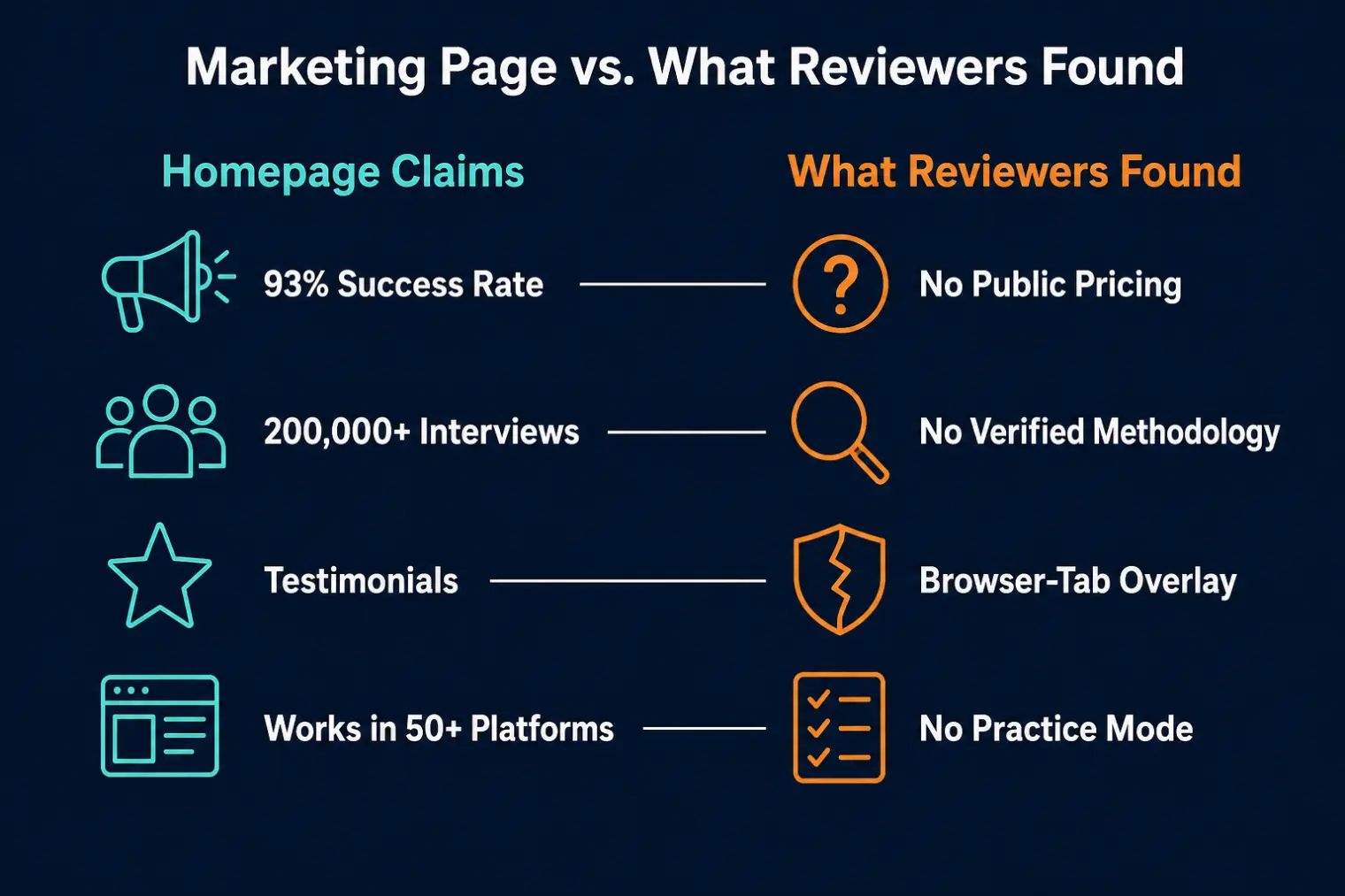
Look past the homepage and a few gaps show up consistently:
- No public pricing. There's no tier breakdown anywhere on the marketing site. Every path leads to a free signup, and plan cost only surfaces once you're inside the dashboard. Independent reviews put paid plans at a $30–60/month equivalent, but treat that as an estimate, not a price: the billing period, the amount actually charged per cycle, and the commitment length are all unpublished, so a "$30/month" figure could equally be an annual prepay divided by twelve. There's also a separate, unpriced "Career Accelerator" tier above that. The one thing the company does put in writing is its terms of service (checked August 27, 2026): it's a recurring subscription that keeps charging until you cancel, all fees are non-refundable including prorated amounts, and cancelling takes effect immediately with no refund for time you've already paid for.
- Unverifiable headline stats. "93% interview success rate," "200,000+ interviews completed," and testimonials naming specific hires at Google, Apple, Microsoft, Facebook, Tesla, and Goldman Sachs all appear without a methodology, sample size, or any third-party audit attached. That doesn't make them false — it makes them unconfirmable from the outside, which is a meaningfully different thing to build a purchase decision on.
- No structured practice mode. The product is live-assistance only. If you want mock-interview reps to build actual fluency before the real thing, that's not part of what's offered here.
- Browser-tab architecture, not desktop-level. This cuts both ways, and it's worth understanding both sides before you decide it matters to you.
The Real Tradeoff: Browser Overlay vs. Desktop-Level App
This is the gap that gets the least attention in most reviews, including the product's own marketing. A browser-tab overlay renders inside the browser's own layer, not above the operating system's screen-capture layer. In practice, that means if you mis-share your entire screen instead of a single application window — or the video platform itself captures the full desktop rather than one window — the overlay can end up visible to the interviewer. A genuinely desktop-native tool sits above that capture layer by design, which is a structural difference, not just a marketing one.
The same trait that makes Live Interview AI convenient on a locked-down corporate laptop — no installer, runs in any browser tab — is also what removes that system-level layer of protection. It's a real tradeoff, not a flaw to be embarrassed about, but it's one the product page doesn't spell out, and it's worth knowing before a live interview rather than during one.
What to Check Before You Switch
- Is pricing published, or hidden behind a signup wall? A tool that shows its price up front lets you compare real costs before you've handed over an email address.
- Are the claims checkable? Self-reported success rates and testimonials aren't disqualifying on their own, but weigh them differently than a claim you can actually verify.
- Desktop-level or browser-tab? If screen-share exposure matters to you, understand which layer the tool actually runs at, not just whether it's "invisible" in marketing copy.
- Live-only, or does it help you prepare too? A tool that only assists live gives you nothing to practice with beforehand.
How AceRound Compares as a Live Interview AI Alternative
AceRound AI runs as a native desktop client on Mac and Windows, sitting above the OS-level screen-capture layer rather than inside a browser tab, and we publish our pricing openly rather than gating it behind a signup flow. We're not going to claim zero screen-share risk under every possible sharing configuration — no honest vendor should promise that, and how you share your screen still matters more than which tool you're running. What we'd actually suggest is testing the two things this review keeps surfacing: can you see the real price before committing, and does the tool sit at a level that matches how carefully you actually need to manage screen-share exposure. For a wider comparison of where the current copilot field stands, see our best AI interview copilot 2026 roundup, and for the mechanics of what is and isn't visible on a shared screen, our screen-share visibility breakdown goes deeper than any single product's marketing page will.
FAQ
Does Live Interview AI show pricing before I sign up?
No. There is no public pricing page — every call-to-action routes to a free signup, and plan prices only appear inside the dashboard after you have an account. That leaves the three things you would normally check before paying all unpublished: the billing period, the amount actually charged each cycle, and how long you are committing for. The commonly quoted $30 to $60 a month is a third-party monthly-equivalent estimate, not a confirmed month-to-month price — it could just as easily be an annual or quarterly prepay divided out, and no upfront total is disclosed anywhere public. What is confirmed comes from Live Interview AI's own terms of service (checked August 27, 2026): it is a recurring subscription that keeps billing until you cancel, all subscription fees are non-refundable including prorated amounts, and cancelling takes effect immediately with no refund for time already paid. An unpriced upper tier sits above that estimated range as well.
Is Live Interview AI's "93% success rate" claim real?
It is self-reported, with no published methodology, cohort size, or independent audit behind it. The same goes for the "200,000+ interviews completed" and named-company hire testimonials (Google, Apple, Morgan Stanley, and others) that appear on the homepage. None of this makes the product fake, but none of it is verifiable from outside the company either — treat it as marketing copy, not evidence.
Is a browser-based AI interview assistant safe to use during a screen share?
It carries more exposure than a desktop-native tool. Browser-tab overlays sit inside the browser's own rendering layer, so if you mis-share your full screen instead of a single window, or the interviewing platform captures the whole desktop, the overlay can become visible to the interviewer. A true desktop-level app renders above the capture layer the operating system hands to screen-sharing software, which is a structurally different (and generally safer) position.
Does Live Interview AI work with native desktop apps like the Teams or Zoom client, or only in a browser tab?
Its own site describes browser-tab operation across 50+ web-based video platforms. It does not document how, or whether, it handles an interview run through a native desktop conferencing app rather than the browser version of that same platform — a real gap if your interviewer's company defaults to the desktop client.
Is using an AI interview assistant considered cheating?
Most employers have not published a clear policy either way, and views vary by company, role, and interviewer. Treat any real-time assistant as a confidence aid for answers you already know and have practiced, not a replacement for preparation — and assume a competent interviewer can probe past a scripted-sounding response with a natural follow-up question.
What should I compare before picking a Live Interview AI alternative?
Four things: whether pricing is published up front or hidden behind a signup wall, whether the tool's claims are backed by anything checkable or just self-reported numbers, whether it runs as a desktop-level app or a browser-tab overlay, and whether it offers any structured practice mode beyond live-only assistance.
Author · Alex Chen. Career consultant and former tech recruiter. Spent 5 years on the hiring side before switching to help candidates instead. Writes about real interview dynamics, not textbook advice.
Related Articles
OpenAI's AI Interview Policy: Banned, Required, or Team-Dependent
OpenAI sells AI coding agents, then bans most candidates from using one. Here's the round-by-round policy, including the new agentic round that flips it.
Does Harver Detect Cheating? What Its Proctoring Actually Checks
Does Harver detect cheating on its pre-employment assessments? A candidate look at Harver's Proctoring add-on, what gets logged after a flag, and what happens next.
Micro1's Zara AI Interview: What It Actually Tests (And Why Timing Gets Flagged)
Micro1's AI interviewer Zara has run 300,000+ interviews for remote roles. Here's why it flags response latency as a cheating signal, and what that means for AI prep.