Does TestGorilla Detect Cheating? What Actually Gets Flagged
Does TestGorilla detect cheating? Yes, via a three-tier behavior system, webcam snapshots, tab-switching and paste detection. Here's what actually triggers a flag.
TL;DR: Yes — does TestGorilla detect cheating has a concrete answer. Its help center documents seven monitored behaviors: webcam snapshots (every 30 seconds), full-screen tracking, tab switching, webcam status, developer tools, IP-based location and paste detection, all rolled up into a three-tier behavior rating. Screen recording is not one of them. And a flag isn't an automatic fail — TestGorilla itself calls these signals symptoms of behavior rather than proof, and tells employers not to reject anyone on that basis alone. None of it is the same thing as a live interview, which is the round a real-time copilot like AceRound actually helps with.
You just submitted a TestGorilla skills assessment for a job you actually want. Somewhere in the middle of it, a browser notification popped up and you clicked away from the tab for two seconds to dismiss it. Now you're staring at the "assessment submitted" screen wondering if that counts as something, and whether there's a number attached to you that the recruiter can see and you can't.
That anxiety has spawned a small industry of "how to cheat on TestGorilla" posts, most of them thin on specifics and long on promises. Here's what TestGorilla's own documentation actually says it monitors, what a flag really means, and where the honest limits of that monitoring are — written for the person taking the test, not the company administering it.
What TestGorilla Actually Monitors
TestGorilla names its anti-cheating layer directly in its help center: a three-tier behavior system — No Issues, Some Issues, Major Issues — built from a published list of monitored behaviors, not one black-box "cheating detector." The seven behaviors it says it monitors are:
- Webcam snapshots. The system captures an image every 30 seconds to verify the candidate's identity. This is not continuous video and not facial-expression analysis. It's also the only anti-cheating setting the help center says an employer can disable.
- Full-screen tracking. TestGorilla monitors whether you stay inside the full-screen test window or exit the mode.
- Tab switching. Moving to another browser tab during the assessment is detected separately from full-screen exits.
- Webcam status. The system tracks whether the camera gets disabled or turned off.
- Developer tools. Opening your browser's developer tools during a test is logged by name.
- IP-based location. TestGorilla records the approximate location and IP address, which it uses to identify potential unauthorized attempts from the same user.
- Paste detection. It tracks when and where content is pasted, so an employer can cross-examine a submission for authenticity.
Notice what isn't on that list: nothing there captures your screen. There is no screen recording among the behaviors TestGorilla documents.
Around that behavior layer sits a set of structural measures aimed at the test itself rather than at you: question banks cycled by an algorithm with maximum exposure limits, one attempt per email address, signup restricted to business email addresses so candidates can't practice, a server-side timer that keeps running even if you close the test window, and an honesty agreement you sign before submitting that commits you to not using AI tools.
TestGorilla is unusually direct about the limits of all this in its own blog post on why it's impossible to fully prevent cheating: no assessment has ever been 100% cheat-proof, and the goal is to raise the cost of cheating and leave a trail, not to build a perfect filter. That post also puts a number on the problem — when hiring with TestGorilla's skills assessments, its data shows only one in six candidates has attempted to cheat. That's a statement about how many candidates try, not about how many flags turn out to be false alarms; TestGorilla doesn't publish a figure for that.
What Actually Gets You Flagged
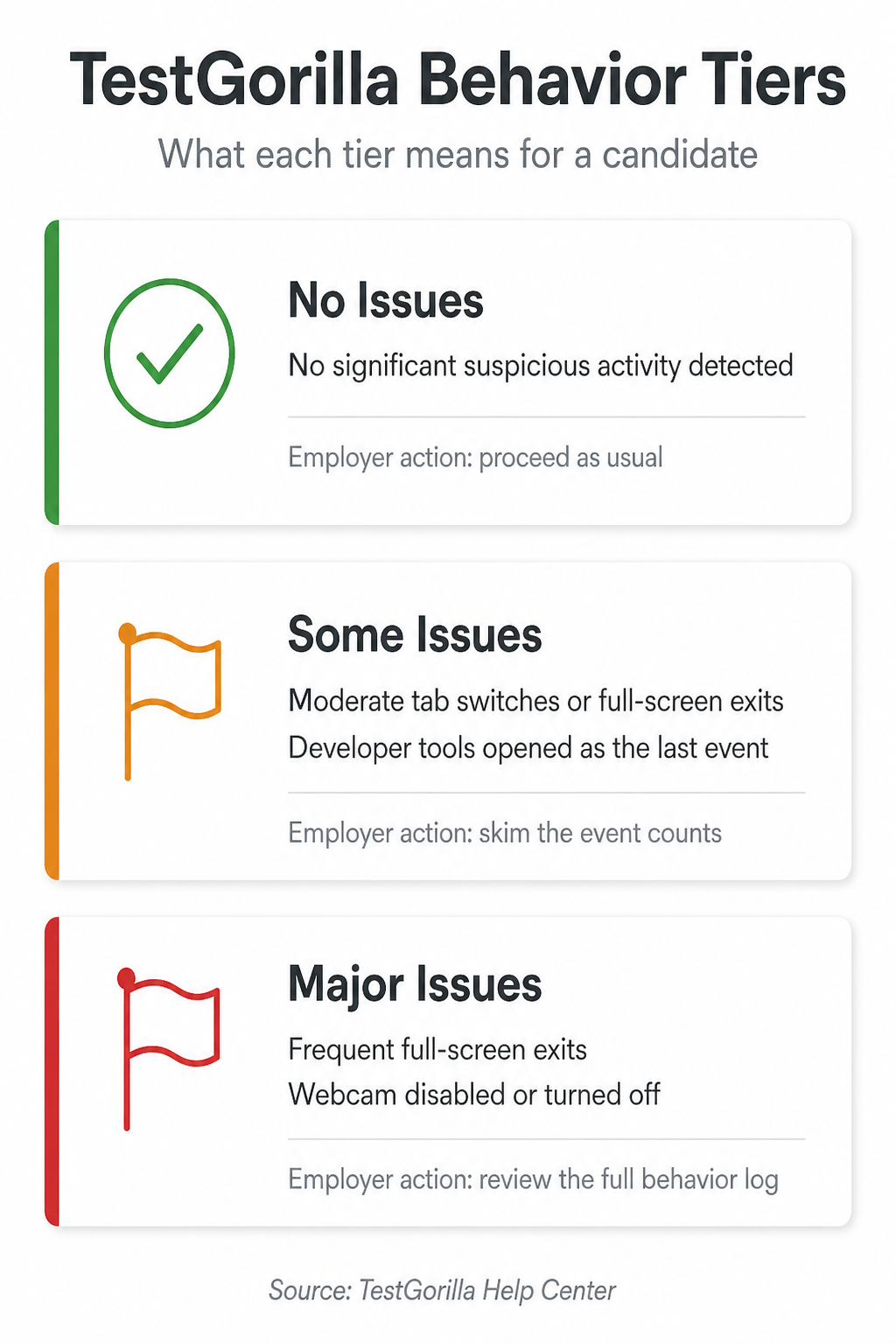
The help center is explicit that tiers exist so that flags aren't read in isolation: the system is meant to reflect "the depth, intensity, frequency, and variety" of a candidate's behaviors. Here's how it describes each tier, with the examples it publishes:
- No Issues (checkmark) — the lowest risk level, no significant suspicious activity detected. The recommended action for the employer is to proceed with the process as usual.
- Some Issues (orange flag) — intermediate risk. The published examples are moderate tab switches or full-screen exits, or opening developer tools as the last recorded event in a test. The employer is advised to open the behavior log and skim the event counts for context.
- Major Issues (red flag) — the highest risk level. The published examples are frequent full-screen exits or the webcam being disabled. The employer is advised to review the full behavior log carefully before making a hiring decision.
Beyond those examples, TestGorilla doesn't publish exact thresholds — how many tab switches counts as "moderate" versus "frequent" isn't disclosed. What it does say clearly is that the tier is a summary for a human to interpret, not a score that decides anything by itself.
What a Flag Doesn't Mean
The anxious version of this question treats every ordinary interruption as a verdict. TestGorilla's own documentation argues the opposite:
- A flag is not proof. The help center says these flags are "symptoms of behavior, not outright proof of cheating," and that the measures "should not be used on their own as grounds to disqualify or reject a candidate."
- Closing a notification pop-up is the company's own example of an innocent full-screen exit — it explicitly notes a candidate might leave full-screen to dismiss a system notification.
- An IP-location flag has mundane explanations. TestGorilla's own example is a candidate taking the assessment on a mobile device while in a car.
- Taking your time on a hard question. Nothing in the documented list of monitored behaviors is about how fast or slowly you answer. Tests are timed, and that timer keeps running even if you close the window — but pace itself isn't one of the seven logged signals.
- TestGorilla says it doesn't label anyone a cheater. In its words, proving intent is impossible; the signals exist to support a human judgment, and it recommends employers contact a candidate about a flag rather than reject them over it.
TestGorilla's Own Admission: It Can't Promise Cheat-Proof
What separates TestGorilla's public documentation from most "beat the detector" content online is candor. The company's own blog states plainly that no assessment platform can guarantee cheating is impossible — the honest goal is raising the cost and visibility of dishonest behavior, not building a perfect filter. That's a meaningfully different claim than the absolutist language ("100% undetectable," "guaranteed clean") that shows up on sites selling stealth overlay tools for the assessment itself. And per TestGorilla's own framing, the monitor's output was never meant to decide an outcome on its own — it's data handed to a human who is explicitly told not to treat it as proof.
The Skills Assessment vs. the Interview That Follows
This distinction matters more than most cheat-detection content admits: a TestGorilla assessment is an asynchronous screening step — a filter before you talk to a human, not the interview itself. It is a different system, with different stakes, than the live conversation that typically comes after you pass it.
That's also where the practical prep advice diverges. Spending energy trying to route around assessment monitoring is a bad trade even when it technically works, because for most candidates the real bottleneck isn't the OA — it's the live round afterward, where a hiring manager is evaluating how you think in real time. AceRound AI is built for that round specifically: real-time coaching during a live conversation, not a way to route around an automated screening step. If you're weighing what kind of prep tool actually matches what you're facing next, the best AI for technical interview guide breaks down live-support tools versus prep-only tools.
For assessment platforms with different detection models, CodeSignal's system works differently and is worth knowing if your pipeline uses both. And for the full landscape across formats, this breakdown of how online interviews detect cheating compares HireVue, Zoom, and OA-style tools side by side.
How to Prepare So You Never Have to Think About Any of This
- Take the assessment somewhere you control — stable wifi, notifications off, single monitor if you're worried about full-screen exits triggering unnecessarily.
- Leave your webcam connected and on. A disabled webcam is one of the two examples TestGorilla publishes for its Major Issues tier, and it's the one signal you can trip purely by fiddling with settings.
- Don't open browser developer tools during a test. It's logged by name, and doing it as the last event in a test is a published Some Issues example.
- If you draft a written answer elsewhere first, retype the final version instead of pasting it. It costs a minute or two and removes an entire category of ambiguity from your submission.
- Read the assessment instructions and the honesty agreement before you start. That agreement is what you're actually held to, and it commits you to completing the assessment without AI tools.
- Put your prep energy into the live round that follows. The assessment is the low-stakes filter; the interview is where practiced, real-time reasoning under pressure actually decides the outcome.
FAQ
Does TestGorilla record your screen?
No. Screen recording is not part of TestGorilla's documented anti-cheating layer at all. Its help center lists seven monitored behaviors — webcam snapshots, full-screen tracking, tab switching, webcam status, developer tools, IP-based location and paste detection — and none of them capture what is on your screen.
Does TestGorilla record you through your webcam?
It captures still snapshots every 30 seconds to verify identity, not a continuous video feed. TestGorilla's help center also notes that the snapshot feature is the only anti-cheating setting an employer is able to switch off, so on most assessments it is running.
Can I get flagged even if I'm not cheating?
Yes. TestGorilla states plainly that these flags are symptoms of behavior, not outright proof of cheating, and offers its own examples — exiting full-screen to close a system notification, or an IP-location flag from someone taking the assessment on a phone in a car. It also tells employers not to use this data on its own as grounds to reject anyone.
Does TestGorilla detect ChatGPT or AI-generated answers?
There is no publicly documented feature that reads your answer text and labels it AI-written. What is documented is activity monitoring — tab switching, paste detection, developer tools and webcam signals — plus an honesty agreement you sign before submitting, which explicitly commits you to completing the assessment without AI tools.
Does a flagged result mean I failed the assessment?
No. The behavior tier and event log go to the hiring company alongside your score, and TestGorilla does not auto-reject candidates. Its help center says it never recommends using the anti-cheating monitor as grounds to immediately reject or disqualify someone, and suggests employers contact the candidate first.
Author · Alex Chen. Career consultant and former tech recruiter. Spent 5 years on the hiring side before switching to help candidates instead. Writes about real interview dynamics, not textbook advice.
Related Articles
Does TestDome Detect Cheating? What Actually Gets Flagged
Does TestDome detect cheating? Only when an employer turns on proctoring. Here's exactly what its screen/webcam/AI review catches — and what it can't.

How Do You Measure Success? The Interview Answer That Works
How do you measure success interview answer, decoded: what recruiters vs. hiring managers actually screen for, plus role-specific scripts and a freeze-proof framework.

Tell Me About a Time You Managed Up
Answer 'tell me about a time you managed up' with a real STAR story, not corporate-speak — three manager archetypes and sample answers included.