Does Talview Detect Cheating? Yes, Here's How
Does Talview detect cheating and AI copilots like Cluely? A candidate look at app-lockdown, behavioral analytics, and its agentic 'Alvy' proctor.
TL;DR: Talview's anti-cheat stack layers application/browser lockdown, behavioral and audio pattern analysis, a multi-camera room scan, and an agentic AI proctor it calls "Alvy" that correlates signals across sessions and candidates. Talview markets this directly as a countermeasure to invisible AI copilots like Cluely and Final Round AI — and its own pages concede those tools are hard to catch with standard monitoring, which is the entire reason the more aggressive layers exist. Independent sources, not Talview's own marketing, also document real false-positive risk in this category. None of this is about beating the system; it's about understanding what's actually watching.
You're sent a link to a Talview-run interview, and somewhere in the process you notice the company markets itself specifically as the tool that catches AI interview copilots. That's a more direct claim than most proctoring vendors make, so it's worth understanding exactly what "detect cheating" means here — not from Talview's sales copy, but from what its own technical pages and independent sources say about how the system actually works.
Talview Names Its Target Directly
Most proctoring platforms describe the threat they defend against in general terms — "AI-assisted answering," "unauthorized tools." Talview doesn't. It publishes dedicated pages titled things like "Stop Cluely Cheating" and "Detecting and Blocking FinalRound AI Cheating," naming specific products by name and describing them as invisible on-screen overlays that stay hidden during screen sharing and are hard to catch with standard monitoring tools. That last part is worth sitting with: it's Talview's own admission of why the rest of its stack exists in the first place.
The Five Layers, From Talview's Own Pages
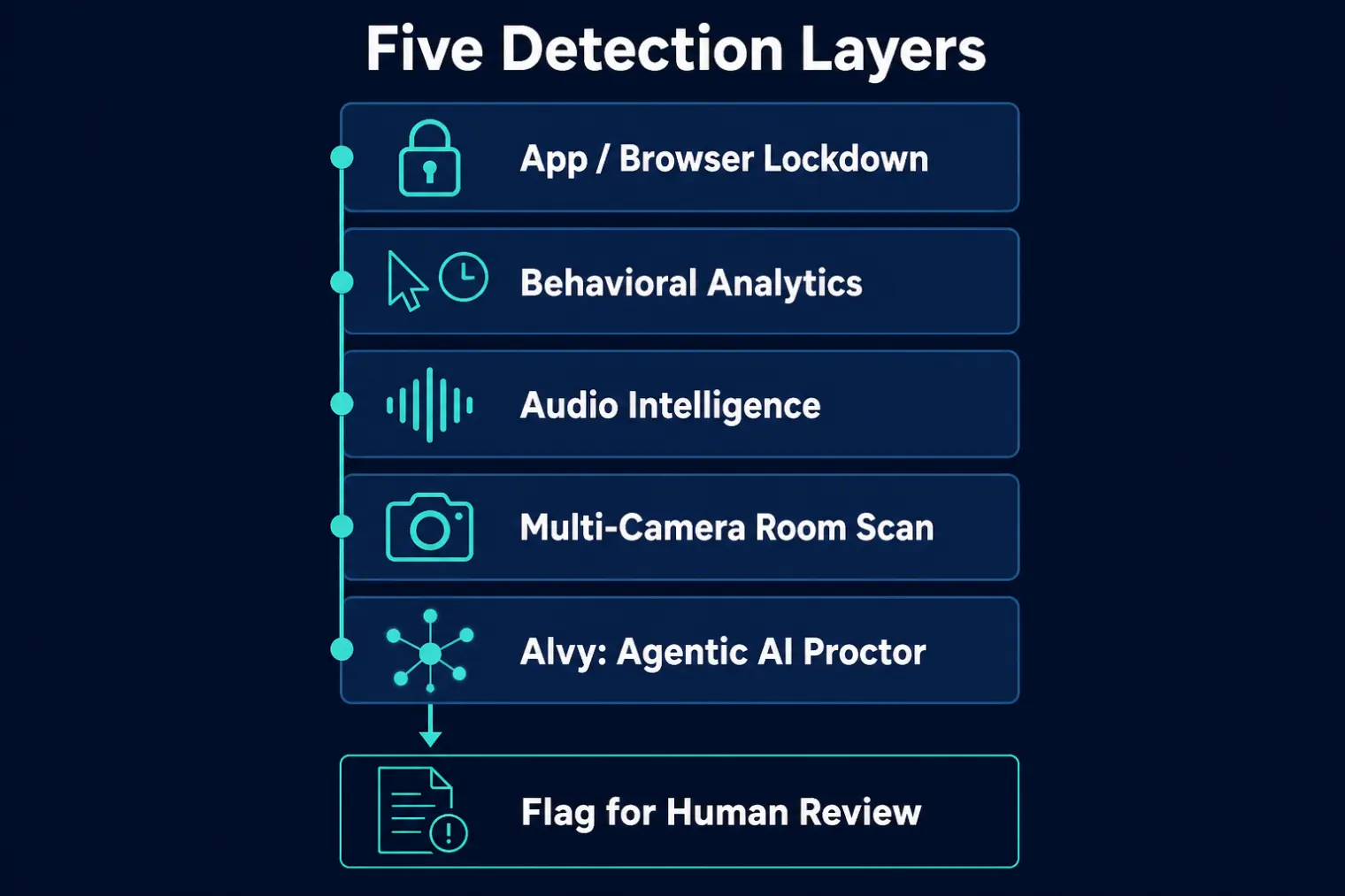
According to Talview's own product and blog pages, the stack breaks down into five distinct mechanisms:
- Application/browser lockdown. The session is restricted to a whitelisted app or browser; processes and overlays outside that whitelist get flagged or blocked. This is the primary control aimed at on-screen overlay tools specifically.
- Behavioral analytics. Flags unusual desktop activity, suspicious keyboard shortcuts, and answer timing that looks scripted or unnaturally uniform rather than showing the normal hesitation of live, unrehearsed speech.
- Audio intelligence. Analyzes voice for AI-generated or coached-sounding delivery, and listens for a second voice feeding answers off-screen.
- Multi-camera and room scan. A secondary camera plus a 360° environment check, aimed at catching a second device or a second person outside the primary camera's view.
- Alvy, the agentic AI proctor. Built on a granted patent (US 12,361,115 B1) for what Talview calls "signal fusion" — correlating video, audio, device, and behavioral data across sessions and candidates, not just flagging anomalies within a single interview. Talview's own material also describes it weighing response latency and whether a candidate asks clarifying questions, on the logic that genuine engagement includes moments of real uncertainty that a scripted or AI-fed answer typically doesn't.
The Gap Talview's Own Marketing Half-Admits
Here's the part worth reading carefully rather than skimming past: Talview's "Stop Cluely" page exists because, in its own words, overlay-style tools stay invisible during screen sharing and are hard to catch with standard monitoring. That's not a competitor's claim about Talview — it's Talview's own framing of the problem it's solving. Application lockdown and behavioral inference are real friction, but they are fundamentally different from literally detecting an overlay's on-screen content. Independent analysis of this category also notes that standalone desktop applications can run outside a browser's sandbox, which limits how much a browser-focused lockdown control can actually see. None of this means detection doesn't work — it means "detect cheating" here mostly means detecting behavior consistent with AI assistance, not directly reading what's rendered on your screen.
What Talview Doesn't Advertise: False Positives Are Documented Independently
Talview's own materials cite a claim that context-aware AI reduces bias-related false positives by roughly 25–30% — which is itself an acknowledgment that the underlying problem is real, not hypothetical. That tracks with independent research outside Talview entirely: NIST's Face Recognition Vendor Test on demographic effects (NISTIR 8280) documented false-positive rate differences across demographic groups in facial-recognition-adjacent systems, sometimes by wide margins, and academic ethics reviews of exam-proctoring technology have raised similar concerns about disability, bandwidth limitations, and normal human interruptions being misread as suspicious behavior. Independent reviewers of Talview specifically also describe a real, if inconsistent, pattern of false flags. None of this is a reason to panic — it's context for why a flag on your session, if one happens, isn't automatically a verdict.
How to Actually Approach a Talview-Proctored Interview
None of the mechanisms above are something to route around — they're context for behaving normally rather than guessing. Stay on the whitelisted application for the session rather than switching windows unnecessarily. Speak at a natural pace with the normal pauses that come from thinking through a real question, since scripted-sounding uniformity is specifically one of the behavioral signals in play. If you know the room-scan layer might be active, stay visible and alone in frame. And since you can't confirm from the candidate side which layers are switched on for your specific interview, the practical approach is the same one that applies across this entire category: prepare thoroughly enough that your honest, practiced answers already sound natural, rather than trying to guess what's being monitored.
If your process pairs a Talview-run round with a separate technical assessment, our does HackerRank detect cheating and does SHL detect cheating breakdowns cover how those platforms' monitoring differs from what's described here. For the mechanics of what is and isn't actually visible when you share your screen during any live interview, our screen-share visibility breakdown goes into more depth than any single vendor's product page will — and if you're evaluating live-assistance tools generally, AceRound AI is built around helping you prepare answers you can deliver naturally and confidently in real time, not around defeating any specific vendor's monitoring.
FAQ
Does Talview specifically try to detect tools like Cluely or an AI interview copilot?
Yes, explicitly. Talview publishes dedicated marketing pages naming Cluely and Final Round AI by name, describing them as invisible screen overlays that are hard to catch with standard monitoring, and positioning its own product as the countermeasure. That framing is unusually direct for this category — most proctoring vendors describe the threat generically instead of naming specific products.
How does Talview's app-lockdown actually work?
It restricts the interview session to a whitelisted application or browser and flags or blocks processes and overlays that fall outside that whitelist. That is a real friction point for anything running as an on-screen overlay inside the same session. It is a control over what is allowed to run, not a literal scan of overlay content itself.
What is Alvy, and what does it actually check?
Alvy is Talview's own name for its agentic AI proctor, built around a granted patent (US 12,361,115 B1) for correlating signals across video, audio, device, behavioral, and historical data — across sessions and candidates, not just within a single interview. Talview's own materials describe it also weighing response latency and whether a candidate asks clarifying questions, framed as a marker of genuine engagement versus a scripted or AI-fed answer.
Can app-lockdown or browser-lockdown monitoring see a desktop AI copilot?
This is the honest gap in the marketing. Talview's own pages concede that invisible overlay tools are hard to catch with standard monitoring, which is the entire premise of the page. Independent analysis of this category also notes that standalone desktop applications can operate outside a browser's sandbox, which reduces how effective browser-focused lockdown controls are against them. Application-level controls and literal content detection are not the same thing.
Does AI interview proctoring have false positives?
Yes, and this is documented independently of Talview's own marketing. NIST's Face Recognition Vendor Test on demographic effects found false-positive rates for facial-recognition-adjacent systems varying substantially across demographic groups. Talview's own materials cite a figure attributing a 25-30% reduction in bias-related false positives to context-aware AI — an improvement claim that itself confirms the underlying problem exists. Independent reviewers also report a real, if inconsistent, pattern of false flags.
Who actually uses Talview, and what should I expect going into an interview it runs?
Talview positions itself broadly as a hiring-integrity and interview-proctoring platform for enterprise hiring pipelines, rather than a niche tool for one industry. As a candidate, treat any Talview-run interview as one where application-lockdown, behavioral pattern analysis, and cross-session correlation could plausibly be active, since there is no way to confirm from your side exactly which layers are turned on for your specific session.
Author · Alex Chen. Career consultant and former tech recruiter. Spent 5 years on the hiring side before switching to help candidates instead. Writes about real interview dynamics, not textbook advice.
Related Articles
OpenAI's AI Interview Policy: Banned, Required, or Team-Dependent
OpenAI sells AI coding agents, then bans most candidates from using one. Here's the round-by-round policy, including the new agentic round that flips it.
Does Harver Detect Cheating? What Its Proctoring Actually Checks
Does Harver detect cheating on its pre-employment assessments? A candidate look at Harver's Proctoring add-on, what gets logged after a flag, and what happens next.
Micro1's Zara AI Interview: What It Actually Tests (And Why Timing Gets Flagged)
Micro1's AI interviewer Zara has run 300,000+ interviews for remote roles. Here's why it flags response latency as a cheating signal, and what that means for AI prep.