Best Verve AI Alternatives in 2026: Pricing, Detection Risk & Prep
Looking for a Verve AI alternative? Compare 2026 options on pricing transparency, detection risk, mock interview prep, and Verve's own docs.
TL;DR: Verve AI is a real-time interview copilot built around "Stealth Mode," an overlay that's supposed to stay invisible during screen sharing. The catch: reviewers keep finding that its own tutorial warns against the "Share Entire Screen" option most interviews actually use, and reported pricing varies wildly across sources. If you want a Verve AI alternative with clearer pricing, a desktop-native client, or built-in mock prep, here's how the main options compare.
Three job seekers, three different complaints about the same tool: one couldn't get a straight answer on what Verve AI actually costs this month, one got flagged by their company's proctoring software mid-interview, and one realized — halfway through reading the app's own help docs — that "Stealth Mode" comes with a caveat most marketing pages don't lead with. None of that makes Verve AI a bad product. It just means a chunk of the people searching "Verve AI alternative" aren't shopping for features — they're trying to avoid a specific set of surprises.
This guide covers what Verve AI actually does, the three reasons people go looking elsewhere, and how the main alternatives — including AceRound — stack up on the things that matter during an actual job search: pricing you can predict, a setup that survives a real screen share, and whether you're getting help before the interview or only during it.
What Verve AI Actually Does
Verve AI is a browser- and desktop-based interview copilot. You install it, join your video call, and it listens in real time — transcribing the interviewer's questions and generating suggested answers using large language models. It supports the usual platforms (Zoom, Google Meet, Microsoft Teams, Webex) plus an "Online Assessment Copilot" mode for coding tests, and claims support for 25+ languages.
The headline feature is Stealth Mode: an overlay designed to sit on your screen without appearing in whatever you're sharing with the interviewer. On paper, that's the entire value proposition — help that only you can see.
That's also where most of the complaints start.
The Real Reasons People Search for a Verve AI Alternative
1. Stealth Mode has a documented contradiction.
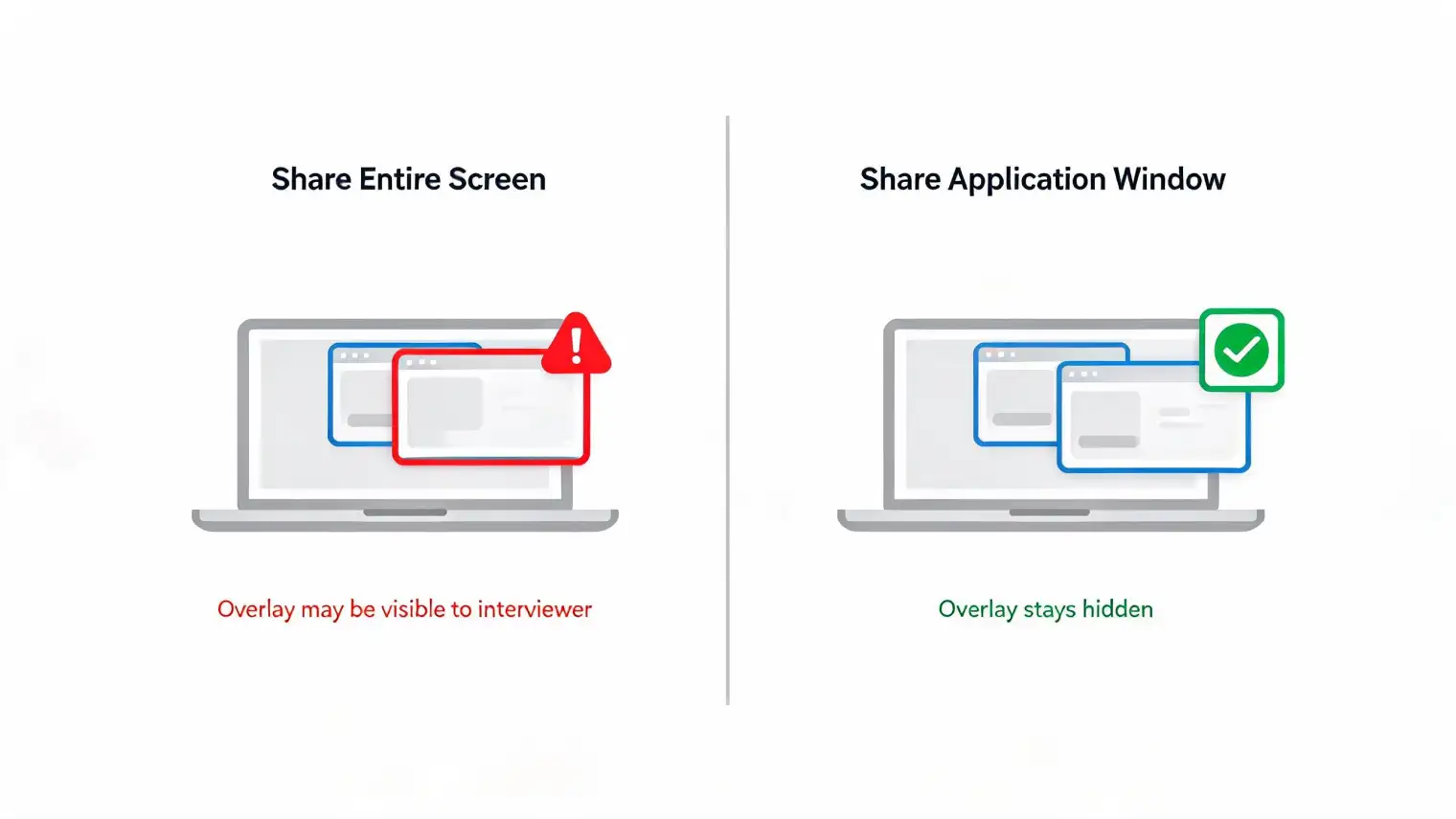
Verve AI's own help center describes Stealth Mode as staying invisible "even during screen share." But multiple independent 2026 reviews report that the app's in-product onboarding tutorial specifically advises against selecting "Share Entire Screen" — the exact screen-sharing mode that many interview platforms default to, and the one interviewers often ask for directly ("can you share your whole screen so I can see your desktop?").
That's not a minor edge case. If the tool's own guidance is "don't use the sharing mode your interviewer is most likely to request," the invisibility claim comes with a condition that isn't always front and center in the marketing.
2. Pricing is inconsistent across sources — which is a trust problem on its own.
Search around and you'll find real disagreement on what Verve AI costs: some reviews cite a Standard tier around $38–$40/month with Pro around $59–$60/month; others cite a much lower Standard tier near $17/month with Pro around $31–$35/month. A separate, possibly unofficial site claims a flat $19.99/month "everything included" price. That kind of spread usually means one of two things — frequent, unannounced pricing changes, or reviewers copying stale numbers from each other. Either way, you can't budget for a job search around a price you can't verify without checking the vendor's site the same day you read about it.
3. The desktop "stealth" experience still depends on a browser extension staying active.
Several reviews note that even Verve AI's desktop-flagged Stealth Mode routes through a browser extension that has to keep running in the background. Extensions can be disabled by IT policies, browser updates, or a simple accidental click mid-interview — which is a worse failure mode than a fully native desktop client, because it can fail silently while you're mid-answer.
None of this means Verve AI doesn't work. Plenty of users report it does, for plenty of interviews. It means the tool asks you to accept some conditions that aren't always obvious on the pricing page.
Best Verve AI Alternatives to Consider in 2026
AceRound AI — Best for Prep + Live Assistance in One Subscription
AceRound AI is built around a desktop-native client rather than a browser extension that has to stay alive in the background — the overlay runs as its own application layer, separate from whatever you're sharing, and it isn't dependent on a browser tab surviving the interview.
The bigger difference from Verve AI is workflow, not just plumbing. AceRound pairs pre-interview preparation — structured mock interviews with scored feedback on your STAR-method answers — with the same live-assist overlay for the real thing. Your mock sessions inform what the live tool suggests, so answers lean on the specific examples you've already rehearsed instead of a generic template pulled from your resume alone. If you're doing more than two or three interviews in a search, having prep and live help in the same product (one subscription, not two tools and two bills) tends to matter more than it sounds like it would.
We'll say the honest part plainly: no interview copilot, AceRound included, should be marketed as guaranteed-undetectable. Treat any real-time assistant as a support tool for a live conversation you're still having yourself, not a substitute for knowing your material.
Best for: candidates who want prep and live support in one place, non-native English speakers, anyone who wants a single predictable subscription instead of credits.
Parakeet AI — Best for Simple, Pay-as-You-Go Pricing
Parakeet AI uses a straightforward credit system — roughly one credit per interview session — which is easier to reason about than Verve's shifting tiers, even if it can add up over a long search. It's strong on language coverage (59 languages) and coding-interview screenshot support, but it has no built-in mock prep, and enterprise proctoring vendor Talview specifically names it in detection documentation.
Best for: candidates doing a small, defined number of interviews who want transparent per-session pricing.
Final Round AI — Best for US Tech Hiring Brand Recognition
Final Round AI is the most widely covered name in this category and offers more structured STAR coaching than most competitors, with unlimited mock sessions on higher tiers. It's priced higher at scale ($29–$99/month) and its non-English support lags behind AceRound and Parakeet.
Best for: English-speaking candidates targeting established US tech companies who want a well-documented tool.
LockedIn AI — Best for Candidates Who Only Want Live Support
LockedIn AI is the closest match to Verve AI's product philosophy: live-session-only, no prep layer, and a more aggressive stance on overlay/evasion techniques via a dedicated desktop app. The trade-off is stability — more aggressive techniques mean a higher chance of app conflicts with your video call software mid-interview.
Best for: candidates who already feel prepared and want a live safety net only.
ChatGPT in a Second Window — Free, Manual, No Install Risk
Some candidates skip dedicated copilots entirely and run ChatGPT for interview prep in a second monitor, typing in questions as they're asked and reading back suggested talking points. It's free, doesn't touch your screen-share, and there's nothing to get "detected" — but it's manual, slower, and doesn't transcribe your interviewer for you.
Best for: low-stakes practice rounds or candidates who'd rather not install anything before a live interview.
Quick Comparison
| Verve AI | AceRound AI | Parakeet AI | Final Round AI | LockedIn AI | |
|---|---|---|---|---|---|
| Pricing model | Subscription (reported inconsistently) | Subscription | Credits (~$10/session) | Subscription | Subscription |
| Client type | Browser extension + desktop wrapper | Desktop-native | Browser-based | Browser-based | Desktop app |
| Mock interview prep | ❌ | ✅ | ❌ | ✅ | ❌ |
| Full-screen-share behavior | Reportedly discouraged by own tutorial | Runs as separate app layer | Overlay-based | Overlay-based | Aggressive overlay |
| Named in proctoring detection docs | Not confirmed | Not confirmed | Yes (Talview) | Not confirmed | Not confirmed |
| Non-English support | 25+ languages | Strong, incl. native Mandarin | 59 languages | Limited | Fair |
Pricing and detection claims change; verify current terms directly with each vendor before you commit a job search to any single tool.
How to Choose the Right Verve AI Alternative
If you're comparing on price transparency: don't trust the number in a review article — check the vendor's live pricing page the same day, since this category updates tiers often and older posts (including this one, eventually) go stale.
If your interviews will require a full-screen share: ask directly, before you buy, how the tool behaves in that exact mode. Don't assume "Stealth Mode" in the marketing copy covers every sharing configuration — test it on a mock call first.
If you're doing more than a handful of interviews: a subscription with built-in prep (AceRound, Final Round AI) usually beats a pure live-assist tool on total value, because you're not paying twice — once for a prep tool, once for live help.
If detection risk is a real concern for your target employer: large enterprises, government roles, and finance are more likely to run dedicated proctoring software than a startup is. The full picture on AI interview detection in 2026 covers what's technically detectable versus what's actually being enforced today.
FAQ
What is the best Verve AI alternative? It depends on what you need. If you want prep and live assistance in one subscription, AceRound combines mock interview practice with real-time help. If you only want a pure live-session tool, Parakeet's credit model or LockedIn AI's more aggressive overlay are the closest matches to what Verve AI offers.
Is Verve AI safe to use during a real interview? Verve AI's own documentation promotes Stealth Mode as invisible during screen sharing, but independent reviews report the app's in-product tutorial warns users against selecting "Share Entire Screen" — the exact mode most video platforms default to for interviews. Treat any "undetectable" claim as conditional, not guaranteed.
How much does Verve AI cost compared to alternatives? Pricing for Verve AI has been reported inconsistently across review sites, roughly $17–$60/month depending on tier and when the review was published — check vervecopilot.com/pricing directly before buying. Subscription alternatives like AceRound and Final Round AI publish flatter, more predictable monthly tiers.
Does Verve AI work if I have to share my entire screen? This is the central tension reviewers keep flagging: Verve's Stealth Mode is designed to stay invisible during screen sharing, but the app's own onboarding reportedly tells users to avoid "Share Entire Screen" — which is often required by interview platforms or requested by interviewers. If your interview setup forces a full-screen share, verify the current guidance before relying on it.
Can employers or proctoring software detect AI interview copilots like Verve AI? Detection is platform-dependent. Standard video call software (Zoom, Meet, Teams) generally doesn't flag overlay tools by default. Dedicated proctoring vendors are a different story — some publish detection lists that name specific copilots. Academic research on gaze and reading-pattern detection also suggests these behaviors are technically identifiable, even if not every employer is actively screening for them.
What should I check before switching from Verve AI to another tool? Confirm current pricing on the vendor's own site (reviews go stale fast in this category), test the tool with a mock call on the exact platform you'll interview on, and check whether it includes prep — not just live suggestions — if you're doing more than a handful of interviews.
Author · Alex Chen. Career consultant and former tech recruiter. Spent 5 years on the hiring side before switching to help candidates instead. Writes about real interview dynamics, not textbook advice.
Related Articles
OpenAI's AI Interview Policy: Banned, Required, or Team-Dependent
OpenAI sells AI coding agents, then bans most candidates from using one. Here's the round-by-round policy, including the new agentic round that flips it.
Does Harver Detect Cheating? What Its Proctoring Actually Checks
Does Harver detect cheating on its pre-employment assessments? A candidate look at Harver's Proctoring add-on, what gets logged after a flag, and what happens next.
Micro1's Zara AI Interview: What It Actually Tests (And Why Timing Gets Flagged)
Micro1's AI interviewer Zara has run 300,000+ interviews for remote roles. Here's why it flags response latency as a cheating signal, and what that means for AI prep.