Best InterviewFox Alternatives in 2026: Same-Screen vs. Dual-Device Risk
Looking for an InterviewFox alternative? Compare pricing signals, the dual-device screen-share claim, and same-screen options like AceRound before you buy.
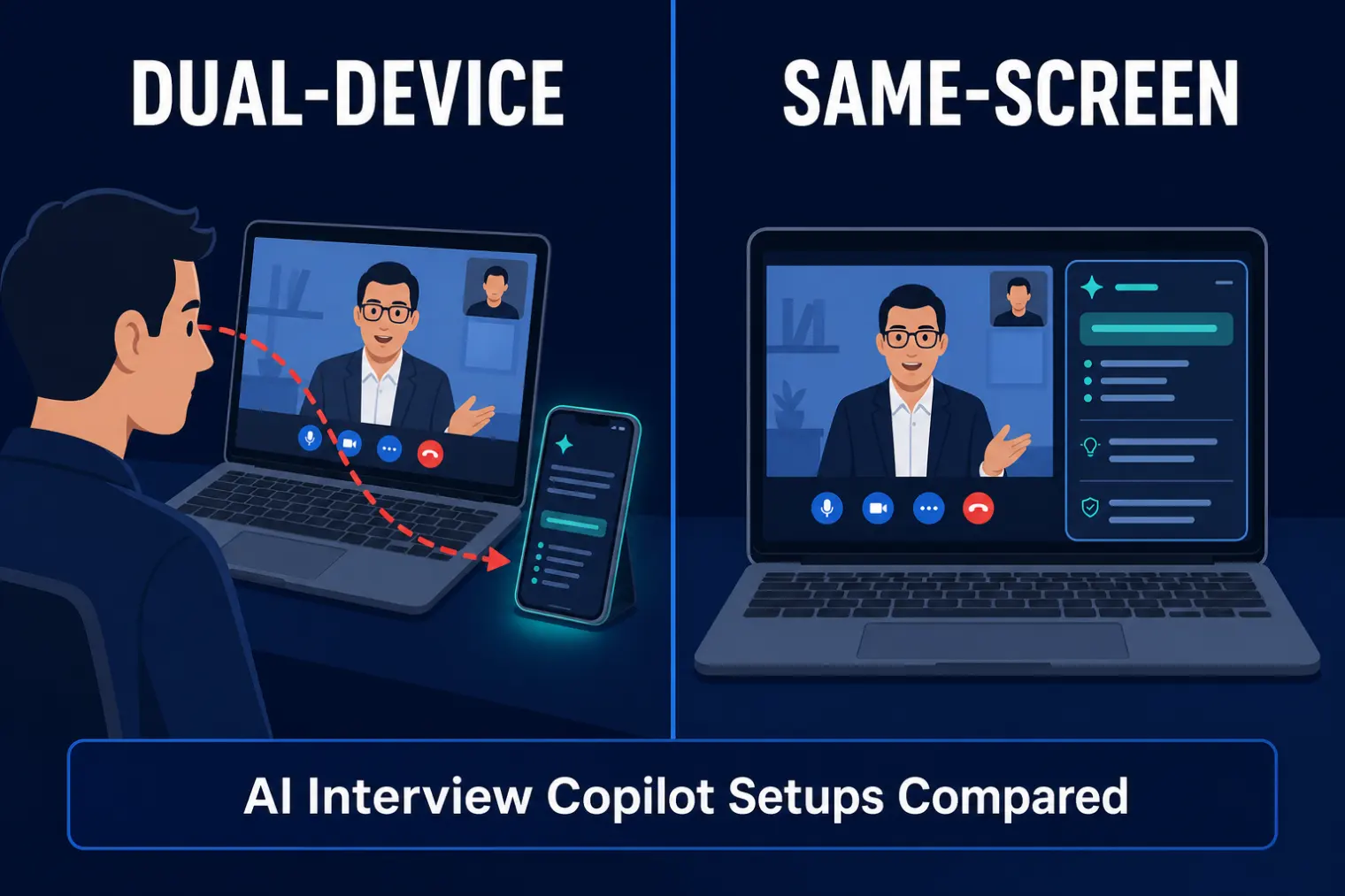
TL;DR: InterviewFox is an AI interview copilot built around a "dual-device" or "air-gap" mode: your answers stream to a second device, like a phone, so nothing ever touches the screen you're sharing. It's a genuinely clever answer to screen-capture detection — and it doesn't remove risk, it relocates it, because repeatedly glancing at a second device is exactly the gaze pattern that recruiter-training guides now teach people to watch for. If you want an InterviewFox alternative with clearer pricing or a same-screen setup with no second device at all, here's how the field compares.
Picture the setup InterviewFox is selling: your laptop shares your screen with the interviewer, showing nothing but your resume-review doc or coding editor. Your actual help — the transcribed question, the suggested talking points — is rendering silently on your phone, propped just out of webcam frame. On paper, that's airtight. In practice, somewhere around your third or fourth glance down at that phone in six minutes, you've built a rhythm a trained interviewer can clock without needing any software at all.
That's the real tension behind "InterviewFox alternative" searches. It's not that dual-device is a bad idea — for the narrow problem of screen-capture detection, it's arguably the cleanest fix on the market. It's that a chunk of people typing that search have already sat through an interview holding a second device and felt exactly how exposed that habit is, live, in a way no screen-recording tool would ever catch. This guide covers what InterviewFox actually does, why some candidates go looking elsewhere anyway, and how the alternatives — including AceRound's same-screen approach — stack up.
What InterviewFox Actually Does
InterviewFox positions itself around one core claim: your desktop client only relays your microphone and screen content to the AI — it never renders anything on the display you're sharing. Instead, AI-generated answers and talking points show up on a second device (typically a phone), which stays off-screen and off-camera. The pitch is "100% invisible even on Share Entire Screen," and InterviewFox's own marketing claims broad platform coverage across Zoom, Meet, Teams, Webex, and coding platforms like HackerRank and LeetCode.
Independent coverage of InterviewFox is thin — this is a smaller, newer entrant compared to Parakeet or Cluely, and most of what's findable is either AI-tool directory listings or comparison pages published by competing vendors, which is worth keeping in mind as you weigh any specific claim, including the ones in this article. One thing multiple sources agree on: the dual-device architecture genuinely does what it says for the screen-capture problem. What it doesn't address is everything that isn't screen capture.
The Real Reasons People Search for an InterviewFox Alternative
1. Dual-device moves the risk, it doesn't remove it.
Recruiter-facing guidance on spotting AI copilot use names "scanning eye movement" — a candidate's gaze repeatedly shifting to a fixed point off to the side — as one of the top behavioral tells interviewers are now trained to notice. A second device sitting just off-camera produces exactly that pattern. InterviewFox solved the technical detection vector (nothing appears in a screen recording) while leaving the human detection vector — the thing an attentive interviewer actually watches for in real time — completely open.
2. Pricing is inconsistent across sources, and that's a trust problem on its own.
Numbers for InterviewFox diverge depending on where you look: pay-as-you-go pricing around $29 for roughly 200 minutes shows up on some listings, while a rival's comparison page cites monthly subscription tiers from about $39-45/month on longer terms up to $69/month billed month-to-month, plus a separate ~$99/month tier for an "AI Agent" feature. That's a wide enough spread that you can't reliably budget a job search around it without checking the vendor's own pricing page the same day you're deciding — and a category where reviewers frequently cite different numbers is a category where you should double-check everything, not just the price.
3. No desktop-native option — the second device is mandatory, not optional.
Every workflow described for InterviewFox assumes a second screen. There's no path to running it as a single desktop app the way some competitors do. That means an extra piece of hardware to charge, position, and keep from sliding out of "off-camera but still readable" range for the entire interview — a physical failure mode that has nothing to do with software at all.
4. The clearest InterviewFox roundup is vendor-authored.
The most detailed "best AI interview copilots 2026" comparison that scores InterviewFox highest is published on InterviewFox's own blog, where it rates itself 5/5 across safety, accuracy, personalization, and coding support — well above Parakeet, Final Round AI, LockedIn AI, Verve, and Sensei in the same table. That's not disqualifying, but it means the strongest praise for the product is also the least independent source of it.
None of this means InterviewFox doesn't work for plenty of interviews. It means the "100% undetectable" framing skips a category of risk that has nothing to do with screens.
Best InterviewFox Alternatives to Consider in 2026
AceRound AI — Best for Solving the Risk at the Source, Not Relocating It
AceRound AI runs as a desktop-native overlay on the same screen you're already using — no second device, no phone to position off-camera, no glance-down habit to manage during the interview. The overlay renders as its own application layer, separate from whatever window or screen you're sharing, so there's nothing extra to hold and nothing extra for an interviewer to notice you looking at.
The bigger difference from InterviewFox is workflow, not just hardware. AceRound pairs pre-interview prep — structured mock interviews with scored feedback on your STAR-method answers — with the same live-assist overlay for the real thing, in one subscription. Your mock sessions inform what the live tool suggests, so you're working from examples you've already rehearsed rather than a generic template.
We'll say the honest part plainly, the same way we'd say it about any tool in this category: no interview copilot, AceRound included, should be marketed as guaranteed-undetectable, and a same-screen overlay's safety still depends on what monitoring software the platform or employer runs. Treat any real-time assistant as support for a conversation you're still having yourself.
Best for: candidates who don't want to manage a second device during a live interview, anyone who wants prep and live help under one subscription, non-native English speakers.
Parakeet AI — Best for Simple, Pay-as-You-Go Pricing
Parakeet AI uses a straightforward credit system, which is easier to reason about than a tiered subscription even if it adds up over a long search. It covers 59 languages and has strong coding-interview screenshot support, but has no built-in mock prep, and enterprise proctoring vendor Talview specifically names it in its own detection documentation.
Best for: candidates doing a small, defined number of interviews who want transparent per-session pricing.
Final Round AI — Best for US Tech Hiring Brand Recognition
Final Round AI is the most widely covered name in this category, with more structured STAR coaching than most competitors and unlimited mock sessions on higher tiers. It's priced higher at scale ($29-$99/month) and its non-English support lags behind AceRound and Parakeet.
Best for: English-speaking candidates targeting established US tech companies who want a well-documented tool.
LockedIn AI — Best for Candidates Who Only Want Live Support
LockedIn AI skips prep entirely and focuses on live-session overlay support through a dedicated desktop app, with a more aggressive stance on evasion techniques than most competitors. The trade-off is stability — more aggressive techniques mean a higher chance of app conflicts with your video call software mid-interview.
Best for: candidates who already feel prepared and want a live safety net only.
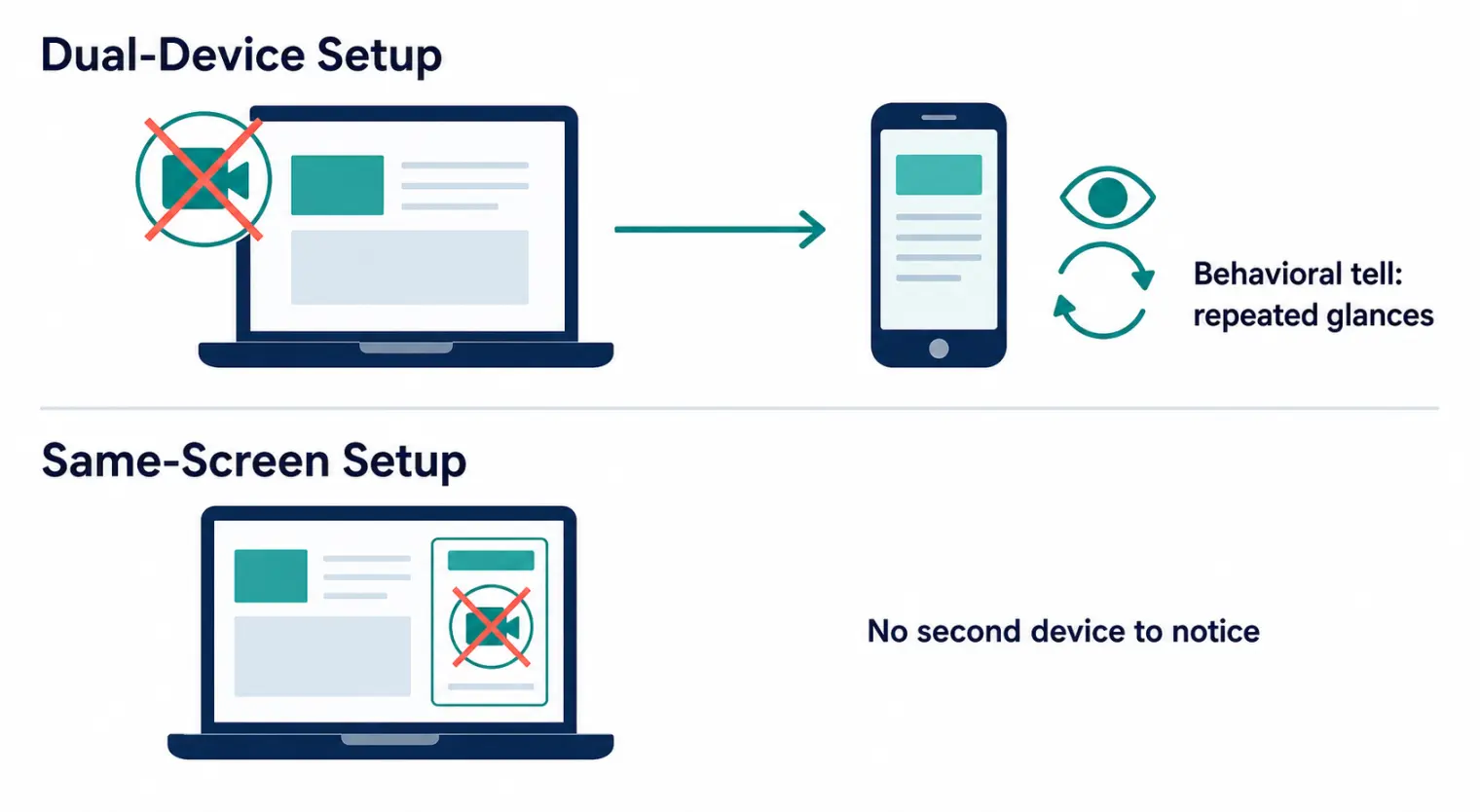
Dual-Device vs. Same-Screen: Which AI Interview Assistant Setup Is Actually Safer?
This is the question worth answering honestly, because most roundups don't. A dual device AI interview setup like InterviewFox's solves exactly one thing: nothing shows up if someone records or screenshots your shared screen. It does not solve:
- Gaze pattern. Looking away from your camera on a repeating interval, toward a fixed off-screen point, is a named behavioral red flag in interviewer-training material — it doesn't require any technical detection at all, just a person paying attention.
- Physical presence. A phone propped near your keyboard is a real object someone can ask about ("what's that for?") in a way a same-screen overlay never triggers, because there's nothing visibly different about your setup.
- Device-level scanning. Some platforms are adding OS-level integrity checks that look for known interference tools running on your machine — a same-screen desktop app and a dual-device relay app are both exposed to this category equally; neither architecture is inherently safer against it.
Whether AI interview assistant screen share safe actually holds true for either approach depends less on the product and more on what the interviewer is watching for and what the platform runs underneath. A same-screen, desktop-native overlay removes the specific hardware-and-habit tell that dual-device introduces — but "removes one risk category" is a more honest claim than "100% undetectable," and it's the claim worth making.
Quick Comparison
| InterviewFox | AceRound AI | Parakeet AI | Final Round AI | LockedIn AI | |
|---|---|---|---|---|---|
| Pricing model | Pay-as-you-go + subscription (reported inconsistently) | Subscription | Credits (~$10/session) | Subscription | Subscription |
| Setup | Requires second device | Same-screen, desktop-native | Browser-based overlay | Browser-based overlay | Desktop app |
| Mock interview prep | ❌ | ✅ | ❌ | ✅ | ❌ |
| Second device required | Yes | No | No | No | No |
| Named in proctoring detection docs | Not confirmed | Not confirmed | Yes (Talview) | Not confirmed | Not confirmed |
| Best independent coverage | Limited (mostly vendor/rival pages) | Growing | Established | Established | Established |
Pricing and detection claims change fast in this category; verify current terms directly with each vendor before committing a job search to any single tool.
How to Choose the Right InterviewFox Alternative
If the second device is the actual problem: a same-screen, desktop-native tool like AceRound removes that hardware step entirely instead of adding a workaround for it.
If you're comparing on price transparency: don't lean on any single review's number, including this one — check the vendor's live pricing page the same day, since this category updates tiers often.
If you're doing more than a handful of interviews: a subscription with built-in prep (AceRound, Final Round AI) tends to beat a pure live-assist tool on total value, because you're not paying twice — once for practice, once for live help.
If detection risk is a real concern for your target employer: large enterprises, government roles, and finance are more likely to run dedicated proctoring or device-integrity software than a startup is. The full picture on AI interview detection in 2026 covers what's technically detectable versus what's actually being enforced today, and this breakdown of screen-sharing detection on Zoom is worth reading before you assume any setup is invisible by default.
FAQ
What is the best InterviewFox alternative? It depends on what's actually bothering you about InterviewFox. If the friction is carrying a second device, AceRound's same-screen desktop-native overlay removes that step entirely while adding mock-interview prep in the same subscription. If you just want the cheapest pay-per-session option, Parakeet's credit model is closer to InterviewFox's own pricing shape. If brand recognition with US tech recruiters matters most, Final Round AI has the longest track record.
Is InterviewFox's dual-device mode actually undetectable? It solves one specific problem — nothing renders on the screen you're sharing, so screen-capture tools can't see it. It does not solve the behavioral problem: repeatedly glancing at a phone or second screen is a documented red flag in recruiter-training material on spotting AI copilot use. Dual-device relocates the risk from "screen forensics" to "body language," it doesn't remove it.
How much does InterviewFox cost? Reported numbers conflict across sources — InterviewFox's own site has cited pay-as-you-go pricing around $29 for 200 minutes, while a rival's comparison page cites subscription tiers from roughly $39-45/month on longer commitments up to $69/month billed monthly, plus a separate $99/month "AI Agent" tier. Treat any number you read (including this one) as provisional and confirm on interviewfox.ai the same day you're deciding.
Is a dual-device AI interview setup safer than a same-screen overlay? Safer against screen-recording and screen-share detection, yes. Not necessarily safer overall — a same-screen, desktop-native overlay (AceRound's approach) means there's no second device to hold, glance at, or explain if someone asks what's in your other hand, which removes an entirely different category of tell.
Can employers or AI interview detection tools catch copilots like InterviewFox? Screen-based detection and device-integrity scans are one vector; live human observation of gaze patterns, response timing, and reading cadence is a separate, low-tech vector that no software architecture — dual-device or same-screen — eliminates on its own. Detection risk depends far more on who's watching and how carefully than on which product you use.
What should I check before switching from InterviewFox to another tool? Confirm current pricing directly on the vendor's site the same day (this category changes tiers often), test the tool on a real mock call using the exact video platform and screen-share mode you'll actually use, and decide whether you want prep bundled in or you're fine paying for practice and live help separately.
Author · Alex Chen. Career consultant and former tech recruiter. Spent 5 years on the hiring side before switching to help candidates instead. Writes about real interview dynamics, not textbook advice.
Related Articles
OpenAI's AI Interview Policy: Banned, Required, or Team-Dependent
OpenAI sells AI coding agents, then bans most candidates from using one. Here's the round-by-round policy, including the new agentic round that flips it.
Does Harver Detect Cheating? What Its Proctoring Actually Checks
Does Harver detect cheating on its pre-employment assessments? A candidate look at Harver's Proctoring add-on, what gets logged after a flag, and what happens next.
Micro1's Zara AI Interview: What It Actually Tests (And Why Timing Gets Flagged)
Micro1's AI interviewer Zara has run 300,000+ interviews for remote roles. Here's why it flags response latency as a cheating signal, and what that means for AI prep.