Tesla AI Interview (Ribbon) 2026: Questions and How to Pass
Tesla's first round is a recorded Ribbon AI screen: 4–7 questions built from the job posting, 10–25 minutes, no interviewer on the line, and it moves on the moment you stop talking. What each stage asks and how the tape gets scored.
TL;DR: Tesla's first round is not a recruiter. For a wide band of roles — store and service advisors, production associates, engineering technicians, software and firmware engineers — the first conversation after you apply is a recorded voice screen run by Ribbon's AI interviewer. Candidates report 4 to 7 questions built from the job posting, a 10 to 25 minute slot, no human on the line, and a recruiter who listens to the recording afterwards.
The mechanic that decides more than any answer: the screen moves on when you stop talking. Candidates report it does not repeat a question when asked and closes each prompt at the first long pause, so a nervous six-minute recording in a twelve-minute slot reads as a finished, thin interview. Ninety seconds to two minutes per answer, outcome first, is the shape that survives a transcript.
This guide separates what Tesla and Ribbon publish from what candidates report, lists the question shapes the screen actually uses, and covers the five stages that follow — including the Evidence of Excellence box on the application, which for some roles is read by an executive before an offer is approved.
Tesla does not publish its interview stages or the vendor behind the screen, and most "Tesla interview process" pages describe the human loop while skipping the machine that decides whether you reach it. That is the wrong order. For most candidates the AI screen is the gate, and it is the one stage where the format — not your experience — is what people lose on.
What follows is the format as candidates describe it, checked against the vendor's own product documentation, plus what each stage after the screen asks for. Where Tesla has not published something, that is stated rather than guessed.
What the Tesla AI interview actually is
Tesla sends a link by email after you apply — sometimes within hours, sometimes weeks later. It opens a recorded voice interview: an AI reads a question, gives you a moment to think, and records your spoken answer. Nobody is on the line. When the recording ends, a recruiter listens to it and reads the transcript before deciding whether you move on.
| Detail | What it is |
|---|---|
| Vendor | Ribbon, per consistent candidate reports; Tesla does not publish it |
| Format | Recorded voice interview, one take, no live interviewer |
| Length | 10–25 minutes; most candidates finish early |
| Questions | 4–7, generated from the job posting you applied to |
| Who hears it | An AI scores the transcript, then a recruiter reviews the recording |
| What follows | Recruiter or hiring manager call, assessment, panel, executive review |
| Retakes | A per-employer setting; Tesla's configuration is not published |
Two things about that table matter more than the rest.
The questions are built from the posting, not from a bank. Ribbon's own description of the product says it starts with a job description and generates both the interview questions and a scoring rubric from it. Practically, that means the screen for a Service Advisor in Austin and the screen for a Firmware Engineer in Palo Alto are different interviews, and that rereading your posting the night before is not generic advice — it is reading the exam.
The score is a transcript score. Ribbon says it evaluates candidates on interview transcripts, and roughly 90% of its customers run the recommended default configuration. So the recording is judged as text before a person ever presses play: what you said, in what order, with what specifics. Filler is not neutral in a transcript. It occupies the space where the evidence should be.
Which roles get the AI screen
Candidates report the screen across the whole range of Tesla hiring, not only engineering: retail and service advisors, production associates, detailers, engineering technicians, and software, firmware, Autopilot and energy teams. A detailer applicant reported an invitation three hours after applying; an Engineering Technician for Optimus reported the same screen before an onsite invite days later.
For engineering roles the screen is the front door to a normal loop, not a replacement for it: the AI screen, then a recruiter or hiring manager call, then a timed assessment or a take-home, then a panel.
If your invitation says "AI-enabled interview" or links to a Ribbon page, this guide applies. If a recruiter calls you first, you are past this stage and the panel sections below are the ones that matter.
The question shapes, and what the tape has to contain
Candidates report the same question shapes across roles and levels. They are ordinary behavioural questions. The difficulty is that the thing asking them gives nothing back — no nod, no follow-up, no second chance at the same prompt.
| What the AI asks | What a reviewer needs from the answer |
|---|---|
| "Why Tesla, and why this role?" | One specific reason tied to the team or product, in under two minutes. Mission language alone is what every other recording says. |
| "Tell me about a time you went above and beyond for a customer." | The customer's actual problem, what you did that was not in the script, and what changed afterwards. Asked of engineers too. |
| "Tell me about a customer who was unhappy with the service, and what you did." | What they were unhappy about, what you did on the spot, what you changed so it did not recur. Not why they were wrong. |
| "How do you work when priorities change under you?" | One specific week: what moved, what you dropped, who you told, how it ended. Tesla's pace is the point of the question. |
| "Tell me about a mistake you made and what you did about it." | A real mistake with a cost, the fix, and the habit you built. Half a minute on the mistake, the rest on the repair. |
| A prompt with two or three questions folded into one | Each part named and answered in the order it was asked. Candidates report the AI will not repeat it. |
Engineering screens add two more: the hardest problem on your resume, explained as decisions rather than outcomes, and one role-specific technical question answered out loud — a verbal system design trade-off, a concurrency or memory question for firmware teams, a modelling question for AI teams. The depth expected is verbal. You are explaining your reasoning, not writing code.
The mechanic that decides more than your content
Every candidate account of this screen contains the same warning in different words: it ends when you stop talking.
That is not a quirk. An asynchronous interviewer has no way to know whether you paused to think or finished, so silence is treated as done and the next question starts. Ask for a repeat and candidates report you do not get one.
The practical consequence is a target length. Ninety seconds to two minutes per answer is long enough to contain a situation, your actions and a result, and short enough that a 4-to-7-question slot still fits inside 25 minutes. Under 60 seconds and the transcript has no evidence to score. Over three minutes and you spend the slot on one question.
Inside that window, the order does the work:
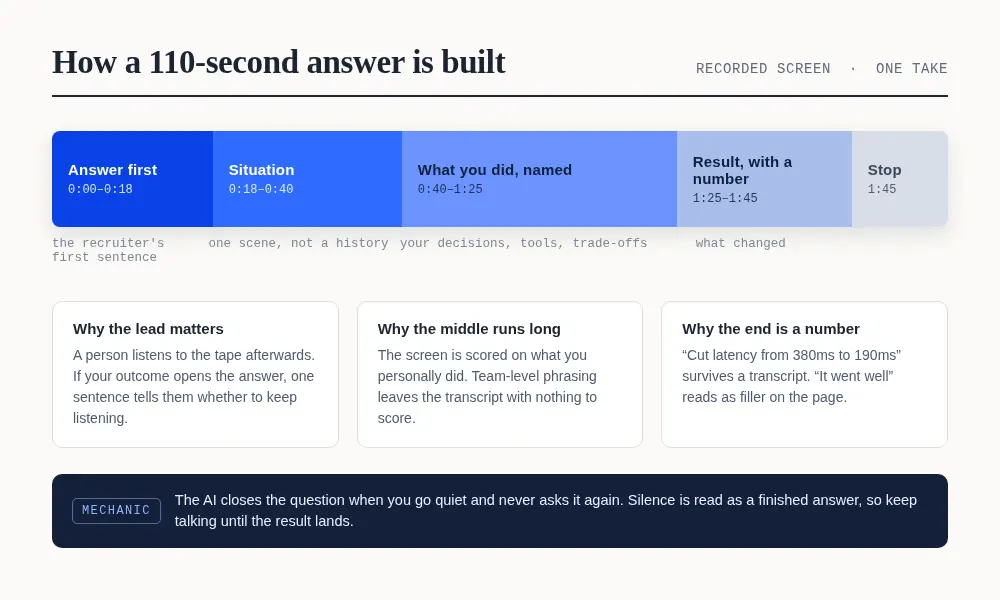
Lead with the outcome. A reviewer listening afterwards decides in one sentence whether to keep listening. "I cut our nightly batch from 90 minutes to 11 by replacing a full-table scan" earns the next ninety seconds; "so this was during my internship" does not.
Name your own actions. "We migrated the service" gives the transcript nothing to score. "I split the migration into two deploys, wrote the rollback first, and ran it behind a flag for a week" gives it six specifics.
Land a number, then stop. Latency, cost, count, percentage, time saved — a result with a unit is what a transcript scorer can lift. Trailing off after the result is how answers lose their ending.
What the integrity checks actually look at
Dayforce's acquisition announcement describes the platform's checks directly: video and other built-in integrity checks can detect unusual audio, gaze, and response-timing patterns, and the product flags off-screen activity and irregular response timing before a candidate reaches the recruiting team. Retakes are employer-controlled.
That is worth knowing for one practical reason: this format rewards a room and a screen setup that produce clean audio and a steady frame. A phone on a table, a laptop with a fan under the microphone, or a browser tab you keep leaving all show up as signal before they show up as a score.
Candidates describe both routes — a phone number to call, or a browser link. The browser link is the better working setup: you can sit at a laptop with the posting open, the pre-check tells you what the camera and microphone actually capture, and the questions arrive as audio you can hear clearly while you speak.
What happens after the screen
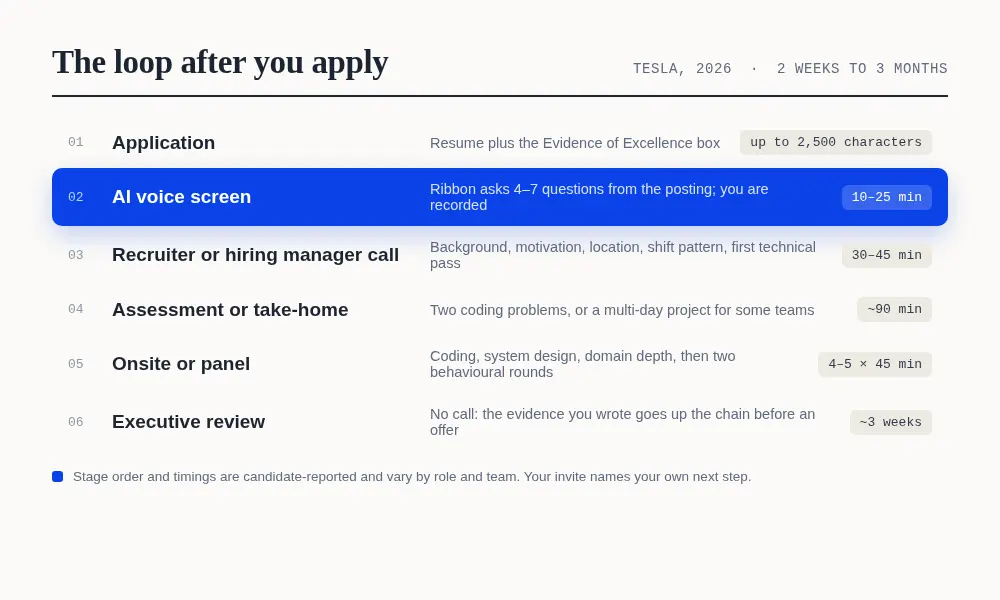
The screen is stage two of up to six. Candidates report the same shape after it, with timing that varies more than the stages do.
| Stage | What it is | Reported length |
|---|---|---|
| Recruiter or hiring manager call | Background, motivation, location and shift pattern for site roles; a first technical pass for engineering | 30–45 min |
| Assessment or take-home | Two coding problems in about 90 minutes, or a multi-day project on some teams | ~90 min |
| Onsite or panel | Coding, system design and domain depth, then two behavioural rounds; in person or virtual | 4–5 sessions of ~45 min |
| Executive review | No call: your written evidence of excellence goes up the chain alongside panel feedback | ~3 weeks to an offer |
Turnaround from the AI screen varies from same-day to two weeks, and a follow-up email followed by silence is reported often enough to treat as normal rather than as a rejection. Keep other processes moving.
The Evidence of Excellence box
Tesla's application includes an optional free-text field, around 2,500 characters, that asks for the hardest problems you have solved and exactly how you solved them. Candidates have reported the field for years, and it resurfaces later: some roles ask for three fresh paragraphs of it after the panel, and an executive reads what you wrote before an offer is approved.
Write it as two or three achievements, each with a number and a clear line to the role you applied for: what the problem was, what you decided, what you built, what changed. A list of responsibilities scores nothing here, because the field is read as evidence, not as a summary.
Where an Interview Copilot fits in a machine-run screen
A recorded screen is the format where a live copilot is most useful, because the constraints are all on your side: no interviewer to read, no follow-up to rescue a thin answer, and a hard stop at the first long pause.
AceRound's Interview Copilot runs as a desktop overlay. It hears the AI's question as it is read, drafts the answer in the first seconds — outcome first, your actions named, a number at the end — and keeps the lead line pinned at the top of the panel so you can start speaking while the rest fills in. The panel sits beside the interview window on the same screen, so your eyes stay where the question is, and the recording captures your microphone and camera, not the panel.
Two other stages in this loop have their own tools. The mock interview is where you rehearse the audio-only format, because the skill being tested is speaking a complete answer to something that does not react — five runs through the four core stories is worth more than another read-through. And if the assessment after the screen is a coding test, OA Copilot is built for that stage: HackerRank, CodeSignal, Codility and take-homes, in the same desktop client.
A new account gets 30 minutes of live help and one mock interview with no credit card, which covers the screen and one rehearsal. A single interview afterwards is the Starter Pack at $9.90 for 60 minutes, and the minutes do not expire, so a loop that stretches over three weeks does not cost anything extra.
One evening of preparation
Forty minutes: write four stories. Going beyond for a customer, a difficult customer, a week when priorities moved, and a mistake you repaired. One real moment each, with a number in the result. These four cover the reported behavioural set for front-line and engineering screens alike; why Tesla is the one answer you write on its own.
Twenty minutes: read the posting as a question list. The questions are generated from it. Every requirement in the posting is a prompt you may be asked to evidence, so mark the three requirements you can prove and the one you cannot — that gap is where a good answer needs a different story.
Thirty minutes: say them out loud to something that does not react. Record on your phone, listen back, and cut the first fifteen seconds of every answer. If the outcome is not in the first sentence, move it there.
Ten minutes: the room. Laptop rather than phone, wired or close microphone, door closed, posting open in a second tab, and the pre-check done five minutes early so the camera and microphone are settled before the first question.
The one thing not to do: answer in forty-five seconds because the silence feels wrong. The silence is the format. Talk until the result lands.
FAQ
What is the Tesla AI interview?
It is Tesla's first-round screen: a recorded voice interview run on Ribbon's AI interviewer, sent by link after you apply. Candidates report 4 to 7 questions generated from the job posting, a 10 to 25 minute slot, and no person on the line. A recruiter listens to the recording and reads the transcript afterwards.
Does Tesla really use Ribbon AI?
Tesla does not publish its vendor. Candidates consistently name Ribbon, and the platform's own product description matches what they describe: a conversational voice interviewer that generates questions and a scoring rubric from the job description, then scores the transcript. Ribbon agreed to be acquired by Dayforce on 23 October 2026; the product continues under that ownership.
How long is the Tesla AI interview?
Slots run 10 to 25 minutes for 4 to 7 questions. Most candidates finish early, and that is the first trap: the screen closes a question when you stop talking, so a six-minute recording in a twelve-minute slot leaves the reviewer almost nothing to score.
What questions does the Tesla AI interview ask?
Candidates report the same shapes across roles: why Tesla and why this role, a time you went above and beyond for a customer, a customer who was unhappy with the service, how you work when priorities change, and a mistake you made and what you did about it. Engineering screens add the hardest problem on your resume and one role-specific technical question answered out loud.
Does the Tesla AI interview end early if I give short answers?
Yes. Candidates report the AI moves to the next question the moment you go quiet and does not repeat a question when asked. Silence is read as a finished answer, so the recording is short and the reviewer has less to score. Aim for 90 seconds to two minutes per answer, with the outcome in the first sentence.
Is the Tesla AI interview audio only, or is there a camera?
Candidates describe a voice screen reached by phone or a browser link, and report a pre-check that asks for a microphone. Ribbon's own product runs both a microphone and a camera check before an interview starts, so treat the camera as configuration-specific: the invite and the pre-check screen tell you what your version records.
Can you retake the Tesla AI interview?
Retakes are an employer setting on Ribbon, not a candidate option. Some companies allow a retry, Tesla's configuration is not published, and candidates report one attempt. If something fails technically — a dropped call, no audio — reply to the invitation email rather than starting a second recording on your own.
What happens after the Tesla AI screen?
Candidates report a recruiter or hiring manager call of 30 to 45 minutes, then an assessment or take-home for technical roles, then a four to five session panel of about 45 minutes each, and for some roles an executive review of the Evidence of Excellence you wrote on the application. The whole loop runs from two weeks to three months.
Can you use AceRound during the Tesla AI interview?
Yes. Interview Copilot runs as a desktop overlay: it hears the question as the AI reads it, drafts a structured answer on your screen in the first seconds, and keeps the lead line at the top so you can start speaking immediately. The overlay sits on your desktop beside the interview window, and the recording captures your microphone and camera, not the panel.
Related reading: how Ribbon's AI interviewer scores a screen, Micro1's Zara screen and why response timing gets flagged, and how to prepare for a recorded one-way interview.
Author · Alex Chen. Career consultant and former tech recruiter. Spent 5 years on the hiring side before switching to help candidates instead. Writes about real interview dynamics, not textbook advice.
Related Articles
Ribbon AI Interview Tips: What the Screening Bot Actually Scores
Ribbon AI interview tips based on how the platform actually works — adaptive follow-ups, the integrity monitor, and how to prepare honestly for a Ribbon screening call.

Natively AI Review 2026: Free Setup, $60 Pro, and Whether It's Worth It
Natively AI (heynatively.com) review, read November 9, 2026: free with your own key, Pro at $30 a year or $60 once, hosted plans at $8–$35 a month, and the refund rules.
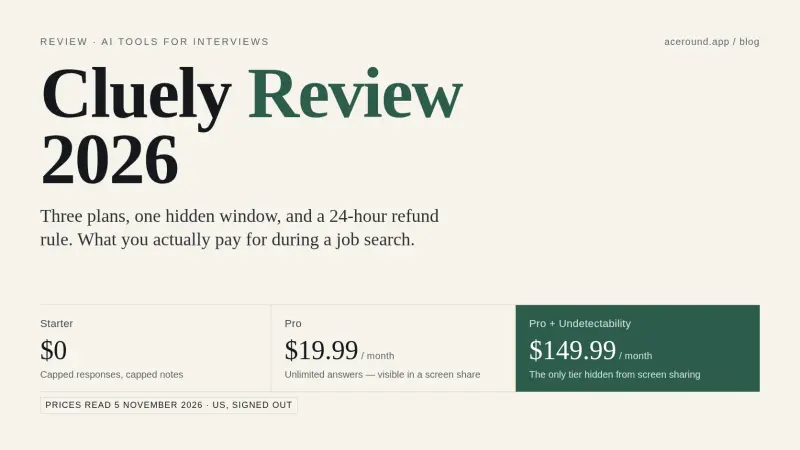
Cluely Review 2026: Price, the $149.99 Stealth Tier, and Whether It's Worth It
Cluely review with the plan list read on 5 November 2026: free Starter, $19.99 Pro, $149.99 Pro + Undetectability, a 24-hour refund rule, and who it suits.