Best OphyAI Alternatives in 2026: Browser Overlay vs. Desktop-Native Risk
Looking for an OphyAI alternative? Compare pricing, the browser-overlay setup, and desktop-native options like AceRound before you commit to a plan.

TL;DR: OphyAI is a browser-based AI interview copilot (Chrome/Edge only) built around "Whisper Mode" — a floating overlay that streams AI-suggested answers during a live video call using the browser's Picture-in-Picture feature. It genuinely covers 35 languages and bundles resume, application, and mock-interview tools into one subscription. The trade-off: no desktop app, shared credits that burn fast across all those bundled tools, and a still-thin independent track record (Trustpilot rates it "Average," 3.2/5). Here's what OphyAI actually does and how desktop-native alternatives like AceRound compare.
Open OphyAI's own pricing page and you'll see something unusual for this category: it isn't just an interview copilot. It's a resume builder, a job-application assistant, a company-guide library, and a live-interview overlay, all drawing from the same pool of monthly credits. That bundling is either exactly what you want — one subscription for the whole job search — or the reason your credits are gone by week two of using it for anything beyond live interviews.
That tension is roughly what "OphyAI alternative" searches are usually about. It's not that OphyAI doesn't work — Whisper Mode is a real, working piece of browser engineering. It's that a browser-overlay architecture with shared credits behaves differently under pressure than a dedicated desktop app built for one job. This guide covers what OphyAI actually does, why some candidates look elsewhere anyway, and how the alternatives — including AceRound's desktop-native approach — stack up.
What OphyAI Actually Does
OphyAI's core feature is Whisper Mode, a real-time overlay built on the browser's Document Picture-in-Picture API. During a live call on Zoom, Google Meet, or Teams, it transcribes the conversation and floats AI-generated, STAR-format talking points in a small window that — per OphyAI's own claim — stays out of most screen-share captures. It supports speech recognition across 35 languages, which is genuinely broad for this category, and ships 51 company-specific interview guides.
Beyond the live overlay, OphyAI bundles a wider job-search suite: a resume builder, an application assistant, and a job tracker. A separate coding-interview tool — vision-based analysis of code and system-design screenshots for platforms like LeetCode, HackerRank, and CodeSignal — is gated to its top pricing tier rather than included everywhere. The free option is a single ~15-minute trial session with no credit card required; beyond that, pricing runs in tiers, reported inconsistently across sources as roughly $9/month for an entry tier without live copilot access, up to $39-59/month for the tier that unlocks the coding tool (OphyAI's own comparison page; Final Round AI's OphyAI review).
Independent coverage of OphyAI is thin — it's a newer entrant, and most detailed write-ups are either OphyAI's own vendor page or reviews published by competing tools, both of which carry an obvious conflict of interest worth keeping in mind, including anything you read here. Trustpilot currently rates it "Average" at 3.2/5, and by most third-party estimates it has a modest, still-growing user base compared to more established names like Parakeet or Final Round AI.
The Real Reasons People Search for an OphyAI Alternative
1. Whisper Mode's invisibility depends on your exact setup, not a guarantee.
OphyAI itself is upfront about this: what another meeting participant can see depends on the specific browser, operating system, and screen-share mode you're using. That's an honest disclosure, but it also means the thing you're relying on to stay invisible can change behavior the moment Chrome ships an update or you switch to a different sharing mode mid-call — a moving target that a desktop-native app, whose window management doesn't depend on browser API changes, isn't exposed to in the same way.
2. No desktop client — you're tied to a browser tab for the entire interview.
Every workflow described for OphyAI runs through Chrome or Edge. There's no standalone app that runs independently of your browser session, which means browser crashes, tab focus issues, or an accidental refresh carry more risk than they would with a dedicated application running as its own process.
3. Credits are shared across the whole suite, not reserved for live sessions.
If you use OphyAI's resume builder, application assistant, or mock-interview coach in the same billing cycle as live interviews, you're pulling from the same credit pool. Heavy users of the bundled tools report running low on credits for live sessions before the month is out — a real cost if your plan was "one subscription covers everything."
4. Independent validation is still thin.
Reviews on Trustpilot, G2, and Reddit are sparse for OphyAI specifically — a search for direct user discussion turns up almost nothing outside vendor pages and competitor-published comparisons. That's normal for a 2026 entrant still building a track record, but it's worth knowing you're an early adopter rather than relying on years of accumulated user reports the way you could with a more established tool.
5. The coding-interview tool is gated to the priciest tier.
If technical screens are part of your search, the vision-based code and system-design analysis tool only unlocks on OphyAI's top tier — a meaningfully higher monthly cost if that's a feature you actually need rather than a nice-to-have.
6. The most detailed comparison table is OphyAI's own.
The most thorough "AI interview copilot" roundup that ranks OphyAI highest lives on OphyAI's own blog, which explicitly discloses that "vendor claims were not independently verified." That's an unusually honest disclosure for a vendor page, and it's still worth reading any specific claim — including in this article — with that in mind.
None of this means OphyAI doesn't work. It means the "invisible overlay" framing depends on more variables than the pitch suggests, and the bundled-tools model is a real trade-off, not a pure upside.
Best OphyAI Alternatives to Consider in 2026
AceRound AI — Best for a Setup That Isn't Tied to One Browser
AceRound AI runs as a native desktop app on Mac and Windows, not a browser extension or overlay dependent on a Picture-in-Picture API. It works as its own separate process across Zoom, Google Meet, Microsoft Teams, and platforms like HireVue and HackerRank, so the setup doesn't change depending on which meeting tool your interviewer picked.
The other difference is workflow: AceRound pairs structured mock-interview prep with scored feedback on your STAR-method answers, then carries what you practiced into the same live-assist overlay for the real interview — one subscription, not a credit pool shared with a resume builder and job tracker.
We'll say the honest part plainly, the same way we'd say it about any tool in this category: no interview copilot, AceRound included, should be marketed as guaranteed-undetectable, and any live-assist tool's safety still depends on what monitoring software the platform or employer runs. Treat a real-time assistant as support for a conversation you're still having yourself.
Best for: candidates who want one setup that works the same way regardless of meeting platform, anyone who wants prep and live help bundled without sharing credits with unrelated tools, non-native English speakers.
Parakeet AI — Best for Simple, Pay-as-You-Go Pricing
Parakeet AI uses a straightforward credit system dedicated to interview support, which is easier to budget than a shared multi-tool credit pool. It covers 59 languages and has strong coding-interview screenshot support, but has no built-in mock prep, and enterprise proctoring vendor Talview specifically names it in its own detection documentation.
Best for: candidates doing a defined number of interviews who want transparent, interview-only pricing.
Final Round AI — Best for US Tech Hiring Brand Recognition
Final Round AI is the most widely covered name in this category, with more structured STAR coaching than most competitors and unlimited mock sessions on higher tiers. It's priced higher at scale ($29-$99/month) and covers fewer languages than OphyAI.
Best for: English-speaking candidates targeting established US tech companies who want a well-documented tool.
LockedIn AI — Best for Candidates Who Only Want Live Support
LockedIn AI skips prep entirely and focuses on live-session overlay support through a dedicated desktop app, with one of the fastest reported response times in the category. The trade-off is a more aggressive stance on evasion techniques than most competitors, which can mean a higher chance of app conflicts with your video call software mid-interview.
Best for: candidates who already feel prepared and want a live safety net only.
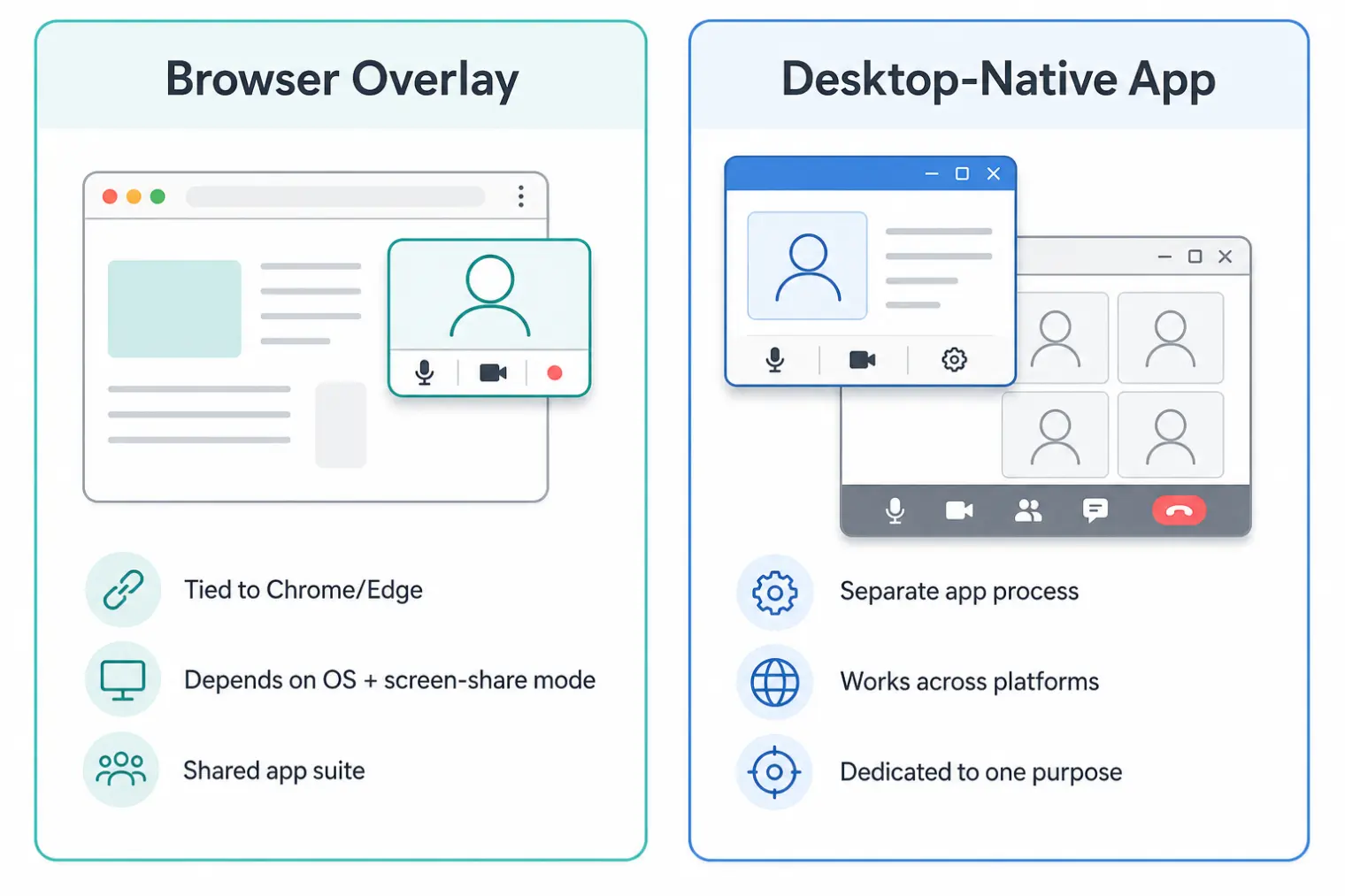
Browser Overlay vs. Desktop-Native: Which Setup Actually Holds Up?
This is the question most roundups skip. A browser-based overlay like OphyAI's Whisper Mode solves a real problem — rendering answer suggestions without them appearing in most screen captures — using a browser API rather than a separate application. That architecture has a specific weak point: its behavior is coupled to the browser and OS you're running, which change on their own schedule, not yours.
A desktop-native app runs as an independent process. It doesn't depend on a browser feature staying consistent across updates, and it isn't limited to whichever meeting platforms happen to run well in a browser tab. That doesn't make it inherently "safer" in some absolute sense — what's actually detectable during an AI-assisted interview depends far more on what the platform or employer is monitoring for than on the assistant's architecture. But it does remove one specific category of risk: a browser update or an unexpected screen-share mode changing what's visible mid-interview without you doing anything differently.
Whether screen sharing is actually safe with either approach comes down to what's running underneath the meeting software, not just which product you picked. Zoom's own screen-share detection behaves differently depending on sharing mode, which matters regardless of which copilot architecture you're using.
Quick Comparison
| OphyAI | AceRound AI | Parakeet AI | Final Round AI | LockedIn AI | |
|---|---|---|---|---|---|
| Setup | Browser overlay (Chrome/Edge only) | Desktop-native (Mac/Windows) | Browser-based overlay | Browser-based overlay | Desktop app |
| Pricing model | Subscription, shared credits | Subscription | Credits (~$10/session) | Subscription | Subscription |
| Languages | 35 | Broad multi-language | 59 | Fewer than OphyAI | Fewer than OphyAI |
| Mock interview prep | ✅ (shares credit pool) | ✅ | ❌ | ✅ | ❌ |
| Bundled non-interview tools | Resume builder, application assistant, job tracker | Not bundled | ❌ | ❌ | ❌ |
| Coding-round tool | Gated to top tier | — | ✅ | ✅ | — |
| Named in proctoring detection docs | Not confirmed | Not confirmed | Yes (Talview) | Not confirmed | Not confirmed |
| Independent review volume | Thin (newer entrant) | Growing | Established | Established | Established |
Pricing, feature gates, and detection claims change fast in this category; verify current terms directly with each vendor before committing a job search to any single tool.
How to Choose the Right OphyAI Alternative
If being locked to one browser is the actual problem: a desktop-native tool like AceRound runs independently of browser updates and works the same way regardless of which meeting platform your interviewer picked.
If you don't want a shared credit pool: decide honestly whether you'll use OphyAI's resume builder and application assistant enough to justify credits competing with your live-session budget, or whether a tool dedicated to interviews only makes more sense.
If you're doing more than a handful of interviews: a subscription with built-in prep (AceRound, Final Round AI) tends to beat a pure live-assist tool on total value, because you're not paying twice — once for practice, once for live help.
If detection risk is a real concern for your target employer: large enterprises, government roles, and finance are more likely to run dedicated proctoring or device-integrity software than a startup is, regardless of which copilot's architecture you're comparing.
FAQ
What is the best OphyAI alternative? It depends on what's actually bothering you about OphyAI. If the friction is being locked to Chrome or Edge, AceRound's desktop-native app runs as its own process regardless of which browser or meeting app you're using, and pairs it with mock-interview prep in the same subscription. If you want the cheapest pay-per-session option, Parakeet's credit model is simpler to reason about. If brand recognition with US tech recruiters matters most, Final Round AI has the longest track record.
Is OphyAI safe to use during a real interview? OphyAI's own documentation says what a meeting participant can see depends on your exact browser, operating system, and screen-share mode — that's an honest hedge, not a guarantee. Whisper Mode is a genuine engineering solution to Picture-in-Picture rendering, but it's still tied to browser behavior that changes across Chrome versions and OS updates, which is a different risk profile than a standalone desktop app.
Is OphyAI free? OphyAI offers one trial session of roughly 15 minutes with no credit card required. Beyond that, it's paid, with tiers reportedly running from about $9/month (no live copilot) up to $39-59/month for the full feature set including the coding-interview tool. Confirm current pricing on ophyai.com the same day you're deciding, since tiers in this category change often.
What is OphyAI's Whisper Mode? Whisper Mode is OphyAI's real-time answer overlay, built on the browser's Document Picture-in-Picture API. It floats AI-generated talking points in a small window while you're on a video call, without that window appearing in most screen-share captures. It's a clever browser-native answer to a real problem — the trade-off is that it's a browser feature, not a separate application, so its behavior is tied to whichever browser and OS you're running.
OphyAI vs Final Round AI — which is better? They solve different priorities. Final Round AI has more independent coverage, unlimited mock sessions on higher tiers, and a longer track record with US tech recruiters. OphyAI covers more languages (35) and bundles a broader job-search suite — resume builder, application assistant, job tracker — into the same credit pool, which can be a plus or a drawback depending on whether you want those extra tools or just live interview support.
How much does OphyAI cost? Reported pricing varies by source and by how often OphyAI updates its tiers: roughly $9/month for an entry tier without live copilot access, $19-29/month for a mid tier with a few hundred credits, and $39-59/month for the top tier that unlocks the coding-interview screenshot tool. Credits are shared across OphyAI's resume, application-assistant, and mock-interview tools, not reserved for live sessions only — factor that in before comparing sticker price to a competitor's.
Author · Alex Chen. Career consultant and former tech recruiter. Spent 5 years on the hiring side before switching to help candidates instead. Writes about real interview dynamics, not textbook advice.
Related Articles
OpenAI's AI Interview Policy: Banned, Required, or Team-Dependent
OpenAI sells AI coding agents, then bans most candidates from using one. Here's the round-by-round policy, including the new agentic round that flips it.
Does Harver Detect Cheating? What Its Proctoring Actually Checks
Does Harver detect cheating on its pre-employment assessments? A candidate look at Harver's Proctoring add-on, what gets logged after a flag, and what happens next.

Micro1's Zara AI Interview: What It Actually Tests (And Why Timing Gets Flagged)
Micro1's AI interviewer Zara has run 300,000+ interviews for remote roles. Here's why it flags response latency as a cheating signal, and what that means for AI prep.