Sonar's AI Interview Rules: Required in One Round, Banned in the Rest
Sonar published a candidate guide that splits AI use by stage: coding tests banned, the technical interview built around it. Here's what each round allows.
Most AI interview policies are a single sentence buried in a recruiter email. Sonar, the code-quality company behind SonarQube, wrote a full candidate guide: five stages, five different rules. One of them tells you to bring your AI tools. Three of them tell you to leave them out.
Source note: everything below comes from Sonar's own page, "A guide for candidates: Using AI in our interview process" on sonarsource.com (read October 2026). It describes the general approach, not your specific loop, so confirm the stages and format with your recruiter. I'm not covering Sonar interview questions or round-by-round content because Sonar doesn't publish them.
The Rules, Stage by Stage
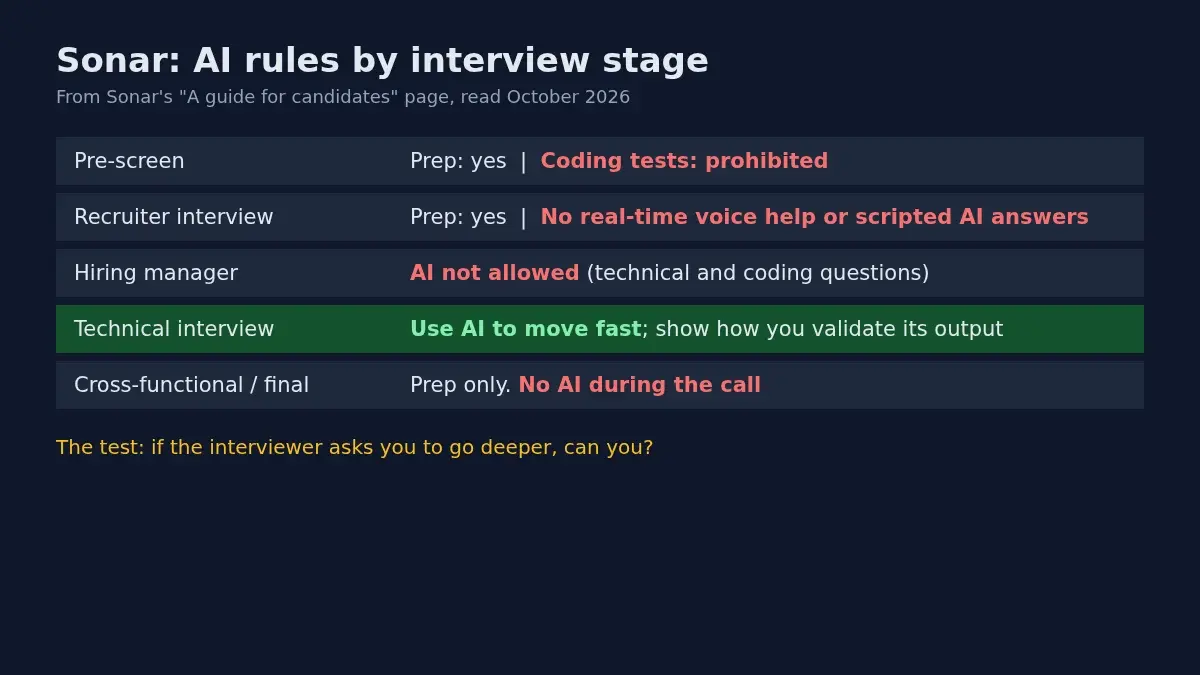
- Pre-screen. Use AI to research the company and refine your application materials. But AI is "prohibited for any coding tests", because Sonar wants "your raw technical skills."
- Recruiter interview. AI for prep is fine. No real-time voice assistance and no scripted AI responses during the call.
- Hiring manager interview. This one includes technical and coding questions, and AI is not allowed during the call. Sonar says it wants your raw problem-solving and your own account of your experience.
- Technical interview. The page calls it your chance to show off an "augmented workflow." Use AI to move fast. Sonar is "looking for how you validate and control the AI's output," and expects you to articulate your logic and reasoning.
- Cross-functional and final interviews. Use AI only to prepare or brainstorm. During the interview, it's not allowed. The final one is described as a conversation about your history, your drive and your questions for leadership.
Notice the order. The two rounds with coding questions you might expect to be most AI-friendly (pre-screen tests and the hiring manager call) are the ones where AI is off. The dedicated technical interview is where it's on. If you only read the headline "Sonar embraces AI," you could walk into the hiring manager call with the wrong plan.
The Two Principles Behind It
Sonar frames the whole thing as transparency and ownership.
Transparency: "there's no need to hide how you work." If AI helped with a take-home or a code sample, tell them. The guide says they "won't penalize you for it" and that they care more about your judgment on when to use these tools than whether you used them.
Ownership: whether you wrote it yourself or with AI, "you stand behind it." One line stands out: "'The AI generated it' is not an explanation — it's a starting point."
For engineering roles it adds what it calls technical discernment: bringing AI into your workflow with "a clear eye for security, performance, and maintainability," and being able to say how you validate output and where you've caught it getting things wrong. That's a fitting position for a company that sells tools that check AI-written code.
What Sonar Says It Doesn't Want
The guide lists four things:
- AI voice assistance during the interview, including real-time voice tools or earpieces that feed you answers.
- AI output as a complete substitute for your own thinking. On a take-home or written exercise, using AI as a thought partner is fine, but "submitting output you can't speak to is not." Sonar says it will discuss your work in depth.
- Code you can't explain. If AI wrote a function, you should be able to walk through the logic, tradeoffs and edge cases, and debug it if asked.
- Hiding your AI use when asked.
Then the one-question test it gives you: "If the interviewer asks me to go deeper on this, can I?" If yes, you're fine however you got there. If not, the guide says that's the gap they'll find.
You Will Get Asked About AI, Every Time
This is the most practical line on the page. In every interview, Sonar says it will ask something like "How have you been using AI in your work or personal projects?" The guide adds that the candidates who impress most "aren't always the ones who use AI the most. They're the ones who use it well": who've formed opinions, caught it making mistakes, and can discuss method specifically.
So this is a question to prepare, even in rounds where AI itself is banned. The final-interview section says the same thing directly: tools aren't allowed during that stage, but "we actually love talking about them."
How to Prepare
What follows is built on the page above, and the parts marked as my suggestion are mine.
- Ask your recruiter which round is which. The guide says "there may be instances" where Sonar explicitly asks you not to use AI, for example a coding interview with a very simple problem to test basic coding on your own. Don't guess from the stage name; ask.
- Write down two stories about AI going wrong. Where did the tool give you code that looked fine and wasn't? What did you check, and how did you catch it? Specific beats general. (My suggestion, based on what the guide says impresses them.)
- For the AI-allowed technical round, narrate your validation. Say what you're checking before you accept a suggestion: tests, edge cases, security, maintainability. Those are the properties the guide names.
- For the banned rounds, practice unassisted. Solve a simple problem out loud with no tool open. If you've leaned on autocomplete for a year, this is the rusty muscle. A mock interview round is a decent way to hear whether your explanations hold up without a second screen.
- Stay out of the gray area. The page tells you what it wants in each round. The downside of ignoring it is the one you'd expect: the interviewer goes deeper and you can't follow.
If you also sit online assessments for other employers, the rules there vary a lot and are usually set by the platform; see our CodeSignal interview tips if that's on your list. For other companies that have put their policy in writing, compare GitLab, Datadog and Canva, or see the side-by-side in which companies allow AI in coding interviews.
FAQ
Does Sonar allow AI in interviews?
By stage. Encouraged in prep and in the technical interview. Not allowed during the hiring manager call, the cross-functional and final interviews, or pre-screen coding tests.
Do I have to tell Sonar I used AI?
The guide asks you to be transparent and says it won't penalize you for AI use on a take-home or code sample. Concealing it when asked is on the list of things it doesn't want.
Can I use Copilot or Cursor in Sonar's technical interview?
That stage says to use AI to move fast and show how you validate its output, and the guide names Copilot, Cursor and Claude as legitimate workflow tools. Some coding interviews use a simple problem with AI banned, so confirm which you have.
What if I use an AI voice tool in a live interview?
The guide says real-time AI voice tools and earpieces aren't something Sonar can work with. It doesn't spell out a specific penalty.
Will Sonar ask me about AI?
Yes, in every interview, about how you use it and where you've learned not to trust it.
Author · Alex Chen. Career consultant and former tech recruiter. Spent 5 years on the hiring side before switching to help candidates instead. Writes about real interview dynamics, not textbook advice.
Related Articles
Dell and HPE Fresher Interview Process in India: HirePro Tests and Project-Heavy Rounds
Dell and HPE campus drives as candidates describe them: HirePro tests, CGPA cut-offs, funnel sizes, technical and HR rounds, and where posts disagree.
Zapier's AI Interview Policy: Use AI to Prep, Not Live (and the AI Recruiter Screen)
Zapier publishes what AI use is OK at each hiring stage, bans it in live interviews, and may put you in a 15-20 minute screen run by an AI recruiter. Here's how both fit together.
GitLab's AI Interview Policy: What's Allowed at Each Stage
GitLab publishes its AI rules for candidates: welcome in assessments and take-homes, not as a script in live interviews. Here's the stage-by-stage breakdown.