Adobe's Final Round Isn't an Interview — It's a Presentation Defense
Adobe's final round for PM, data, strategy, and design roles swaps Q&A for a 20-30 minute deck defense in front of a mixed panel. The follow-up questions decide more than the slides do — here's the deck structure and question bank to prep against.

TL;DR: Adobe's final interview round for PM, data/analytics, strategy, solutions consulting, and design roles isn't a normal back-and-forth — it's a 45-60 minute session built around a take-home deliverable you present live to a mixed technical/non-technical panel. The presentation runs 20-30 minutes; the Q&A that follows takes the rest, and candidate accounts consistently say that's where most of the actual scoring happens. There's no way to wing this one — you have to walk in with something built, then defend the decisions behind it under real follow-up questions.
You don't walk into this round and get asked questions cold. You walk in having already built something over the preceding one to two weeks, and the round itself is built around defending it in front of people who didn't watch you build it — which makes "build a deck, talk through it, done" the wrong way to prep for it.
What the Final Round Actually Is
Adobe's own "How We Hire" page names presentation and case-study exercises as a formal, role-specific assessment type — not an improvised add-on some interviewers happen to run. Candidate-side detail from prep guides and interview-experience writeups fills in the shape: a take-home deliverable, built ahead of the live session, that you then present to a panel and defend.
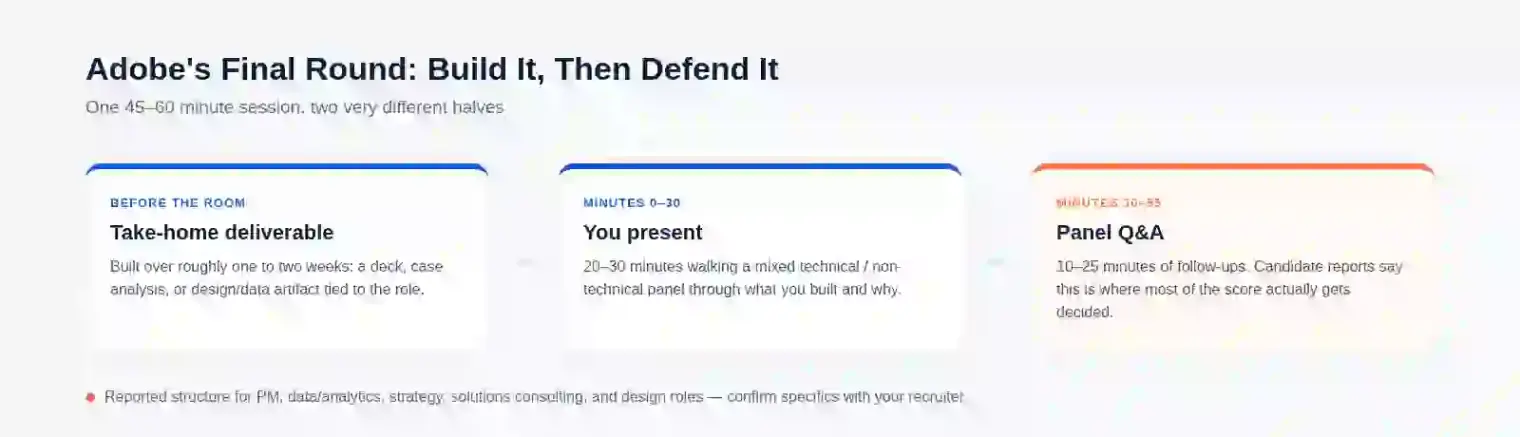
The reported timing is consistent across accounts: the full round runs somewhere in the 45-to-60-minute range, with the presentation itself taking 20 to 30 minutes and the remaining 10 to 25 minutes going to panel questions. That split matters more than it looks like on paper — the presentation is the part you fully control, and it's roughly half the clock. The other half is not something you can script in advance.
Who Actually Gets This Round
Candidate reports point most consistently to product management, data science/analytics, strategy, solutions consulting, and design roles — functions where the hiring team wants to see you reason through an ambiguous problem and communicate the result, not just verify a technical skill in isolation. If your role is more purely engineering-focused, don't assume this structure applies without confirming with your recruiter; take-home-plus-defense rounds are reported far less consistently there.
Building for a Panel That Doesn't Share One Background
The detail most prep advice skips: the panel is typically mixed, technical and non-technical reviewers in the same room. A deck built like you're presenting to a room of engineers loses the non-technical half in jargon. A deck built like a pure narrative pitch reads as thin to anyone evaluating rigor. Neither failure mode shows up until the questions start, which is exactly why it's worth designing against both audiences from the first slide, not adjusting mid-presentation when you notice a blank look from one side of the table.
The practical version of this: state your methodology plainly enough that a non-technical panelist can follow your logic without the underlying tool or technique, while keeping enough specific detail — actual numbers, actual tradeoffs you weighed — that a technical panelist doesn't write you off as surface-level.
Why the Q&A Is Where the Round Actually Gets Decided
This is the part candidates consistently underestimate: the slides establish that you can produce competent work under time pressure, but the Q&A is what tells the panel whether you understand it or just assembled it. A generic prep approach — polish the deck, rehearse the delivery — optimizes for the 20-30 minutes you can fully control and leaves the 10-25 minutes you can't mostly to improvisation.
The panel's questions tend to cluster around whatever part of the presentation moved fastest or got the thinnest justification. If you spent four slides on your data-gathering approach and one slide asserting a recommendation, that recommendation slide is where the follow-up lands. Reviewers press on the part of your case that a careful reader notices got the least rigor — not because they're trying to trip you up, but because that's the actual gap in a working piece of analysis.
The specific wording varies, but candidate reports converge on a handful of question shapes that show up across the format, not just at Adobe:
- "What would change your recommendation?" — tests whether you know your own weakest assumption, or you're just defending the conclusion you already committed to on the slide.
- "Why this approach and not [an obvious alternative]?" — asked when your deck presents one path without acknowledging the others you must have considered and rejected.
- "What would you do with two more weeks and no constraints?" — separates "this is my final answer" from "this is what the timebox allowed," and shows whether you know the difference.
- "Walk me through where this number came from." — targets whichever figure you stated with the most confidence and the least visible sourcing.
- "What's the biggest risk if you're wrong?" — checks whether you've thought past "this works" to "here's what breaks if it doesn't."
Every one of these targets a spot where your deck asserted something without showing the reasoning behind it. A weak answer defends the original slide harder. A strong one names the specific assumption at that spot and what evidence would flip it — "if the adoption curve comes in below X, I'd revisit this" reads as someone who examined their own uncertainty, not someone who got lucky with the data.
How to Actually Prepare
Skip generic "practice your delivery" advice — build against this structure instead, since it maps directly to how the round is reported to run:
- Problem framing (1-2 slides). State the question you were actually given, not a broader one you found easier to answer.
- Approach and data sources (2-3 slides). Show your method plainly enough that a non-technical panelist can follow it without the underlying tool, while keeping specific enough detail that a technical reviewer doesn't write it off as surface-level.
- Options considered and why you ruled them out (1-2 slides). This is the slide that pre-empts the "why not X" question before anyone has to ask it.
- Recommendation and tradeoffs (1 slide). State the call plainly, then name the tradeoff you accepted to make it — don't bury the tradeoff in an appendix.
- Risk and what would change your mind (1 slide). Write the one-line version before you walk in: "If [specific metric or assumption] comes in below/above [threshold], I'd change the recommendation to [alternative]." This single sentence, rehearsed until it's automatic, is what most directly answers the question panels ask most.
Six to nine slides total keeps you inside the 20-30 minute window with room to breathe — pad past that and you're cutting into the Q&A time that decides more of the outcome than the deck does.
Practicing the Part You Can't Script
The deck-building above is work you can do alone, on your own schedule. The harder gap is answering the five question types live, out loud, under real time pressure, when you don't get to see them coming — that's a different skill from writing a good risk slide. Start free: write a one-line answer for each of the five questions above against your actual deck, then say them out loud, timed, before anyone else hears them. Once that's solid, running your real deck content through repeated rounds of live follow-up questioning — instead of talking to a wall — is what our mock interview mode is built for.
If the take-home itself is the part you're still building, our breakdown of what's actually allowed when you use AI on a take-home assignment covers the policy landscape so you're not guessing at the rules before you even get to the defense. And if this round is for a PM-track role specifically, our product manager interview guide covers the frameworks worth having ready before you build the deck in the first place.
FAQ
Does the Adobe interview require a presentation?
For a wide range of roles, yes — Adobe's own hiring-process page names presentation and case-study exercises as a standard assessment type. It's most consistently reported for product management, data/analytics, strategy, solutions consulting, and design roles. If you're interviewing for a role that's more purely engineering-focused, confirm with your recruiter rather than assuming — take-home-plus-defense rounds are reported far less consistently there.
Can you choose your own topic for the Adobe case presentation?
Candidate reports describe the case or project being assigned by the hiring team, usually tied to a real problem relevant to the role you're interviewing for, rather than something you pick yourself. Treat the prompt as given and spend your limited prep time on the analysis rather than negotiating the scope of the question.
What questions does Adobe ask after your presentation?
The specific wording varies, but reported follow-ups cluster around a few shapes: what would change your recommendation, why you didn't take an obvious alternative approach, where a specific number came from, and what the biggest risk is if you're wrong. All four target whatever part of your deck asserted something without showing the reasoning behind it.
Is Adobe's final interview round a case study or a presentation?
Functionally both — you're given a case-study-style problem or project ahead of time, and the round itself is the presentation of your solution followed by a defense of it. Third-party guides tend to describe it as one or the other, which undersells that the presenting and the defending are the same round, not two separate ones.
How many slides should an Adobe case presentation deck have?
Enough to cover problem framing, approach, the alternatives you ruled out, your recommendation and its tradeoff, and the risk to that recommendation — reported timing puts the presentation itself at 20 to 30 minutes, which in practice means somewhere around six to nine slides if you want room to breathe rather than rush the last section.
How do I prepare for an Adobe product manager interview presentation?
Build the deck for a mixed technical/non-technical panel, then spend at least as much prep time on the follow-up questions as on the slides themselves — write a one-line answer in advance for what would change your recommendation, since that's the question type reported most often and the one a polished deck alone doesn't prepare you for.
Author · Alex Chen. Career consultant and former tech recruiter. Spent 5 years on the hiring side before switching to help candidates instead. Writes about real interview dynamics, not textbook advice.
Related Articles
Dell and HPE Fresher Interview Process in India: HirePro Tests and Project-Heavy Rounds
Dell and HPE campus drives as candidates describe them: HirePro tests, CGPA cut-offs, funnel sizes, technical and HR rounds, and where posts disagree.
Zapier's AI Interview Policy: Use AI to Prep, Not Live (and the AI Recruiter Screen)
Zapier publishes what AI use is OK at each hiring stage, bans it in live interviews, and may put you in a 15-20 minute screen run by an AI recruiter. Here's how both fit together.
GitLab's AI Interview Policy: What's Allowed at Each Stage
GitLab publishes its AI rules for candidates: welcome in assessments and take-homes, not as a script in live interviews. Here's the stage-by-stage breakdown.