Take-Home Coding Assignment AI Help: What's Actually Allowed in 2026
Some companies now require AI on take-home coding tests, others ban it outright. Here's the real 2026 policy landscape and how to avoid the trap.
TL;DR: Whether you can use AI on a take-home coding assignment depends entirely on the company, and the split is real: Canva now requires it, Code.org allows it if you disclose it, and roughly 62% of organizations still formally ban it. When the instructions don't say, ask before you assume. Whatever you decide, almost every take-home pipeline ends in a live round where you have to explain your own code line by line — that's the part actually worth preparing for.
An Amazon candidate posted on r/leetcode this year describing something that would have sounded absurd two years ago: a recruiter offered to reimburse up to $100 for an AI coding tool, specifically so the candidate could use it during one of the interview rounds. Meanwhile, a different candidate on Blind described getting rejected after a take-home because they "couldn't explain why the recursion terminated" in code that technically ran correctly — code the hiring manager suspected, but never confirmed, was AI-assisted.
Those two stories are both true in 2026, at different companies, sometimes in the same hiring season. There is no single answer to "can I use AI on this," and treating it like a yes/no question is how candidates get burned in either direction — either by holding back on a round that expected AI fluency, or by using it on a round designed to filter exactly that out.
The Real 2026 Policy Landscape: Who Allows AI, Who Doesn't
The policy gap between companies is wider than most prep content admits.
Canva publicly documented its position: candidates are expected to use AI tools like GitHub Copilot, Cursor, or Claude during backend, frontend, and ML coding rounds. Canva's engineering team's reasoning is blunt — close to half their engineers already use AI tools daily, so an interview that banned AI stopped measuring anything close to real job performance. They redesigned their problems to be ambiguous enough that a single AI prompt can't solve them outright, which shifts the evaluation toward how you direct the tool, not whether you used one.
Amazon has offered an optional AI-assisted interview round for some candidates, with reimbursement for tool costs up to $100 reported by candidates online. This is a specific round, not a blanket company policy — Amazon still restricts AI use elsewhere in its process.
Code.org has a formal written AI use policy: AI is allowed on interviews and take-homes as long as it's disclosed. Undisclosed use, or misrepresenting AI output as entirely your own thinking, is treated as an integrity violation — a much harsher outcome than the AI use itself would have triggered.
On the other side, one hiring manager writing about her own process on Medium said flatly: "I don't just allow the use of AI tools — I expect it," while pairing that expectation with a mandatory live walkthrough where the candidate has to justify every AI-assisted decision out loud.
And the counterweight: survey data puts the share of organizations that still formally prohibit AI in interviews at roughly 62%. Most job postings and take-home instructions simply say nothing at all, which is its own signal — silence is not permission.
Is It Cheating to Use AI on a Take-Home Coding Test?
The honest answer: it's cheating exactly when the company says it is, and not before. That's unsatisfying, but it's the actual state of the industry right now, mid-transition between "AI use is automatically suspicious" and "AI fluency is a job requirement."
A useful gut check, borrowed from how several hiring managers describe their own bar: would you be comfortable explaining, out loud, in a live follow-up, exactly what you asked the AI for and why you accepted its suggestion? If the honest answer is "I'd rather they didn't know," that's usually a sign you're on the wrong side of that company's line, regardless of what the assignment instructions technically said.
The riskiest position isn't "used AI when it was banned" or "didn't use AI when it was expected" — both of those are recoverable with an explanation. The riskiest position is silence when the instructions were ambiguous, followed by a submission that reads as more polished than your live interview performance suggests you could produce alone. That gap is what gets noticed — the same mismatch that shows up in is using AI in interviews cheating, just shifted from a live round to an async one.
Can You Use ChatGPT for a Take-Home Coding Challenge? A Disclosure Framework
Rather than a yes/no rule, use this four-way framework based on what the assignment actually says:
- AI explicitly required or expected (Canva-style): use it fully, and focus your prep on directing the tool well — the evaluation is on your prompting and judgment, not raw recall.
- AI explicitly allowed with disclosure (Code.org-style): use it, and say so. A one-line note in your README — "I used [tool] to scaffold the initial structure and generate test cases" — costs nothing and protects you completely.
- Instructions are silent: ask before you assume. A two-line email to your recruiter — "Is AI tool use acceptable for this assignment?" — is a normal, expected question in 2026, not a red flag.
- AI explicitly banned: don't use it. This is the one category where both automated detection and the live follow-up round exist specifically to catch violations, and getting caught here is treated as an integrity issue, not a technical one.
The pattern across all four: disclosure is nearly always free, and silence is nearly always the expensive choice.
How Companies Detect AI Use on Take-Home Submissions
Even where policy is unclear, companies increasingly can check, and it's worth understanding the mechanics rather than assuming detection is a bluff.
- Plagiarism-matching tools like Codequiry compare submitted code against known public solutions, prior candidate submissions, and common AI outputs for the same problem statement.
- Traceability through search: a controlled academic study found that AI-generated code solutions were identifiable via a plain Google search in 96% of test cases, because language models tend to reproduce recognizable structural patterns from their training data rather than genuinely novel implementations.
- Commit and timing patterns: reviewers increasingly look at repo history for signs like an entire, complex function appearing in a single commit with no iteration, or code quality that jumps sharply between commits.
- The live follow-up round, covered next, which doesn't require detecting anything technical at all — it just requires you to explain what you submitted.
None of these are foolproof individually — take-homes generally get lighter session monitoring than a proctored live coding round, since there's no one watching you work in real time. But together, and combined with the follow-up interview, they make "quietly outsource the whole assignment and hope no one asks" a much worse bet than it looks.
The Live Follow-Up Round Is Where This Actually Gets Decided
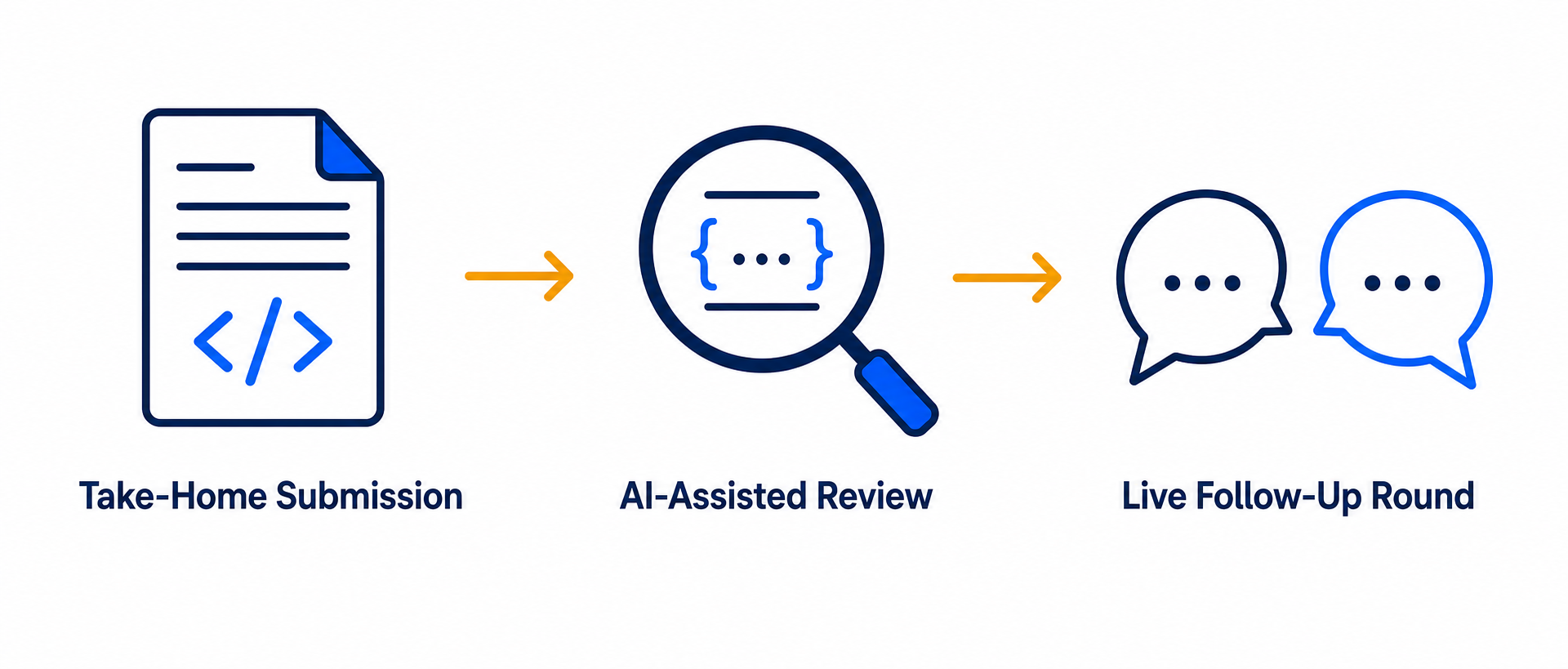
Here's the pattern that matters more than any policy debate: almost every take-home coding pipeline, whether AI was permitted or not, ends in a live round where you walk an interviewer through your own submission.
This is true at companies that ban AI (they're verifying you understand code that's supposedly entirely yours) and at companies that expect AI (they're verifying you directed the tool with real judgment, not just accepted its first output). Either way, the question is the same: can you explain every meaningful decision in your own submission, in real time, under mild pressure?
Hiring managers describe rejecting technically correct submissions specifically because the candidate couldn't explain a design choice, couldn't modify their own code live when asked, or gave answers that didn't match the sophistication of what they'd submitted. That mismatch — polished async submission, shaky live explanation — is the single clearest signal reviewers look for, and it's the one thing that AI assistance on the take-home itself can't paper over.
This is also, honestly, the part of the process our own product isn't built for. AceRound AI is a real-time interview copilot for live conversations — it's not designed to write your take-home submission for you, and using it that way would defeat the actual purpose of preparing for what comes next. Where it fits is exactly this live follow-up moment.
How to Use AceRound AI to Prepare for the Live Follow-Up
Once your take-home is submitted, the highest-leverage prep isn't more coding — it's rehearsing the explanation.
- Do a full walkthrough of your own submission out loud, function by function, before the interview. If you used AI on any part, be ready to explain why you accepted that suggestion, not just what it does.
- Practice live modification. Interviewers commonly ask you to change a function or add a feature on the spot. If you can't do this smoothly on code you supposedly wrote, that gap shows immediately.
- Use a mock interview with real-time follow-up questions to simulate the pressure of being asked "why did you choose this approach over the alternative" without advance notice — this is where an AI coding interview assistant built for live sessions is useful, surfacing the kind of follow-up an interviewer is likely to ask so you're not caught flat.
- Time-box your explanation. Being able to summarize your approach in 60–90 seconds before diving into detail signals confidence; rambling through the whole file signals the opposite.
The goal isn't to perform confidence you don't have — it's to make sure the live round reflects the same competence your take-home submission implied, whatever mix of your own thinking and AI assistance went into it.
FAQ
Is it cheating to use AI on a take-home coding test?
It depends entirely on the company's stated policy, and there is no universal answer. Canva now requires AI tool use in its coding interviews. Code.org allows it as long as you disclose it. Roughly 62% of organizations still formally prohibit it. If the instructions don't say either way, ask your recruiter directly before you start — that single question protects you more than any workaround.
Can I use ChatGPT for a take-home coding challenge?
Only if the assignment doesn't explicitly forbid it, and even then you should default to disclosure. If AI is explicitly required, use it fully. If it's explicitly allowed with disclosure, use it and say so. If instructions are silent, ask before assuming. If it's explicitly banned, don't use it.
What happens if I can't explain my AI-assisted code in the follow-up interview?
This is the most common way take-home candidates fail, regardless of whether AI use was permitted. Almost every pipeline ends in a live round where you walk through your own submission, and candidates who can't explain a design decision get rejected even when the code was correct.
Do companies actually check if you used AI on a take-home assignment?
Yes — through plagiarism-matching tools, search-traceability of common AI output patterns (96% traceable in one study), commit-history analysis, and the live follow-up interview, which is the most reliable filter of all.
Should I disclose that I used AI on my take-home submission?
When in doubt, yes. Some companies treat undisclosed AI use as a disqualifying integrity issue even when the AI use itself would have been fine. A one-line disclosure costs nothing if it was allowed and protects you if it wasn't explicitly addressed.
Which companies allow AI on take-home assignments in 2026?
Canva mandates it in coding rounds. Amazon has offered an optional AI-assisted round with cost reimbursement. Code.org has a formal disclosure-based policy. These are named exceptions, not the norm — most postings say nothing, and a majority of organizations still formally restrict AI in some form.
Author · Alex Chen. Career consultant and former tech recruiter. Spent 5 years on the hiring side before switching to help candidates instead. Writes about real interview dynamics, not textbook advice.
Related Articles
Coderbyte Interview Preparation: Formats, Detection & How AI Helps
A factual guide to Coderbyte interview preparation: what each assessment format actually monitors, what triggers a plagiarism flag, and how to prep honestly with AI mock practice.

SRE Interview Preparation in 2026: AI Practice for Site Reliability Engineers
Most SRE candidates fail on operational judgment, not technical knowledge. This guide covers the 6 core interview categories, error budget questions, and how AI can simulate incident scenarios.

Cybersecurity Engineer Interview AI: How to Actually Prepare in 2026
Cybersecurity engineer interviews test five high-demand domains. Learn how AI interview tools help you practice SOC analyst questions, CISSP prep, and live incident scenarios.