SubcueAI Alternative: What to Check Before You Switch
Looking for a SubcueAI alternative? Here's what reviewers say it actually gets wrong — screen-share visibility, credit metering, proctored tests — before you pick a replacement.
TL;DR: If you're checking a SubcueAI alternative, the reason is usually one of three things reviewers flag repeatedly: its overlay can be visible during full-screen sharing (not just window sharing), its credit-based pricing burns faster than expected, and it doesn't support proctored coding assessments. A good replacement needs to hold up under real screen-share conditions, use pricing you can predict, and cover the actual interview formats your process throws at you.
You're thirty seconds into a live interview when you notice the recruiter's screen-share prompt asked for your entire display, not just the meeting window. If the AI copilot you were counting on was built around window-only sharing, that's the exact moment its "invisible" overlay stops being invisible. It's also the most common complaint showing up in independent reviews of SubcueAI, a native desktop AI interview assistant that's picked up a following since launch — reviewed as fast, well-priced, and genuinely private about audio handling, but with specific, documented gaps that matter depending on how your interviews are actually run.
What Is SubcueAI, Exactly?
SubcueAI is a native macOS and Windows desktop app — no browser extension, no meeting bot joining the call — that captures system audio and microphone input locally, transcribes it, and sends only the text to GPT-4o for a suggested response shown in a floating overlay. Reviewers consistently credit it with sub-400ms first-token latency and a real architectural advantage: because audio processing happens locally, it isn't routing your live conversation through a browser extension the way some competitors do. As a real-time interview assistant, that's a genuinely defensible design choice, and it's part of why the tool has decent reviews despite being a newer entrant.
Where SubcueAI Reviewers Say It Falls Short
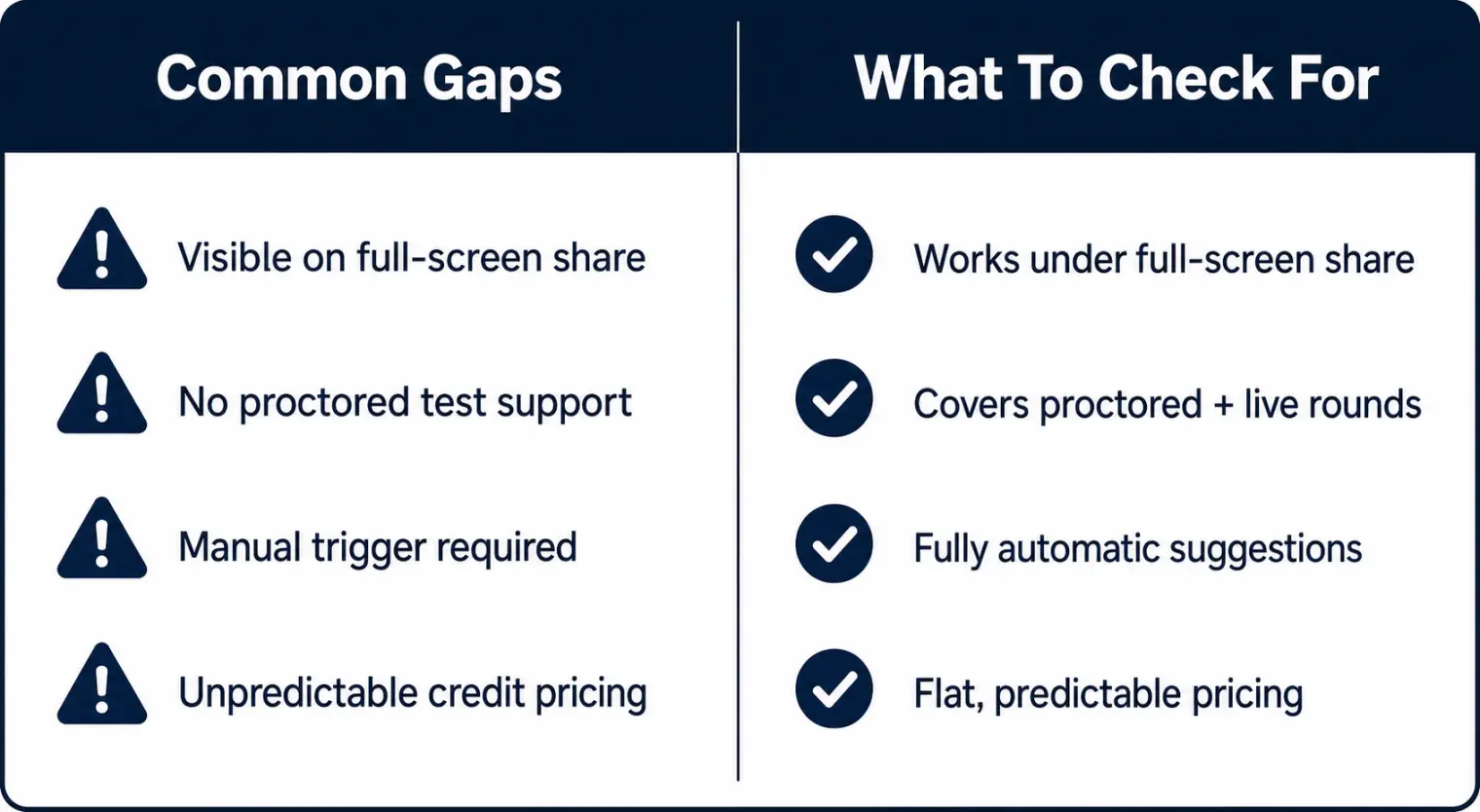
The gap between marketing and real-world use is where most of the switching conversation happens. Independent reviews, including one from a competing product's own comparison page, spell out several recurring issues:
- Full-screen share visibility. The overlay is reported to behave differently depending on whether the interviewer requested a specific window or the entire screen — full-screen sharing is where reviewers say it can become visible, which undercuts the "undetectable AI interview tool" pitch precisely when the stakes are highest.
- No proctored or coding-platform support. Reviews are explicit that SubcueAI doesn't work on locked-down technical assessment tools, so it's a live-conversation product only, not a full-pipeline one.
- Manual-trigger interaction. Rather than surfacing suggestions automatically, it reportedly requires an active prompt mid-conversation — one more small action to manage while you're also trying to sound natural on a call.
- Unpredictable credit burn. Reviewers describe short exchanges costing more credits than expected, which makes the monthly bill harder to estimate than a flat-rate plan would be.
- A hard OS floor. It requires macOS Sonoma 14 or newer, with no fallback for anyone still on Ventura or Monterey.
None of this makes SubcueAI a bad product — its local-audio privacy model and $20 entry price are genuinely competitive. It does mean the "alternative" search usually isn't about SubcueAI being broken; it's about matching a tool to the specific interview formats and sharing setups you'll actually face.
What a Screen Share AI Interview Tool Actually Needs to Handle
Before switching, it's worth being specific about what you need rather than chasing a vaguer "better" tool. The failure mode that shows up most in candidate discussion threads isn't a copilot getting caught for being smart — it's getting caught because the visual layer wasn't built for the sharing mode the interviewer actually chose. A dependable screen share AI interview setup should:
- Stay out of full-screen captures, not just app-window captures — ask directly, because most product pages only describe the easier case.
- Work automatically, without requiring you to remember to hit a shortcut mid-answer.
- Cover the interview formats your process actually includes — conversational rounds, and separately, any proctored or coding-assessment rounds, since those are usually different tools entirely.
- Run on the OS version you currently have, not the newest release you'd have to upgrade to first.
AI Interview Assistant Pricing: Credits vs. Flat Plans
Pricing structure matters as much as the sticker number. SubcueAI's current published pricing is Starter free, Pro at $20/month (2,000 credits), and Premium at $75/month (8,000 credits) — all monthly plans, not annual commitments, with unused credit top-ups reported to carry over. The catch reviewers flag is that credit consumption isn't 1:1 with usage in an intuitive way, so two candidates paying the same $20/month can burn through their allotment at very different rates depending on how much back-and-forth their interviews involve. When comparing AI interview assistant pricing across tools, ask specifically: is this a flat monthly rate regardless of usage, or metered credits that could run out mid-interview season? Flat pricing is easier to budget against if you're interviewing across several companies in the same month.
How AceRound Compares as a SubcueAI Alternative
AceRound AI is a real-time interview copilot built around the same live-conversation use case SubcueAI targets, with a desktop client for Mac and Windows. We won't claim to be invisible under every possible screen-share configuration — no honest vendor should, and treating any tool as guaranteed-undetectable is the wrong way to prepare for an interview anyway. What we'd point you to instead is checking, for your specific situation: whether the plan you'd pay for is predictable regardless of how talkative your interview turns out to be, and whether the tool is meant to support your prep and confidence rather than substitute for knowing your own answers. For a broader side-by-side of the current copilot field, see our best AI interview copilot 2026 roundup, and if screen-sharing behavior specifically is your main concern, this breakdown of what's actually safe on a shared screen covers the mechanics in more depth than any single product page will.
FAQ
Can interviewers tell if you're using SubcueAI during a call?
It depends on how the meeting is shared. Reviewers who've tested SubcueAI report that its floating overlay is designed to stay out of a shared window, but it can still show up in Task Manager or the Dock, and on a full-screen share rather than a window-only share, that visibility gap becomes a real risk. That is the single most-cited concern in third-party reviews of the tool.
Does SubcueAI work for coding interviews or proctored assessments?
No, according to independent reviews. SubcueAI is built around a floating overlay for live conversational rounds, and reviewers report it does not support locked-down technical assessment platforms or proctored coding tests. If your process includes a proctored OA alongside a live interview, you'd need a separate plan for that stage regardless of which live-interview copilot you pick.
What does SubcueAI actually cost?
As of this writing, SubcueAI runs Starter free, Pro at $20 per month for 2,000 credits, and Premium at $75 per month for 8,000 credits, billed monthly rather than annually, with credit top-ups that don't expire. Reviewers note the metering can burn faster than expected — a couple of sentences of transcription and response sometimes costs several credits, which makes real usage harder to predict than the sticker price suggests.
Is using an AI interview assistant considered cheating?
Most employers haven't published a clear policy either way, and it varies by company and by role. A 2026 analysis of over 19,000 live interviews by Fabric found roughly 38.5% were flagged for some form of AI-assisted behavior, so hiring teams are actively watching for it. Treat any real-time assistant as a confidence aid for a conversation you're already prepared for, not a replacement for knowing your own experience.
What should I actually compare before picking a SubcueAI alternative?
Four things reviewers keep coming back to: whether the tool holds up under full-screen sharing (not just window sharing), whether pricing is a flat plan or metered credits, whether it covers proctored/coding-assessment rounds or only conversational interviews, and what operating system versions it actually supports without a hard floor like macOS Sonoma.
Author · Alex Chen. Career consultant and former tech recruiter. Spent 5 years on the hiring side before switching to help candidates instead. Writes about real interview dynamics, not textbook advice.
Related Articles
DoorDash's AI-Assisted Engineering Interview: 60 Minutes, Your IDE, AI Required
DoorDash replaced its coding rounds with a 60-minute AI-assisted working session. Here is what the official post confirms, how it's scored, and how to prepare.
Shopify Interview Process 2026: Life Story, Pair Programming and the AI Memo
Shopify's official hiring steps, what the Life Story round scores, and what Tobi Lütke's reflexive-AI memo does and doesn't tell you about using AI in the interview.
Nagarro, Persistent, Publicis Sapient, Thoughtworks: How Each Interviews Freshers in India
Nagarro's Mettl tests, Persistent's AMCAT-style objective round, Publicis Sapient's values round, Thoughtworks' pairing session: what candidates report for each, and where the reports disagree.