Interview Sidekick Alternative: Pricing Red Flags & 5 Honest Options (2026)
Interview Sidekick quotes three different prices across its own marketing. Before you buy, see what it actually costs, whether Stealth Mode holds up on screen share, and 5 real alternatives.
TL;DR: Interview Sidekick is a real overlay-based AI interview copilot, not just a review site — but its own marketing pages quote at least three different price points for the same tiers, which is the first thing worth knowing before you consider it or any Interview Sidekick alternative. Below: what it actually costs, whether "Stealth Mode" holds up during screen sharing, how it compares to Cluely, and 5 alternatives worth a look, including where AceRound fits for non-native English speakers.
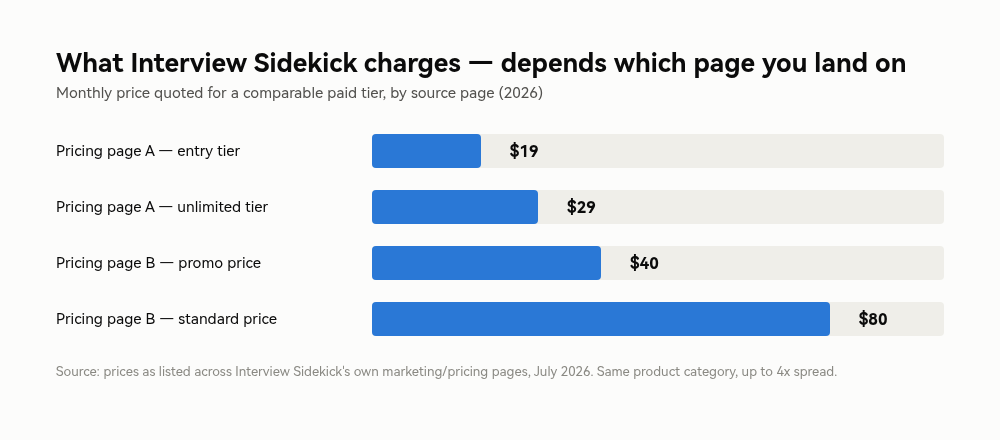
Search "Interview Sidekick pricing" and you'll land on three different numbers depending on which of the company's own pages you hit: a $19/month tier with 1,000 credits, a $29/month "unlimited" tier, or an $80/month "standard" plan that a promo code cuts to $40. Those aren't three eras of pricing history — they're live, simultaneous listings. That's the kind of detail that doesn't show up in the glowing "10/10, best tool of 2026" roundups, mostly because Interview Sidekick publishes a lot of those roundups itself.
What Is Interview Sidekick? (Quick Overview)
Interview Sidekick is a desktop app that listens to your interview call through your microphone and overlays AI-suggested answers on your screen in real time, using a "Stealth Mode" designed to stay invisible during Zoom, Google Meet, and Teams calls. It's a genuine product, not vaporware — but it's also, simultaneously, an aggressive SEO publisher: its own blog runs dozens of "best AI interview copilot" and "X alternative" listicles that conveniently rank Interview Sidekick near the top of its own comparisons. That dual role is worth knowing before you trust any of its published claims, including the user-count figures — different pages on the same domain cite anywhere from 170,000 to 737,000+ users, a spread wide enough that it's safer to treat as unverified marketing copy rather than a hard number.
Is Interview Sidekick Free? The Pricing Numbers Don't Add Up
Short answer: there's a free "Basic Sidekick" tier — around 3 live answers and 3 practice questions per month, no card required — but it's a taste, not a tool you can run an actual job search on.
Past the free tier, Interview Sidekick's pricing is genuinely inconsistent across its own site. Some pages list a $19/month plan (roughly 1,000 credits) and a $29/month "unlimited copilot" tier, alongside a $69-per-quarter option. Other pages on the same domain show an $80/month "standard" price that a "SAVE50" promo code discounts to $40/month. That's not a typo-level discrepancy — it's two entirely different pricing structures live at once, which reads less like a pricing tier system and more like a bait-and-switch anchor: show a high number, then "discount" it to what the real price probably always was.
If you're evaluating Interview Sidekick pricing before you buy, don't trust the first number you see. Check the live checkout page, not a blog post (including this one, eventually).
Interview Sidekick vs Cluely vs AceRound
These three solve overlapping but distinct problems, and the "vs" comparisons matter more than the marketing pages suggest.
Cluely is the category's most visible brand — it went viral in 2025 after a well-publicized Columbia suspension story, and it's since raised real venture funding, which means more consistent (if still aggressive) pricing and a larger, more organic community discussion on Reddit and Blind. Interview Sidekick, by contrast, has almost no organic Reddit or Blind discussion under its own name — a genuine search for community threads about it comes up close to empty, which is itself a signal for a product with real user-count claims in the hundreds of thousands.
AceRound takes a different structural approach from both: instead of positioning purely as a live-session overlay, it pairs mock interview practice with real-time assistance in one subscription, so the live suggestions during your actual interview are informed by answers you've already rehearsed — not a cold, generic template.
Does Interview Sidekick Get Detected on Screen Share?
This is the honest, caveat-heavy answer that most "100% undetectable" roundup articles skip.
Technically: floating overlay windows are generally excluded from a "share this window" capture, but under a full "share entire screen" setting on some platforms and OS combinations, an overlay can still be visible to the person on the other end — a setting difference, not a guarantee either way. Neither Interview Sidekick's marketing nor its competitors' comparison pages spell this out clearly, which is a real gap: the actionable fix (use window-filtered or app-specific screen share, never "entire screen") is something every candidate using any AI interview copilot alternative should confirm before their call, regardless of which tool they're using.
Beyond the technical layer, there's a behavioral one no overlay software can fix. Academic research on AI-assisted-cheating detection in remote assessments has moved toward behavior analytics — pause timing before answers, gaze patterns, delivery rhythm — rather than relying only on screen-capture forensics (arXiv, "Detecting AI-Assisted Cheating in Online Exams through Behavior Analytics," 2025). Separately, a 2026 industry analysis of nearly 20,000 scored interviews found signals consistent with AI-tool usage rose from roughly 15% to 35% of interviews scored across a six-month window (Fabric, "State of Cheating in Interviews in 2026") — meaning interviewers are actively calibrating for exactly this pattern, tool or no tool. No product in this category, including AceRound, should be marketed as immune to that.
5 Interview Sidekick Alternatives Worth Comparing
AceRound AI — Best for Non-Native English Speakers and Prep + Live in One Tool
AceRound AI runs on a subscription rather than credits, and its main structural difference from Interview Sidekick is combining pre-interview mock practice with live assistance — your rehearsed STAR answers inform what the live overlay suggests, rather than starting from a blank template every session. It also natively supports Mandarin interviews and English/Mandarin code-switching, which matters for international students and overseas Chinese candidates specifically.
Best for: candidates who want prep and live help in one place, non-native English speakers, Mandarin-language interviews.
Cluely — Best Name Recognition and Community Discussion
Cluely is the most talked-about product in this category by a wide margin, with real organic Reddit and Blind discussion (unlike Interview Sidekick's near-silent community footprint) and venture funding behind it. That visibility cuts both ways — it's also the most likely tool an enterprise proctoring team has specifically trained detection against, precisely because it's the most famous.
Best for: candidates who want the most battle-tested, most-discussed option and are comfortable with its higher public profile.
LockedIn AI — Best for Pure Live-Session Focus
LockedIn AI skips the prep layer entirely and focuses on aggressive live-session overlay techniques. The trade-off is stability — more aggressive capture-evasion methods are more prone to app crashes or audio conflicts with your call software.
Best for: candidates who already feel prepared and just want a live safety net.
Final Round AI — Best for US Tech Hiring at Scale
Final Round AI has the broadest name recognition in US tech hiring circles, with structured STAR coaching and unlimited mock sessions on its higher subscription tiers. Its non-English support lags behind both AceRound and the live-only tools.
Best for: English-speaking candidates targeting established US tech companies who want the most content and community coverage around the product.
ChatGPT / Claude (Manual) — Free and Unlimited, No Overlay
Many candidates skip dedicated copilots entirely and run ChatGPT for interview prep in a second window, pasting questions manually between exchanges. It's free, unlimited, and handles behavioral coaching well — it just doesn't transcribe your interviewer automatically or run as a hidden overlay.
Best for: candidates comfortable managing the workflow by hand who don't want to pay for or install anything.
Quick Comparison
| Interview Sidekick | AceRound AI | Cluely | LockedIn AI | Final Round AI | |
|---|---|---|---|---|---|
| Pricing clarity | Inconsistent across own site | Consistent subscription | Consistent, funded pricing | Consistent subscription | Consistent subscription |
| Live real-time assist | ✅ | ✅ | ✅ | ✅ | ✅ |
| Mock interview prep | Limited | ✅ | Limited | ❌ | ✅ |
| Mandarin support | Basic | Native | Limited | Limited | Limited |
| Community track record | Very thin (little Reddit/Blind discussion) | Emerging | Extensive | Moderate | Extensive |
| Free tier | Yes, very limited | Free trial | Limited trial | Limited trial | Limited trial |
How to Choose
If you're pricing-sensitive and want to know exactly what you're paying before you commit: the inconsistency across Interview Sidekick's own marketing pages is reason enough to check a subscription-based alternative with one clearly published price.
If you're a non-native English speaker or interview across English and Mandarin: AceRound's native language handling and prep-informed live suggestions close a gap none of the pure live-overlay tools address.
If community track record and transparency matter to you: Cluely and Final Round AI both have far more independent (non-self-published) discussion than Interview Sidekick, which is worth factoring in when a product's own site is also its loudest reviewer.
If you're weighing detection risk at all: the full technical breakdown of what AI interview detection actually looks like in 2026 covers the screen-share and behavioral-signal picture in more depth than any single tool's FAQ page will admit to.
FAQ
Is Interview Sidekick free? There's a free "Basic" tier — roughly 3 live answers and 3 practice questions a month, no card required — but it's nowhere near enough for a real interview. Paid tiers are where the numbers stop lining up: some of Interview Sidekick's own pages list plans around $19–29/month, while others show an $80/month "standard" price cut to $40/month with a promo code. Treat any price you see as a starting quote, not a final one, and check the live pricing page before you commit.
Is Interview Sidekick vs Cluely a fair comparison? They solve the same problem (a hidden overlay that suggests answers during a live call) but Cluely is the more visible, more heavily funded brand with wider media coverage, while Interview Sidekick leans harder into its own SEO content — it runs dozens of "best AI interview tool" roundup posts that happen to rank itself near the top. Neither publishes fully consistent pricing, so compare live trial experience over marketing claims.
Does Interview Sidekick get detected on screen share? Under default settings, some video-call software can still pick up floating overlay windows during a full-screen share unless you specifically enable window-filtered or app-window capture instead of "share entire screen." No overlay tool in this category is immune to that setting, and none can suppress behavioral tells — flat delivery, delayed answers, eyes that dart to one spot on the screen — that a human interviewer notices regardless of what's technically visible.
What are the biggest drawbacks of Interview Sidekick? Inconsistent pricing across its own marketing pages, no dedicated support for coding-platform proctoring (LeetCode/HackerRank-style monitored environments), and a business model that's partly an SEO content engine reviewing its own category — meaning its own "alternatives" roundups aren't neutral. User-count claims (170K to 737K+ depending on the page) also vary enough to warrant skepticism.
Can an interviewer tell if I'm using an AI interview copilot alternative like this? Sometimes, and not through the software. Interviewers increasingly notice unnatural pacing — a beat of silence before every answer, answers that are suspiciously well-structured for a live conversation, or eyes that stay locked on one part of the screen. A 2026 analysis of interview behavioral data found AI-tool usage signals climbing from roughly 15% to 35% of scored interviews within six months, which is why interviewers are calibrating for it.
What's a safer way to use an AI interview copilot? Use live assistance as a backstop for nerves and phrasing, not a script to read verbatim — practice with mock interviews beforehand so your delivery sounds like your own voice, keep screen-share settings on window-filtered capture rather than full-screen, and know your employer's stated policy on AI tools before your interview, since violating a disclosed policy carries real consequences independent of whether you get "caught" technically.
Author · Alex Chen. Career consultant and former tech recruiter. Spent 5 years on the hiring side before switching to help candidates instead. Writes about real interview dynamics, not textbook advice.
Related Articles
Does TCS iON Detect AI or Cheating During the NQT Exam?
Does TCS iON detect AI during the NQT? What its remote proctoring monitors, and why the interview round after is a safer, prep-friendly stage.

Does BrightHire Record You? Yes — Here's What It Captures (2026)
Does BrightHire record your interview? Yes — video, audio, and an AI transcript, now part of Zoom since its 2025 acquisition. What's captured and how to opt out.
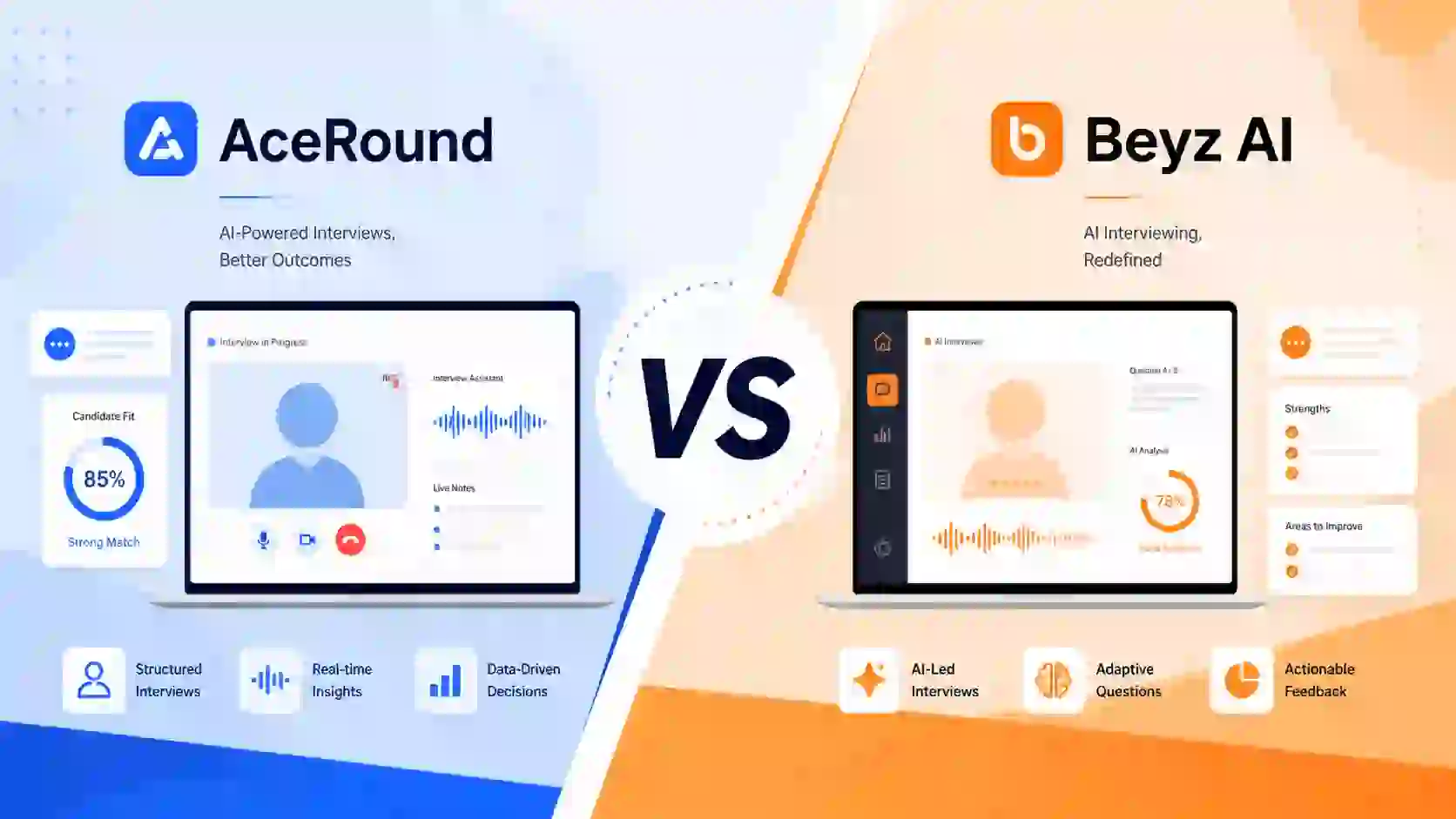
AceRound vs Beyz AI: Which Real-Time Interview Copilot to Trust?
AceRound vs Beyz AI compared: architecture, the pricing trap behind Beyz's $24.99 headline rate, a dedicated Beyz-detection tool, and unverified ratings.